How to Keep Netflix Downloads Forever
 By Miles Kent
To keep Netflix downloads forever, remember this: you can't do it within the Netflix app. Downloads are temporary, licensed copies that Netflix manages. Once the license expires, the file stops working.
In this guide, we'll explain how long Netflix downloads last, why they expire, and what you can do to keep them longer or permanently. We also tested four methods to see which ones still work and which ones don't.
Netflix downloads are temporary files that expire in 7 to 30 days or 48 hours after you start watching. This is due to DRM and licensing rules. To keep the content permanently, you need to convert the downloads to a DRM-free format like MP4 using tools such as VidiFab Netflix Video Downloader. Regular methods like screen recording won't work. Check out Part 4 for all the tested methods.

If you want to understand all download rules, limitations, and alternative options, our Netflix Download Guide covers everything you need to know.
Part 1. Can You Keep Netflix Downloads Forever?
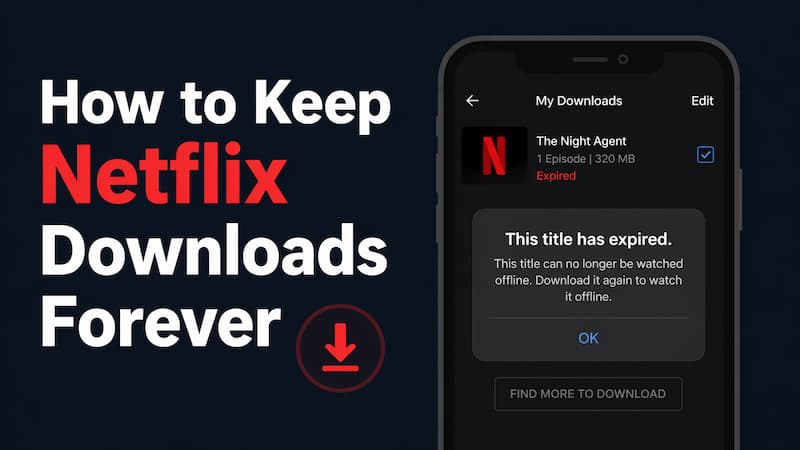
You can't keep Netflix downloads forever in the official app. They come with expiration timers, device restrictions, account status, and licensing rules.
So, if you want to keep Netflix downloads playable for months without relying on the app, the official downloads won't work. They're great for short trips and temporary offline viewing in the Netflix app, but they aren't the same as standard local video files like MP4 or MKV.
Part 2. How Long Do Netflix Downloads Last?
Netflix doesn't have a fixed expiration date for every title. The time a show or movie stays available depends on the specific content, licensing deals, and its current availability on Netflix.
Generally, here are the common timelines for downloads:
- Before Watching: Most downloads stay on your device for 7 to 30 days. Business Insiders mention that many downloads expire in under 7 days.
- After Watching: Once you hit "Play," the time drops significantly. Most downloads expire within 48 hours of your first viewing, even if you only watched the first 30 seconds.
- Library Removal: If a show or movie is about to leave Netflix, all local downloads of that title will expire on the removal date, no matter when you downloaded them. Plus, if you travel to a place where the downloaded titles are not licensed, the downloads will disappear.
- Membership Status: If you cancel your subscription or your account goes inactive, all downloads will disappear from your device immediately.

Part 3. Why Do Netflix Downloads Expire?
Netflix downloads expire due to legal contracts, DRM encryption, and the platform's business strategy.
1. Licensing Agreements Change:
Netflix partners with studios and distributors like Sony and Paramount. Their contracts often set "Offline Viewing Windows," which limit how long you can keep a downloaded copy.
2. DRM (Digital Rights Management):
Widevine encryption. You can only access downloaded titles for a limited time since you don't own them; you're essentially renting access. Each download has an expiration date, similar to a rental period.
3. To Encourage Membership Renewal:
3.Downloads expire, so you need to keep paying for your Netflix membership to renew titles or download them again for offline viewing.
Part 4. Methods We Tested to Keep Netflix Downloads
For testing, we used the Netflix mobile app with a Netflix ad-supported plan and downloaded multiple titles to see how long we could keep them offline.
In this section, we tried different 4 methods to extend Netflix downloads or make them permanent. These methods included official renewal, copying download files, screen recording Netflix videos, and converting downloads to MP4/MKV.
Method 1: Renew Netflix Downloads
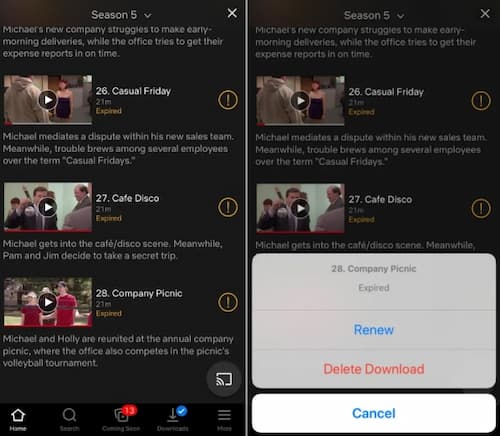
To extend your viewing time, simply use the official Renew button. If your download is about to expire or has already expired, look for an orange exclamation point next to the title. Tap it, and choose Renew Download from the pop-up menu. The timer resets to its original duration, like another 30 days.
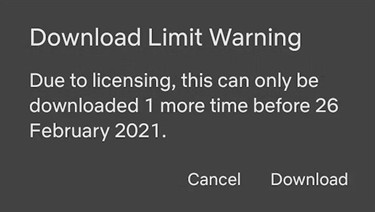
Keep in mind that many titles have a Yearly Download Limit. Major studios like Disney or Sony might only let you download or renew them 2–3 times a year. If it's your last chance to download or renew, a pop-up message will alert you.
This method works for trips but isn't great for permanent archiving.
Method 2: Copying or Transferring Files
For Andorid users, they might assume that they can locate Netflix download files on a device, copy them to a folder, move them to another device, and keep them playable forever. In practice, this usually does not work as expected.
On Android, Netflix store the data in a hidden internal storage folder, such as:
Inside this folder, you'll see a bunch of folders with random numerical names that hold various files like .nfv, .nfs, and fragmented data chunks. We tried copying these Netflix folders to an external hard drive, such as an SD card, and moving them back to the original location after the downloads expired.
The Results:
Unfortunately, a standard media player won't recognize those files. Even after moving them back, the Netflix app won't load them. This happens because the license key in the Netflix app's internal database has expired, so the data becomes useless.
Failed. Without the active decryption key stored within the Netflix app's secure environment, these files are just digital junk.
Method 3: Screen Recording
We tested screen recording Netflix videos on Windows 10, macOS, Android, and iPhone to find out how to save these videos as standard video files for permanent storage.
The Test Process:
- On Mobile (iPhone/Android): We opened the Netflix app and used the screen recording feature from the Control Center or Quick Settings while watching a movie.
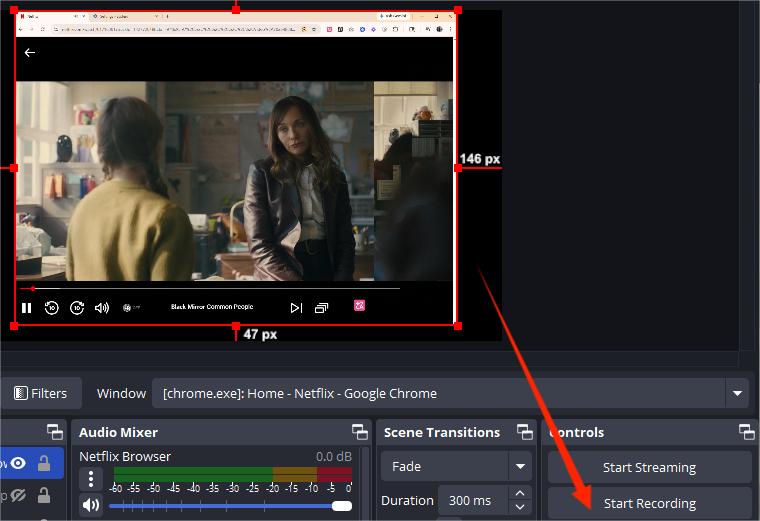
- On Desktop (Windows/Mac): We used OBS Studio to capture the Netflix browser window in Chrome with hardware acceleration turned off.
The Results:
- Black Screen on Mobile: When I hit the Record button, the playback window turned completely black, but the audio continued. This happens due to DRM protection from streaming services.
- Low Quality on Browser: By disabling hardware acceleration in Chrome or Firefox, we could capture the video. However, this overloaded the CPU, causing dropped frames, lag, and poor quality compared to the original 1080p.
- Time Intensive: Screen recording takes real time. To save a 2-hour movie, you must watch the entire 2 hours. Any notifications, mouse movements, or system sounds will be part of the final recording.
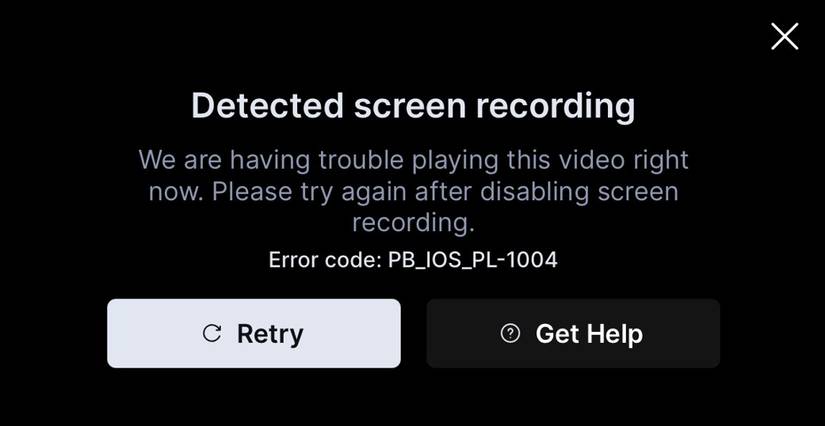
Not recommended. While you can technically screen record on desktop with some hacks, it's inefficient and results in poor quality. On mobile, you'll just get a black screen due to DRM.
Method 4: Converting Netflix Downloads to MP4 (Works)
After testing several failed approaches, we moved to a dedicated tool: VidiFab Netflix Video Downloader. Unlike screen recorders, it doesn't capture playback in real time. Instead, it downloads the Netflix videos to your computer. It uses the internal browser to access Netflix, decrypt the video stream, and save the videos as standard H.264 MP4 or MKV files on your computer's hard drive.
VidiFab Netflix Video Downloader
Download Netflix videos as MP4/MKV in 1080p with Dolby Atmos for offline viewing on your iPhone, Android, desktop, and more devices.
The Results:
We successfully saved a 1080p file with 5.1 audio and multilingual subtitles without ads. Since the file is a standard MP4, it never expires, can be transferred to any device like an iPad, Smart TV, or VLC player, and remains playable even if you cancel your Netflix subscription.
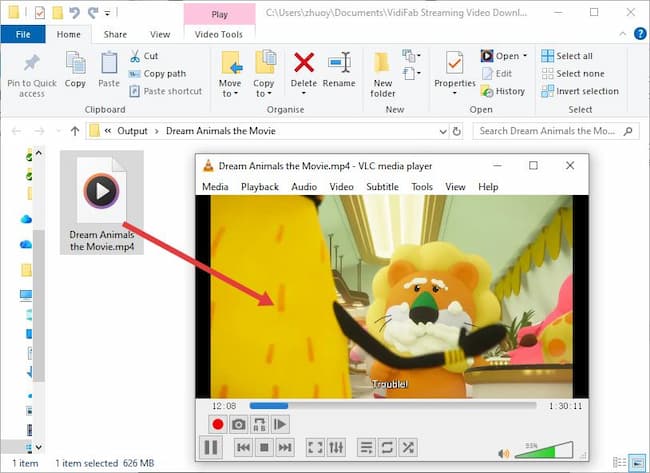
Success. This is the only way to keep Netflix content forever. Remember, this method is only for personal viewing. Sharing or distributing the video content is illegal, so make sure to check your local laws to see if this method applies to you.
How to Keep Netflix Downloads Forever Using VidiFab Downloader
To use VidiFab Netflix Video Downloader to convert Netflix downloads to MP4, follow the steps below:
Step 1. Configure Output Settings and Log In
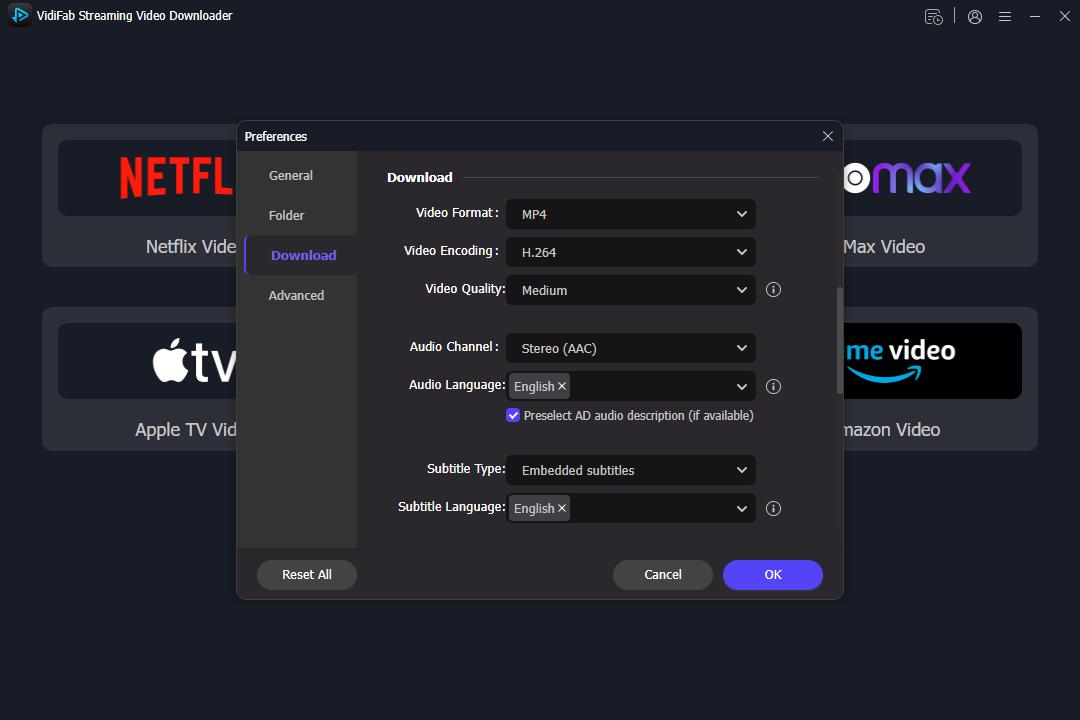
Install and open VidiFab Netflix Video Downloader on your PC or Mac. Click the menu icon in the top right corner and select Preferences. Make sure the Download Video Format is set to MP4 or MKV. Then, click the Netflix icon on the home screen and log into your account. This lets the built-in browser access your region's library and your saved "My List" titles.
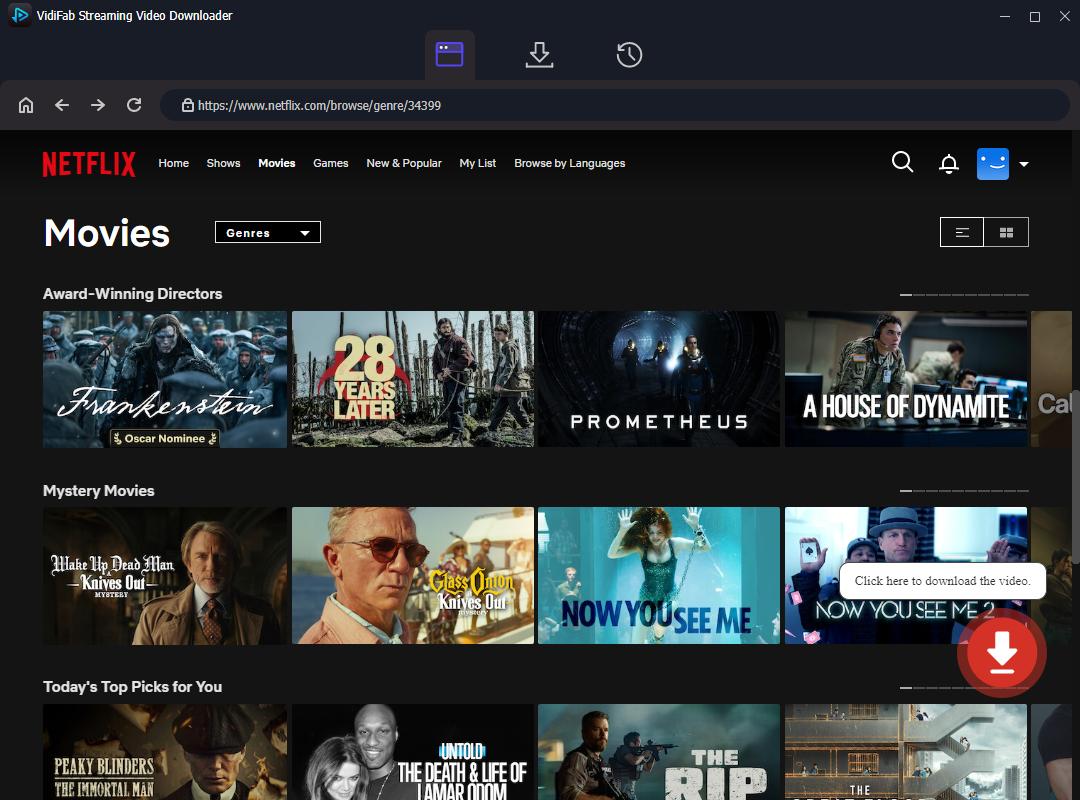
Step 2. Find Titles to Download
Explore the library just like you would on the Netflix website, or paste the URL of a specific movie or series into the search bar. Open the detail page of the title you want to download. A download button will appear in the bottom right corner, click on it.
Step 3. Customize Download Settings
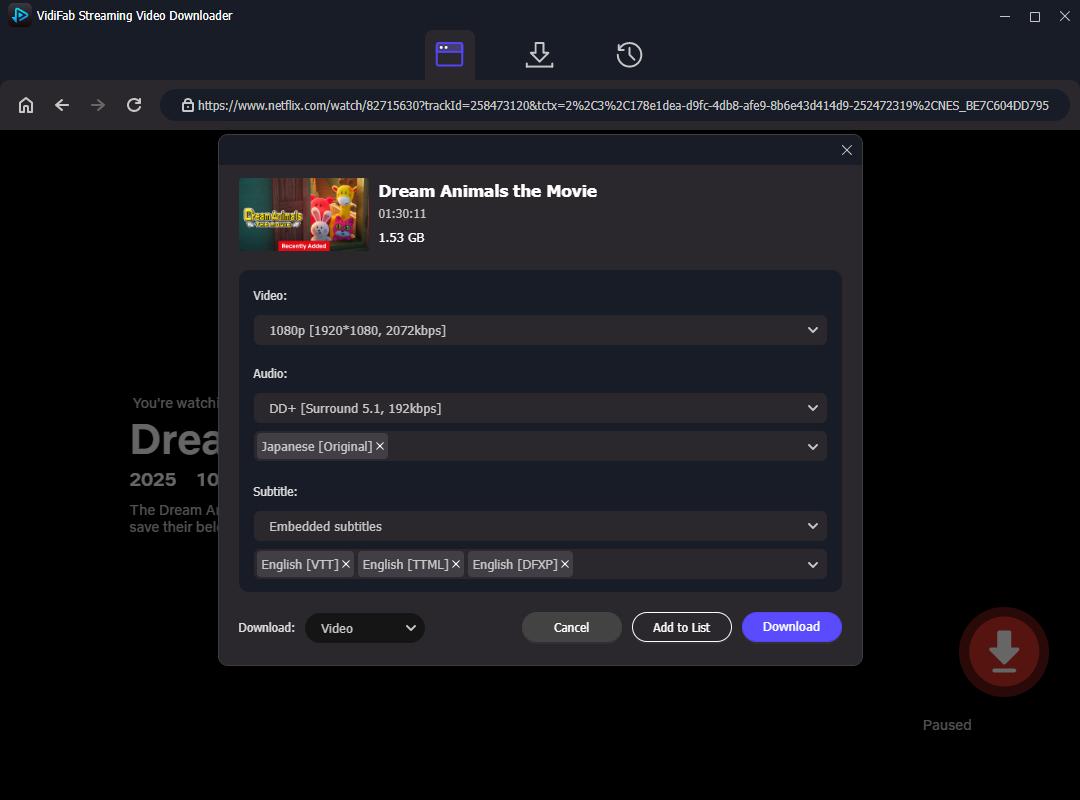
After clicking the download button, a settings window will pop up. Choose 1080p resolution, select your favorite audio tracks (like 5.1 Surround Sound), and pick subtitle languages and types (embedded or SRT file). For series, check the Select All box to download multiple episodes at once.
Step 4. Start Downloading and Save Forever
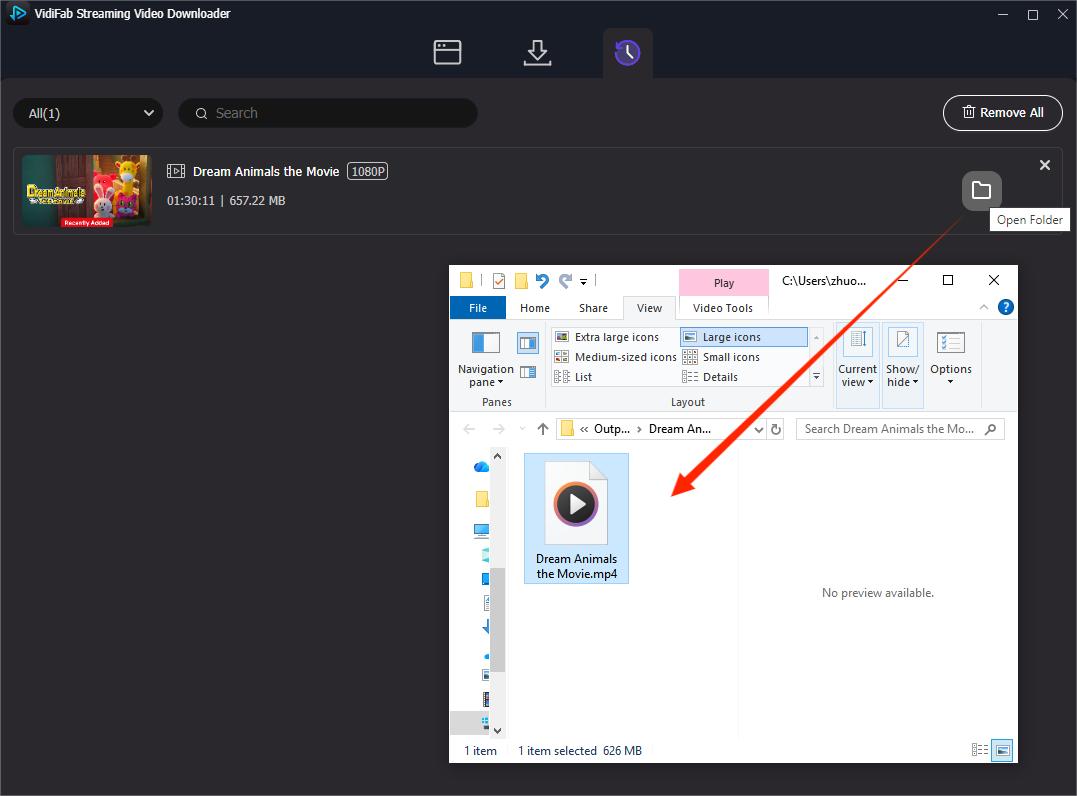
Click the Download button to start the high-speed conversion. Once it's done, your files will save in the output folder on your computer. Click the folder icon next to the title to find your downloaded Netflix videos. You can enjoy them on any media player, and they won't expire, even if the title leaves Netflix or you cancel your subscription.
Part 5. Comparison of Methods We Tested to Keep Netflix Downloads
Based on the four methods tested in Part 4, the conclusion is clear:
If you just want to extend your viewing time, the official Renew option on Netflix works fine.
- Option 1. Use a desktop browser with hardware acceleration off to record playback in real-time. This method works, but the quality is limited and it takes a lot of time.
- Option 2. Use a dedicated downloader like VidiFab Netflix Video Downloader to save videos directly as MP4 or MKV files on your computer.
Here's a comparison of these four methods based on duration, audio/video quality, portability, effort level, and success rate.
| Feature | Method 1: Official Renewal | Method 2: File Transfer | Method 3: Screen Recording | Method 4: MP4 Conversion |
|---|---|---|---|---|
| Duration | 7–30 days (Limited) | Fails instantly | Permanent (if successful) | Permanent (Forever) |
| Video Quality | Up to 1080p/4K | N/A (Encrypted) | Poor (Frame drops/Black screen) | Original 1080p/4K |
| Audio Quality | 5.1 Surround | N/A | Stereo only | 5.1 Surround / Stereo |
| Portability | Netflix App Only | Locked to device | MP4/MKV/MOV. etc (varies by recorder) | MP4/MKV |
| Effort Level | Low | Medium | High (Real-time) | Low (High-speed) |
| Success Rate | High (Until limits hit) | 0% | 100% on desktop; 0% on mobile | 100% |
Part 6. FAQs About Keeping Netflix Downloads Forever
Why did my Netflix download disappear even before the expiration date?
Why does Netflix say my download has expired even though I never watched it?
Is there a limit to how many times I can redownload a Netflix title?
Can I watch my downloads in a different country?
Will converting Netflix to MP4 get my account banned?
Do converted Netflix downloads stay playable over time?
Final Thoughts
Streaming services now have greater control than ever. They can remove a show or block your access anytime, even if you've downloaded it to your phone. The app's timer runs in the background and will eventually delete your files.
To keep Netflix downloads, move it out of the Netflix app. Convert the video to an MP4 file to stop the countdown timer. Once it's an MP4 on your computer, it won't need to check in with Netflix again. It will still work even if you cancel your subscription or if the show is removed.
 Free Download
 Secure Download
 Free Download
Secure Download
Free Download
Secure Download




I'm a video tech specialist with over 10 years of experience in digital media and streaming. I focus on making complex workflows simple and practical. Through my guides, you'll learn how to convert media, keep high-quality playback across devices, and manage your streaming video library with ease.
 Leave Your Comment