8 123Movies Downloaders Tested: What Works on Desktop, Android, and iPhone
 By Arlo Bennett
123Movies is one of the most popular free online movie streaming sites, famous for its huge library of movies and TV shows. Although the 123Movies website shows a "Download in HD" button, my testing found that it doesn't actually download videos. Instead, it often installs third-party software full of ads on your computer. So, to download movies on 123Movies safely, you need a reliable 123Movies downloader.
I tested 6 desktop downloaders and 2 mobile apps to find out which 123Movies download methods still work. This guide covers the test results, pros and cons of each option, and a comparison table to help you choose the right tool for your needs.
Note: We do not condone the distribution of copyrighted material. If you choose to download a movie from 123Movies, ensure it is strictly for personal, fair-use viewing.
Part 1. Is It Possible to Download from 123Movies?
123Movies does not provide a built-in download feature, even though it displays a "Download in HD" button.
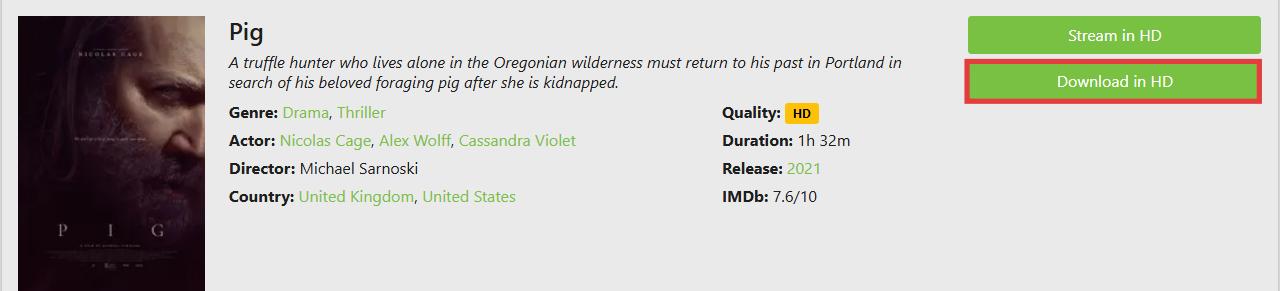
I tested the "Download in HD" button on 123Movies (ww8.123moviesfree.net), and instead of downloading the movie, it prompted me to install a file called OperaGXSetup.exe. After checking, this file is actually an installer for the Opera GX gaming browser, not the movie itself.
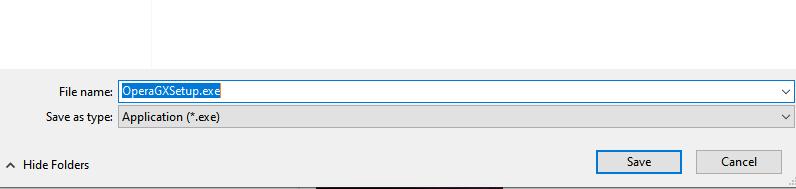
Basically, 123Movies does not let you download videos. The site and its clones only shows a download button to trick users into installing unrelated software for affiliate revenue. If you want a real MP4 file for offline viewing, you need to ignore the on-site buttons and use one of the verified tools mentioned below.

Before using any online video downloader, check whether you have permission to save the content. Some videos are available for offline use through official platforms, while others may have restrictions set by the copyright owner.
Part 2. Best 123Movies Downloaders Tested on Desktop
To compare these 123Movies Video Downloaders fairly, I tested 6 desktop downloaders on Windows 10 and macOS. All tests were performed using a regular residential internet connection rather than a VPN or data center network.
I evaluated each tool based on four factors:
- Detection: Did it successfully capture the playing video, or fail to recognize the media source?
- Quality: What output resolution was available, and were both video and audio tracks preserved?
- Speed: Did it download at real-time speed, or faster?
- Safety: Did the tool show excessive ads, suspicious redirects, or other intrusive behavior? Were the installer files flagged by security tools?
Tool 1. Video DownloadHelper
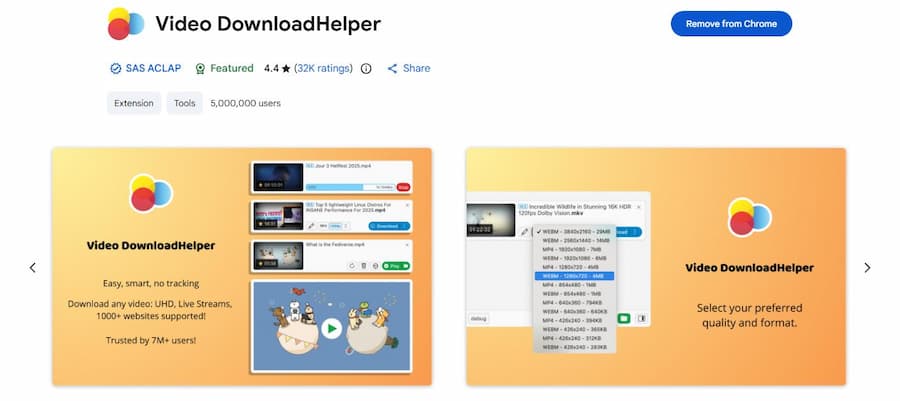
Video DownloadHelper is a browser plugin that works on Chrome, Firefox, and Edge. After testing this extension with different movies on 123Movies, I can confirm it successfully captures video files. However, keep in mind that the download speed is inconsistent and depends on your internet connection and the site's server stability.
Video DownloadHelper offers both free and premium plans. The free plan allows one download at a time, and some high-resolution conversions may include a watermark. The Premium Plan unlocks faster download speeds, removes watermarks on converted files, and allows for simultaneous downloads.
How to Download Movies from 123Movies with Video DownloadHelper
Step 1. Go to the official Video DownloadHelper website and add it to your browser.
Step 2. Open a movie on 123Movies and start playback.
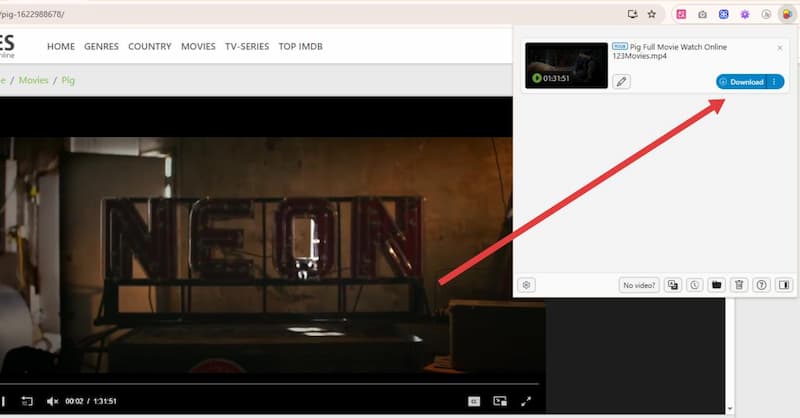
Step 3. Once the video starts, the Video DownloadHelper icon in your browser toolbar will turn from gray to color. Click it to see the detected files.
Step 4. Click the gear icon in the bottom left corner to set the resolution to 1080p or 720p, and select the video format if you have a preference.
Step 5. Click the blue download button. The video will start downloading to your computer.
- Detection: Successfully detected playable video streams.
- Quality: Supports different output qualities, including 720p and 1080p when available. Video and audio tracks were preserved.
- Speed: Relatively slow. A 90-minute movie in 720p took about 40 minutes to download during testing.
- Safety: The extension worked without intrusive redirects during testing. However, always install it from the official browser extension store.
Pros:
- Works on multiple browsers like Chrome, Firefox, and Edge.
- Can download videos from many websites.
- Lets you choose video quality like 1080p or 720p.
- Free plan available for basic use.
Cons:
- Download speed depends on your internet connection.
- Premium plan required for faster downloads and extra features.
- Sometimes the plugin may fail on certain sites.
Tool 2. Internet Download Manager (Windows Only)
Internet Download Manager (IDM) is a legendary download accelerator designed to increase your download speeds. It is widely considered a powerful tool for capturing video from web players. You can easily use IDM to download videos from 123Movies or any other site with video content.
While it is a premium tool, you can use a 30-day free trial with no credit card required to test its full capabilities. It is compatible with Windows 11, 10, 8.1, and 7 (both 32-bit and 64-bit versions).
Steps to Download Movies from 123Movies Using IDM:
Step 1. Download IDM from the official page and install it on your computer.
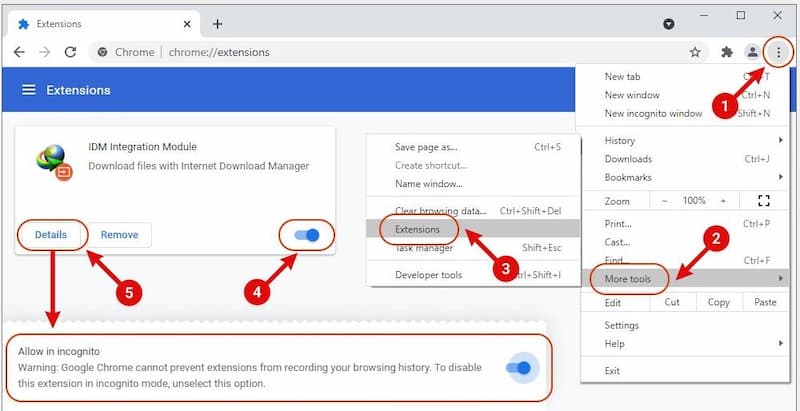
Step 2. Launch IDM. The software will guide you on how to integrate it with your browser. For Chrome, for example, you need to open the extensions page, enable Developer Mode, and toggle the IDM integration extension on.
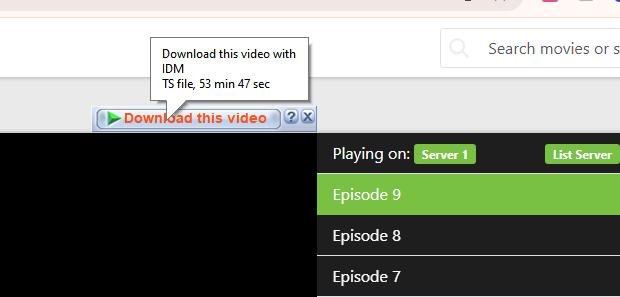
Step 3. Open the movie you want to download on 123Movies. A "Download this video" button will appear in the top-right corner of the video player. Click it.
Step 4. In the pop-up window, select your preferred file save location and click Start Download.
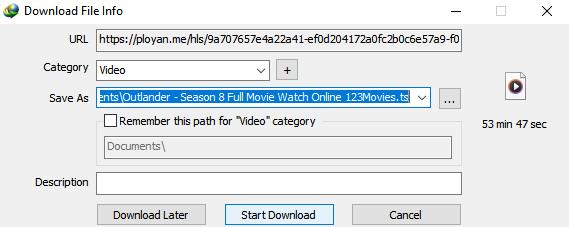
Step 5. You can monitor the download progress in the pop-up window. Overall, IDM usually downloads videos faster than Video DownloadHelper, depending on your internet connection.
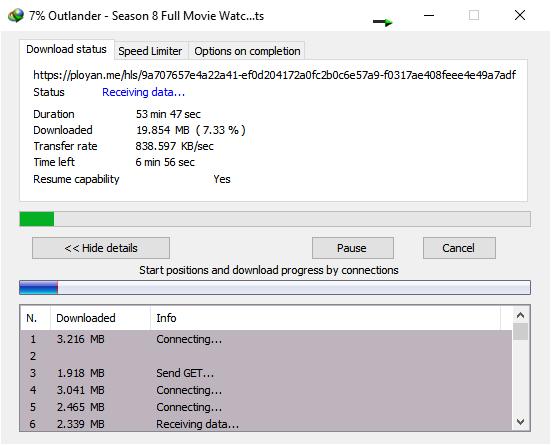
- Detection: Successfully detected.
- Quality: Cannot manually adjust video quality. The output quality depends on the available streaming source, which was mostly 720p during testing.
- Speed: Much faster than Video DownloadHelper. A 53-minute movie took about 10 minutes to download during testing.
- Safety: No suspicious behavior was observed during installation.
Pros:
- Fast download speeds compared to browser plugins
- Detects videos automatically with a "Download this video" button
- Resumes interrupted or broken downloads efficiently
Cons:
- Only available for Windows
- Paid license required after the 30-day free trial
- No options for video subtitles, audio tracks, or video quality setup
Tool 3. VidiFab Streaming Video Downloader
VidiFab Streaming Video Downloader is a professional software that lets you download videos from major streaming platforms like Netflix, Amazon Prime, HBO Max, Hulu, Apple TV+, and Disney+. If you have an active subscription to any of these services, you can use VidiFab to save movies and shows as high-quality, ad-free MP4 or MKV files.
Unlike browser-based tools, which often fail or stop working after updates, VidiFab ensures your downloads keep full HD quality (up to 1080p) and lets you download as many videos as you want. All downloads include multiple audio tracks and embedded or external subtitles, making it easy to watch on any device.
I recommend VidiFab for anyone who wants to build their own collection of movies or TV shows, because it provides a smooth, fast, and reliable download experience. For instance, while downloading movies from Netflix usually takes me about 2 hours, this cuts it down to just a few minutes!
VidiFab Streaming Video Downloader
Download videos from streaming platfroms as MP4/MKV in 1080p with Dolby Atmos for offline viewing all devices.
How to Download Movies from 123Movies Using VidiFab
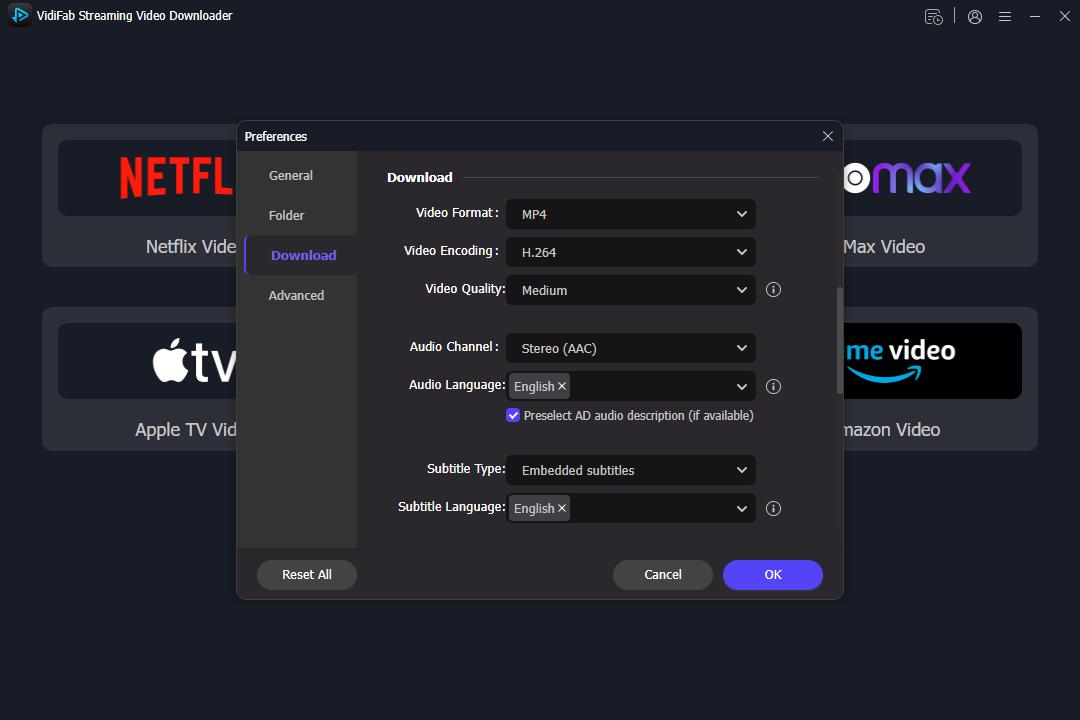
Step 1. Set Your Download Preferences
First, download and install VidiFab. Launch the software, click the Menu icon in the top right corner and select Preferences. Here, ensure the Download Video Format is set to MP4 or MKV. You can also pre-select your preferred video quality (1080p) and encoding method to ensure every 123Movies download meets your standards.
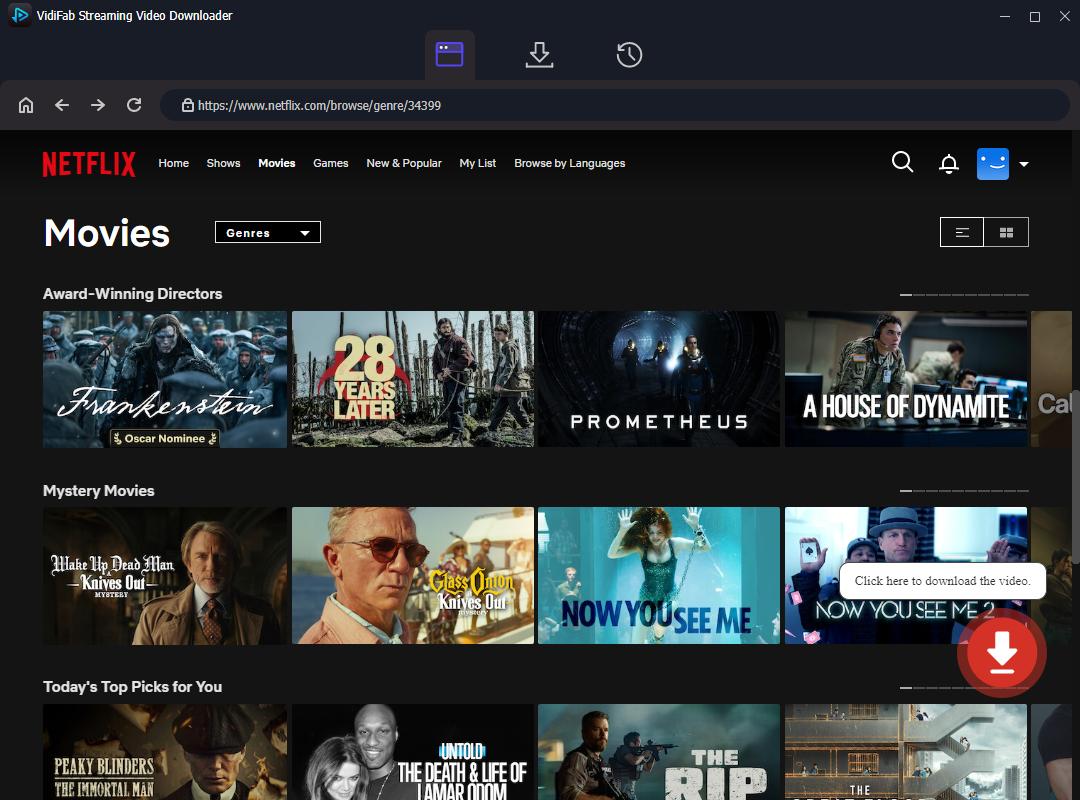
Step 2. Find Your Movie on Supported Premium Platforms
Since most films found on 123movies.to are also available on these platforms, you can use VidiFab to download the official, high-bitrate version instead of a low-quality stream. Simply select the platform icon (e.g., Netflix), log in, and search for the movie you originally found on 123Movies. Click the download button in the bottom right corner.
Good news: VidiFab plans to add support for external websites like 123Movies in the future, so you may soon be able to download directly from sites like 123Movies.
Step 3. Set Video Quality, Audio, and Subtitles
Choose 1080p for high-definition quality. If the movie has multiple audio tracks, select your preferred language. You can also choose embedded or external subtitles. This ensures your downloaded file is ready for offline viewing exactly how you want it.
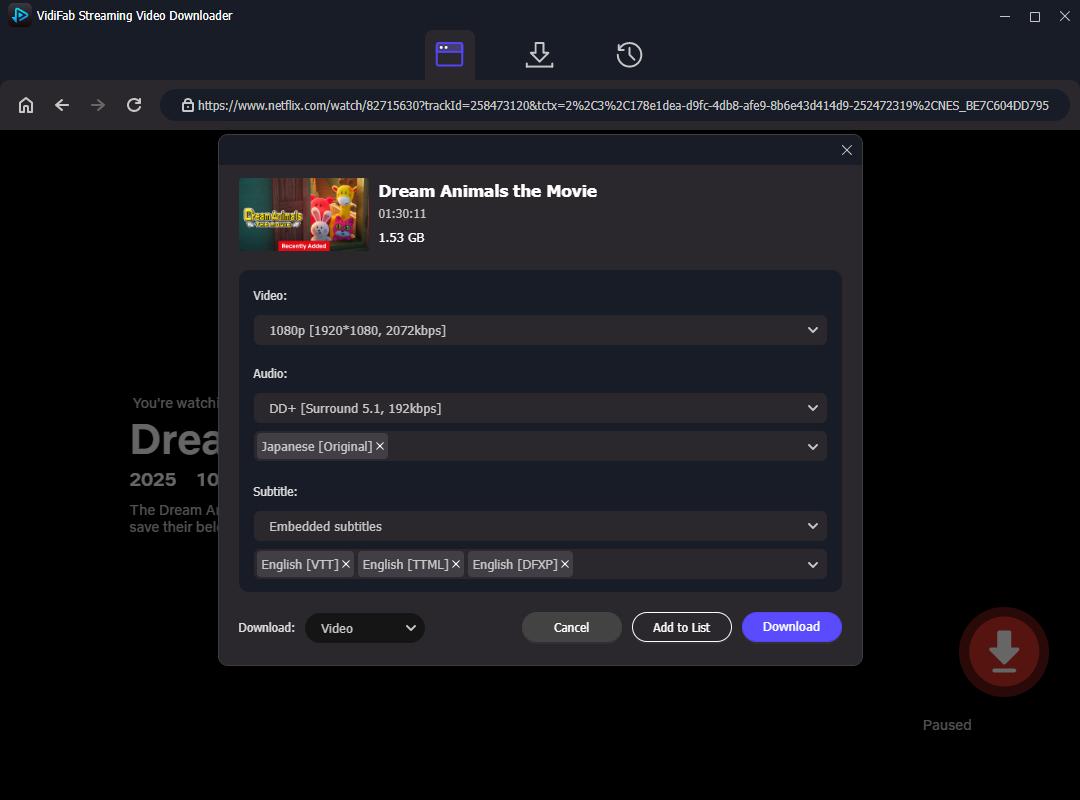
Step 4. Start Downloading and Save Files
Click Download to begin saving the movie. VidiFab extracts the video as a standard MP4 or MKV file, so you can watch it on your PC, Mac, Android device, or Smart TV without needing the original streaming platform. After the download finishes, check the History tab to find and organize your files for offline viewing.
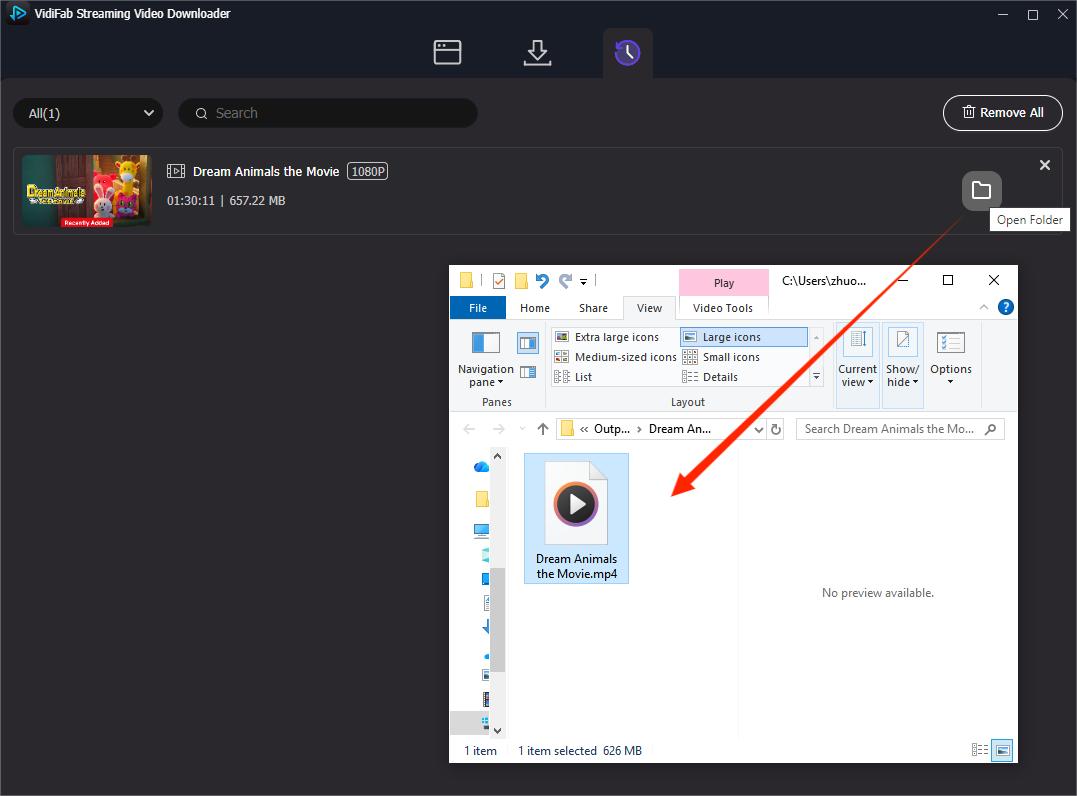
- Detection: Successfully detected video streams, multilingual audio tracks, and subtitles. You can also export audio tracks or subtitle files separately.
- Quality: Supports up to 1080p when available. The output quality can be manually selected, but the final resolution depends on the highest quality provided by the streaming platform.
- Speed: A 90-minute movie took about 20 minutes to complete during testing.
- Safety: The installer file was scanned with VirusTotal and no security issues were detected. No intrusive ads or redirects were observed during testing.
Pros:
- Downloads high-quality MP4 and MKV files
- Supports full 1080p resolution and high-quality audio
- No ads or download limits
- Saves multi-language subtitles and audio tracks
- Offers a safe download environment
Cons:
- Currently doesn't support 123Movies directly
- Requires a subscription to the streaming platform
- Software installation is needed
Tool 4. Video Downloader VeeVee
Video Downloader VeeVee is a browser extension available for Chrome and Firefox, including Firefox on Android. VeeVee detects videos played through HTML5 video players, which makes it possible to capture supported 123Movies video streams.
One feature that makes VeeVee stand out is its built-in QR code sharing option. After detecting a video, you can scan the QR code with an Android or iPhone device to transfer the download directly to your mobile browser. This feature will be covered in Part 4.
Steps to Download Movies from 123Movies with Video Downloader VeeVee:
Step 1. Open the Chrome Web Store, search for Video Downloader VeeVee, and click Add to Chrome to install it.
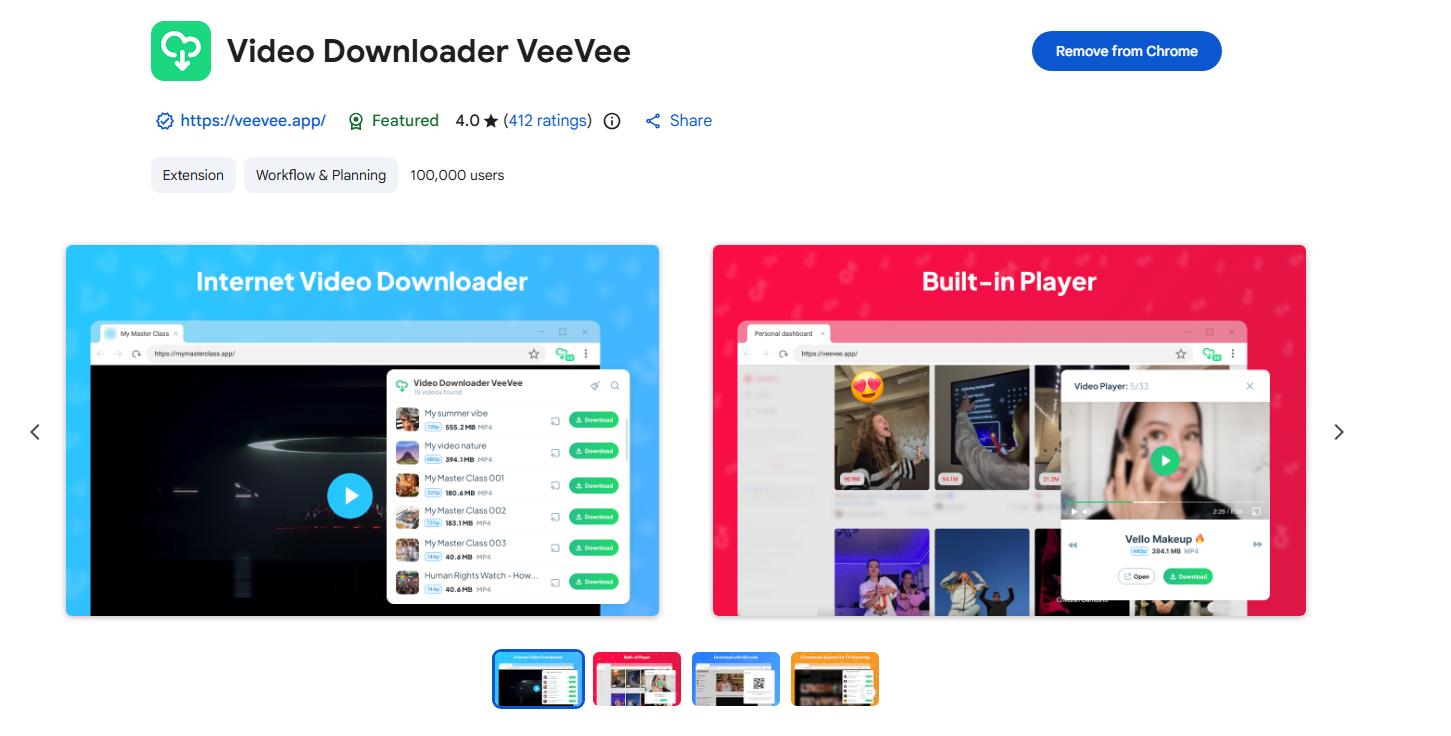
Step 2. Open a movie on 123Movies and start playback. Wait until the video begins playing.
Step 3. Click the extension icon in your browser toolbar. Video Downloader VeeVee will automatically detect available video streams.
Step 4. Click the download button next to the detected video. Choose a download location when prompted, and the video will begin downloading.
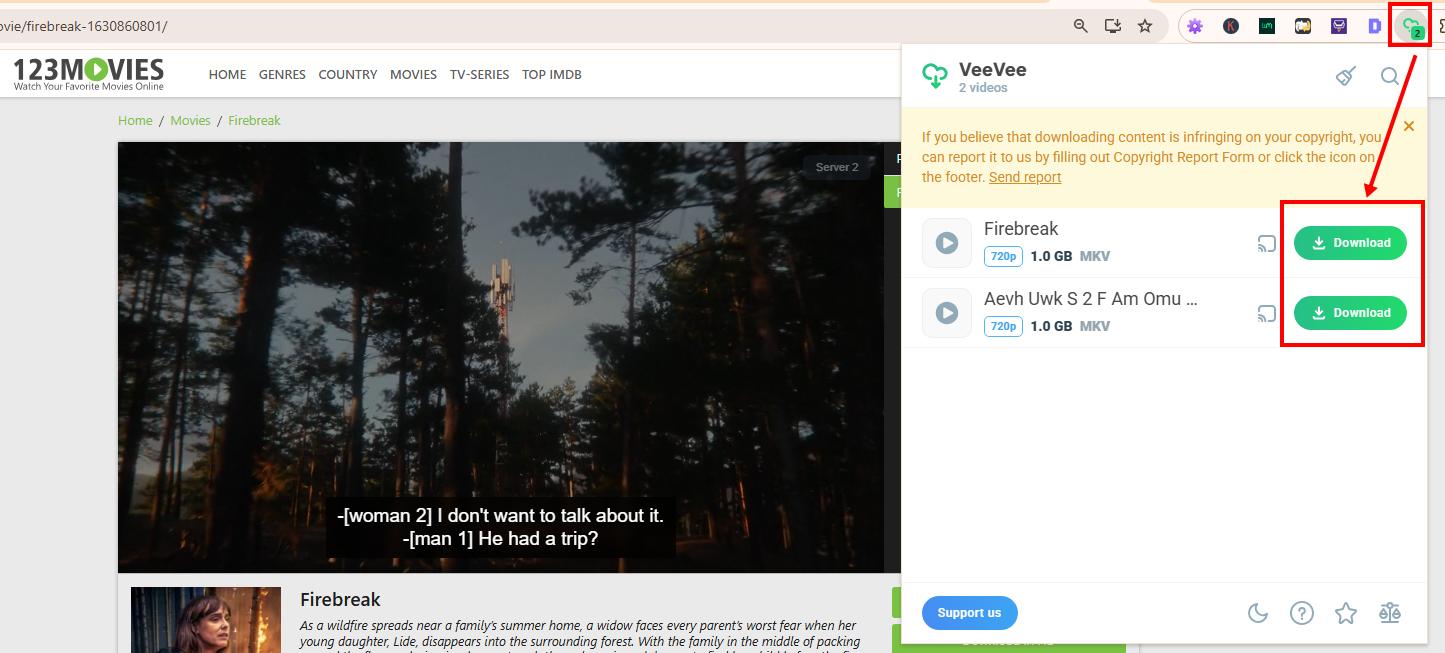
- Detection: Successfully detected HTML5 video streams during testing.
- Quality: Supports different quality levels from SD to 4K when available. The final resolution depends on the source video quality.
- Speed: Relatively fast. A 100-minute movie took about 10 minutes to download during testing.
- Safety: No registration was required. No intrusive ads or suspicious redirects were observed during testing.
Pros:
- No account registration required
- Good output quality when the source video is available
- Faster download speed compared with some browser-based downloaders in testing
- Supports QR code sharing for transferring downloads to mobile devices
Cons:
- Cannot manually select video quality or download format
- Output options depend on the original video source
- Does not preserve original metadata, such as cover images or video titles
Other 123Movies Downloaders I Tested
Below are two alternative downloaders often mentioned in online guides that do not work as of September 2026. Save your time and avoid these options.
TubeOffline Online Downloader (No Longer Works)
TubeOffline no longer works properly with 123Movies videos. After pasting a 123Movies video URL and clicking the download button, it redirected to a separate download page with another download prompt.
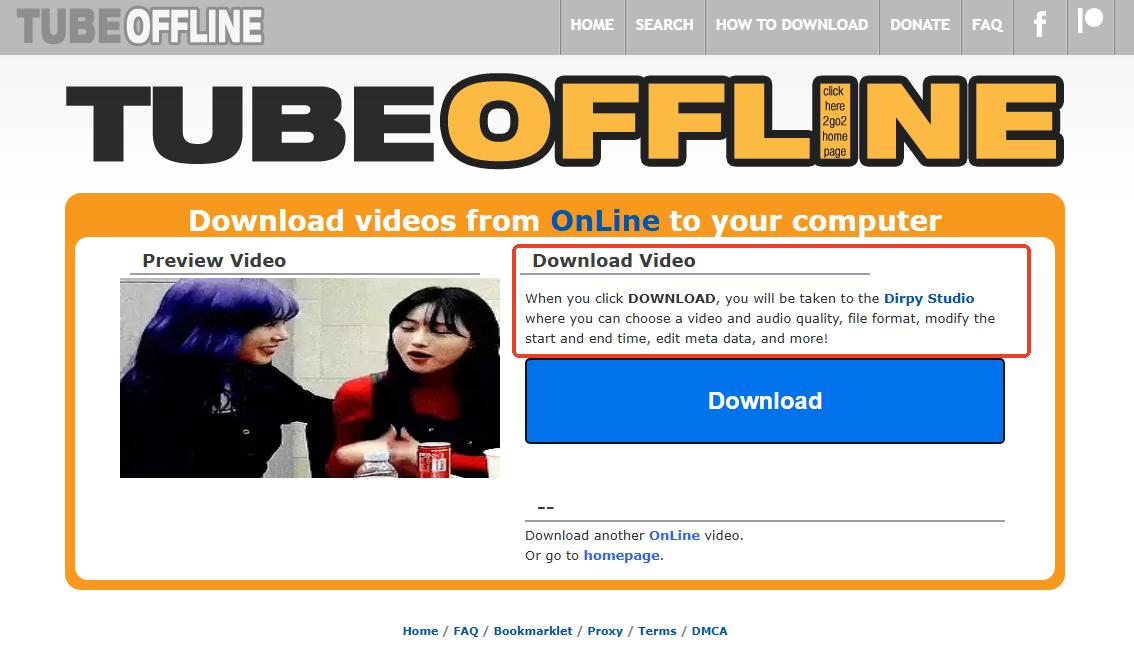
The page stated that clicking download would redirect users to Dirpy Studio. However, Dirpy was also unable to extract the video during testing.
Test result: Not working. The process involved multiple redirects and did not provide a usable download result.
GitHub-Based 123Movies Downloaders (Not Recommended)
This 123Movies downloader published from GitHub claims to download 123Movies videos through browser extensions. I tested it and found that it is a paid service, only offering 3 free downloads.
The extension requires you to do email verification. Although the verification process was completed successfully, the download page did not appear during testing.
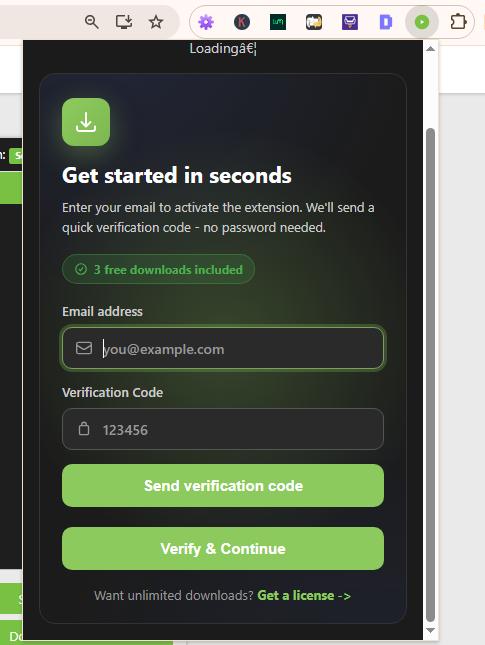
Test result: Not recommended. The setup process is complicated, and the final download step was unreliable.
Part 3. Can You Download Movies from 123Movies on Android?
Yes, you can use a video downloader app on Android to download from 123Movies. The app I tested and that worked is 1DM Browser & Video Downloader. It features a built-in browser and detects the video streams playing in the browser. After the download, you can also manage the video file in your storage within the app.
How to Download Movies from 123Movies on Android Using 1DM
Step 1. Download and install 1DM: Browser & Video Download from the Google Play Store.
Step 2. Launch 1DM and use its built-in browser to visit the 123Movies website.
Step 3. Find the movie you want to download and tap the Play button.
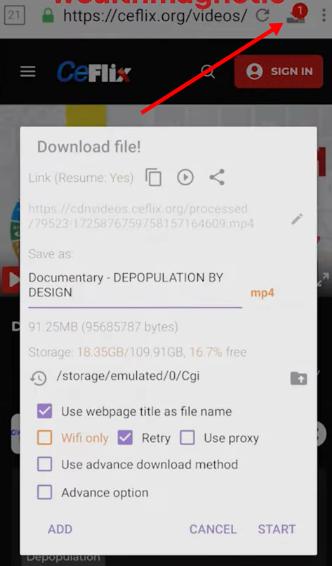
Step 4. Once the movie starts buffering, check the top toolbar in 1DM. The download indicator will appear when the app detects a downloadable video stream.
Step 5. Tap the download icon, select the detected video file, choose your save location, and tap Start to begin downloading.
- Detection: Successfully detected the video stream during testing.
- Quality: Downloaded the available streaming quality. No manual quality selection was available.
- Speed: A standard 100-minute movie took around 7 to 12 minutes to download during testing.
- Safety: Available through Google Play. No suspicious behavior was observed during testing.
Pros:
- Allows you to customize the download location, including SD card storage
- Includes a built-in ad blocker
- Quickly detects available video streams
Cons:
- Downloads are usually saved as MP4 files
- No option to manually select video quality
- Can consume significant battery during long downloads
Part 4. Can You Download 123Movies Videos on iPhone?
Downloading 123Movies videos on iPhone is harder than on Android because iOS has stricter restrictions on file downloads and browser-based video tools.
However, I found that Video Downloader VeeVee's QR code sharing feature can transfer detected video downloads to an iPhone or other mobile devices without installing an additional downloader app.
How to Download 123Movies Videos on iPhone Using Video Downloader VeeVee QR Code
Step 1. Install the VeeVee extension on a supported desktop browser such as Chrome or Firefox.
Step 2. Open 123Movies on your computer, play a movie, and click the Video Downloader VeeVee extension icon.
Step 3. Under the detected video streams, click the QR code icon.
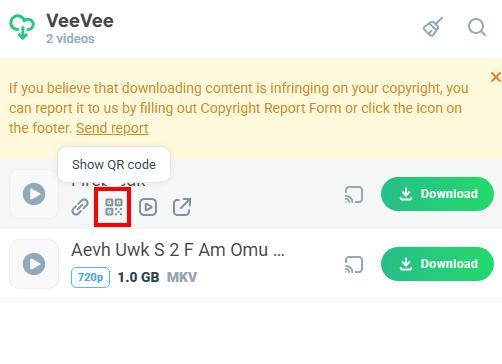
Step 4. Use your phone camera to scan the QR code. This method works with iPhone, Android, and other devices with a browser.
Step 5. After scanning, your phone will open a webpage. Wait for the download window to appear, then tap Download.
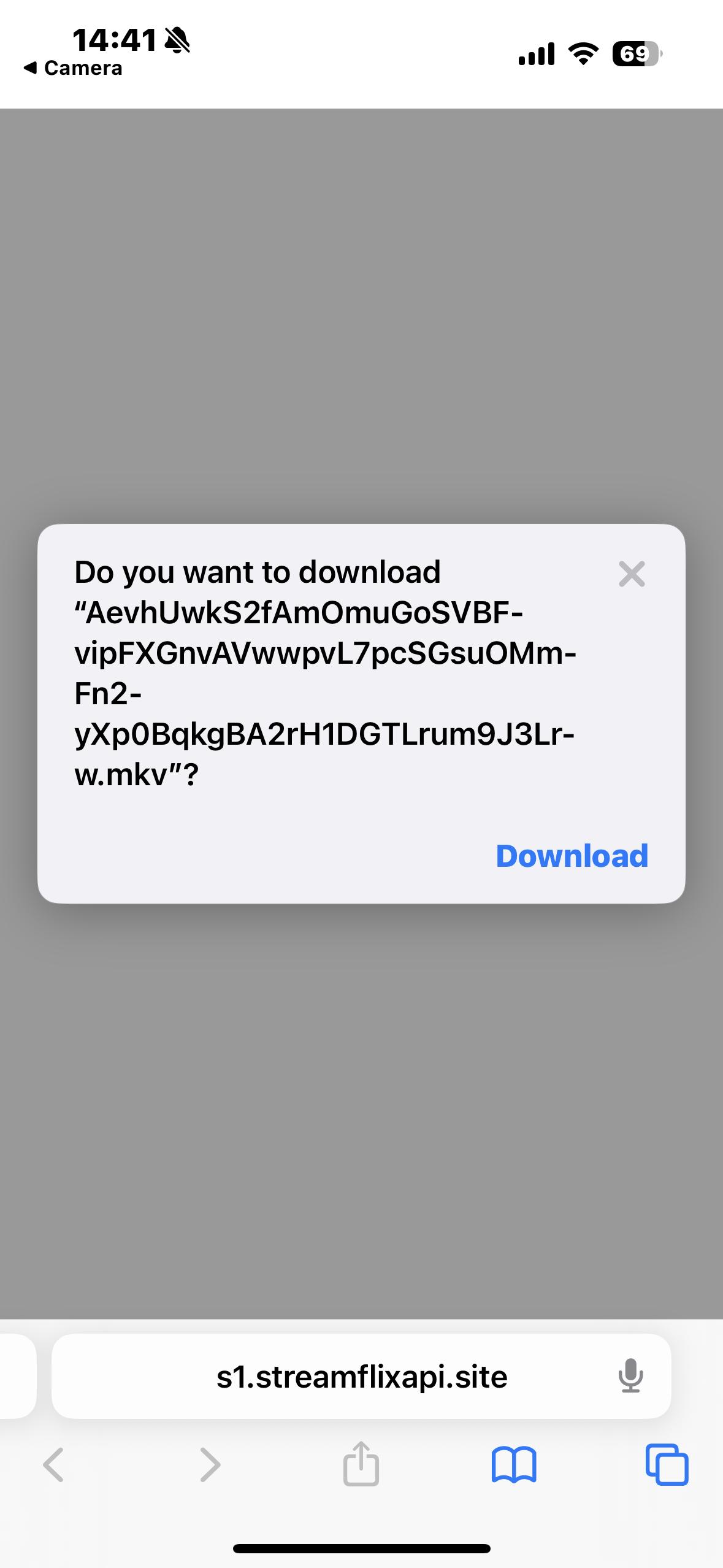
Step 6. The downloaded file will be saved in the browser's download folder. On iPhone, you can find the file through the Files app.
- Detection: Successfully detected the video stream through the desktop extension.
- Quality: The downloaded quality depends on the original video source.
- Speed: A 100-minute movie took about 10 minutes to download during testing.
- Safety: The process requires opening a download page through a QR code. No suspicious behavior was observed during testing, but users should pay attention when opening third-party links.
Pros:
- Does not require installing an additional downloader app on your phone
- Works with iPhone, Android, and other devices with a browser
Cons:
- Requires a desktop computer for the initial setup
- Requires opening a download page through a QR code link
Does 1DM Download 123Movies Videos on iPhone?
1DM is available on iOS, but during testing, the app repeatedly crashed when attempting to use it for this purpose. Other apps tested on the same device did not have this issue, so the problem appeared specific to 1DM.
Test result: Not working during testing.
Can Documents by Readdle Download 123Movies Videos on iPhone?
Documents by Readdle includes a built-in browser and can play 123Movies videos. However, during testing, no download option appeared for the video streams.
Test result: Could play videos, but no downloadable video option was detected.
Part 5. Which 123Movies Downloader Should You Choose?
| Feature | VidiFab Downloader | Video DownloadHelper | Internet Download Manager | Video Downloader VeeVee | 1DM Browser & Video Download |
|---|---|---|---|---|---|
| Platform | Windows & macOS | Chrome, Firefox, Edge | Windows Only | Chrome, Firefox, Firefox Android | Android Only |
| Cost | Free Trial / Paid | Free / Premium Plan | 30-Day Free Trial | 100% Free (No Account) | Free / Paid Version |
| Output Quality | Up to 1080p | Up to 1080p (Source dependent) | Up to 1080p (Source dependent) | Up to 1080p (Source dependent) | Up to 1080p (Source dependent) |
| Subtitles & Audio | Multi-language & 5.1 Sound | Depends on source video | Depends on source video | Downloads attached subtitles | Depends on source video |
| Security | High (Ad-free environment) | Medium (Safe but has ads) | High (Safe tool) | Medium (Safe extension) | High (Strong built-in ad blocker) |
| Best For | Premium quality & safety | Quick, casual browser grabs | Speed-focused Windows users | PC-to-Mobile QR code transfers | Power-user downloading on Android |
- For the best overall quality: Choose VidiFab if you need control over video quality, audio tracks, and subtitles.
- For faster downloads on Windows: IDM and Video Downloader VeeVee performed better in our speed tests.
- For a simple browser extension: Video DownloadHelper is easier to set up and works across multiple browsers.
- For Android: 1DM is the most straightforward option because it includes a built-in browser and video detection.
- For iPhone: VeeVee's QR code transfer method is more practical than dedicated download apps tested on iOS.
Part 6. FAQs About 123Movies Downloads
Is 123Movies safe to use without an ad-blocker?
Why does the 123Movies Download in HD button keep redirecting me?
Why do I get a 'No Video Found' error with my browser extension?
How can I download from 123Movies without losing video quality?
Can I download 123Movies videos directly to my Android or iPhone?
Is it legal to download a movie from 123Movies for personal use?
How do I get subtitles when downloading from 123Movies?
Final Thoughts
Ultimately, while 123Movies is convenient for quick streaming, it doesn't offer a safe, official way to download movies for offline viewing. From my experience, clicking on-site "Download" buttons often leads to adware, redirects, or other security risks.
The safest way to download movies is by using a trusted 123Movies downloader like VidiFab Streaming Video Downloader or IDM. These tools protect your device from malware and let you save high-quality MP4 files with proper subtitles. Always stay cautious online, use an ad blocker, avoid downloading software from 123Movies itself, and keep your offline collection for personal use only.
 Free Download
 Secure Download
 Free Download
Secure Download
Free Download
Secure Download

I write about must-watch movies and TV shows, plus detailed reviews of video downloaders and media tools. I help you discover what to watch next and pick the right tools to save and manage your favorite content. My goal is to give you clear, honest insights so you can enjoy streaming and offline viewing without the hassle.
 Leave Your Comment