3 Ways to Download Netflix Movies on PC
 By Miles Kent
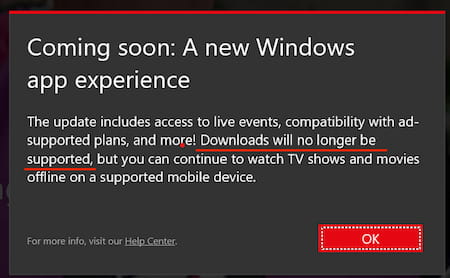
In July 2024, Netflix quietly made a major shift: its native Windows app was replaced with a web-based version. While it looks similar on the surface, one key feature didn't survive the transition: the native download feature was completely removed. Netflix's official advice for those losing the download feature is simple: "Use a mobile device." But for many of us, that isn't a real solution.
In this guide, I'll show you three ways to download Netflix movies on Windows 10, Windows 11, and Mac. By the end, you'll know how to save and watch your favorite Netflix content offline.

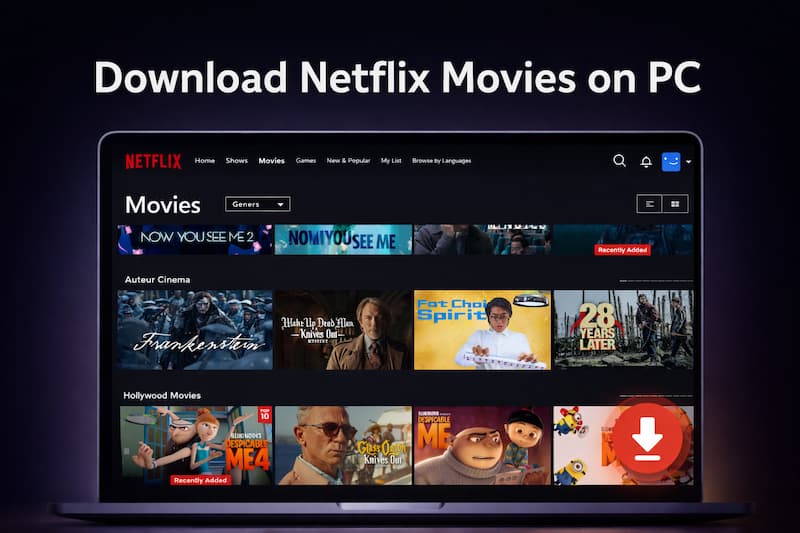
Can You Download Movies from Netflix on PC?
No. You cannot download movies from Netflix on a PC through the official desktop app anymore. The Netflix Windows app is now a web-wrapped version, which simply opens the Netflix website inside a simplified window. Because standard browsers like Chrome, Edge, and Safari do not support file downloads for protected streaming content, the native download feature has been removed for all PC and Mac users. Currently, official downloads are strictly limited to:
- iOS and Android mobile devices
- Amazon Fire tablets
- Chromebooks with the Google Play Store installed
Are There Ways to Download Netflix Movies on a PC?
Yes. can still rely on a few workarounds to save Netflix content on a Windows PC:
- Method 1: Third-party downloaders. This is the most effective way to save videos as permanent files. You can download movies as MP4 or MKV files in 1080p HD with 5.1 surround sound and full subtitles.
- Method 2: Roll back to an older Neetflix Windows app version. You can uninstall the new app and manually install an older version (v6.99.5.0) that still includes the native download button.
- Method 3: Use an Android emulator. By running the mobile version of Netflix inside an emulator on your PC, you can trick the service into showing the download button. Note that this requires more system resources.
Besides those three download methods, you can also try screen recording Netflix on a PC. However, screen recording usually requires real-time playback and may involve quality limitations.

Only Method 1 creates local files you can move. Unlike Netflix official downloads that expire after 7–30 days or 48 hours after you start watching, third-party downloads are permanent video files you can keep and watch on any device.
Method 1. Download Netflix Movies as MP4 or MKV
If you want files that can be watched without the Netflix app, MP4 or MKV downloads are the most flexible option. Unlike official Netflix downloads, these files are stored locally on your computer and can be moved to external drives, USB devices, media servers, or other supported players.
The Tool You Need: VidiFab Netflix Movies Downloader
To download Netflix content in MP4 or MKV format, you need a reliable third-party solution like VidiFab Netflix Movies Downloader. It supports up to 1080p Full HD resolution and preserves advanced encodings like H.264 and AV1 to ensure crisp playback on any screen.
Once the download is complete, there are no 48-hour viewing limits or expiration dates. You can transfer your downloaded videos to your phone, USB drive, Plex Media Server, or TV for more flexible playback and management.
VidiFab Netflix Movies Downloader
Download Netflix videos as MP4/MKV in 1080p for offline viewing on your Windows PC and Mac.
How to Use VidiFab to Download Netflix Movies onto Your PC
Step 1. Install and Log In
Download and install VidiFab Streaming Video Downloader on your Windows PC. Open the software, select the Netflix service from the main screen, and log in to your account using the built-in, secure web player.
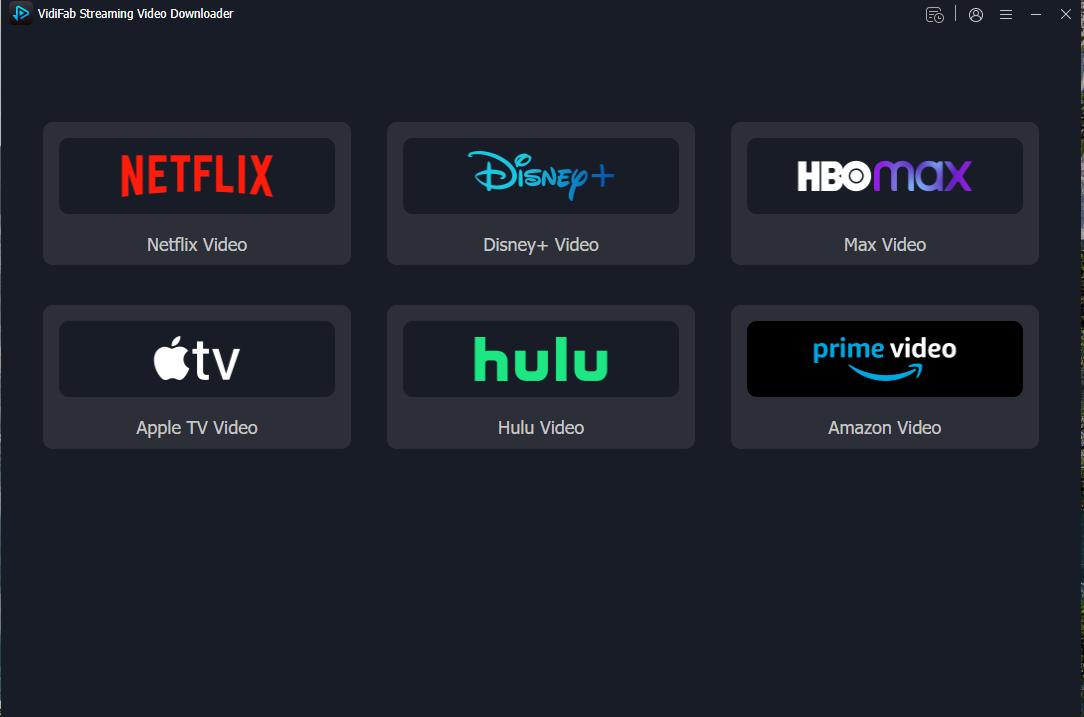
Step 2. Find Your Video
Browse the library or search for the specific movie or show you want to download. Once you are on the video's detail page, click the Download button in the bottom-right corner.
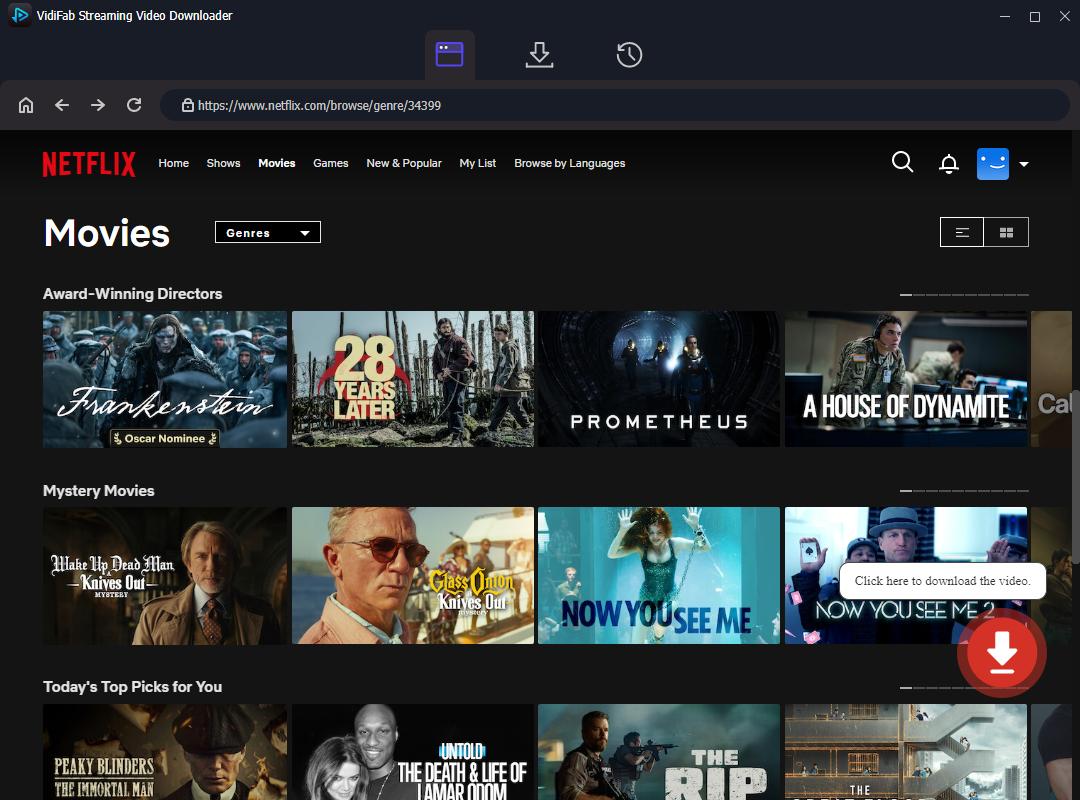
Step 3. Customize Your Settings
A settings window will pop up. Pick your video quality, audio language, and subtitle style. If you want to add more films to your download list, click Add to List. Otherwise, just click Download to start right away.
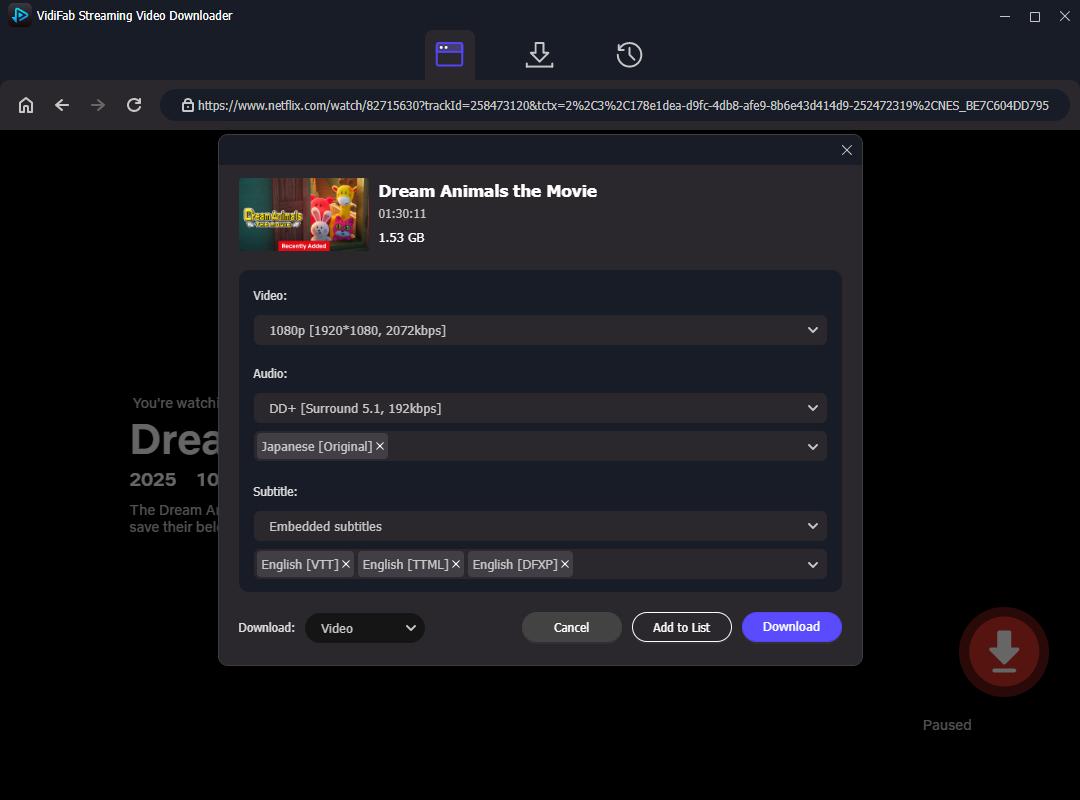
Step 4. Download and Watch Offline
VidiFab will start downloading the video to your computer at 7x speed. Once it's done, head to the History tab (the clock icon) to find your files. Click the folder icon to open the location on your PC. Now you can watch your videos with any media player or move them to other devices for offline viewing.
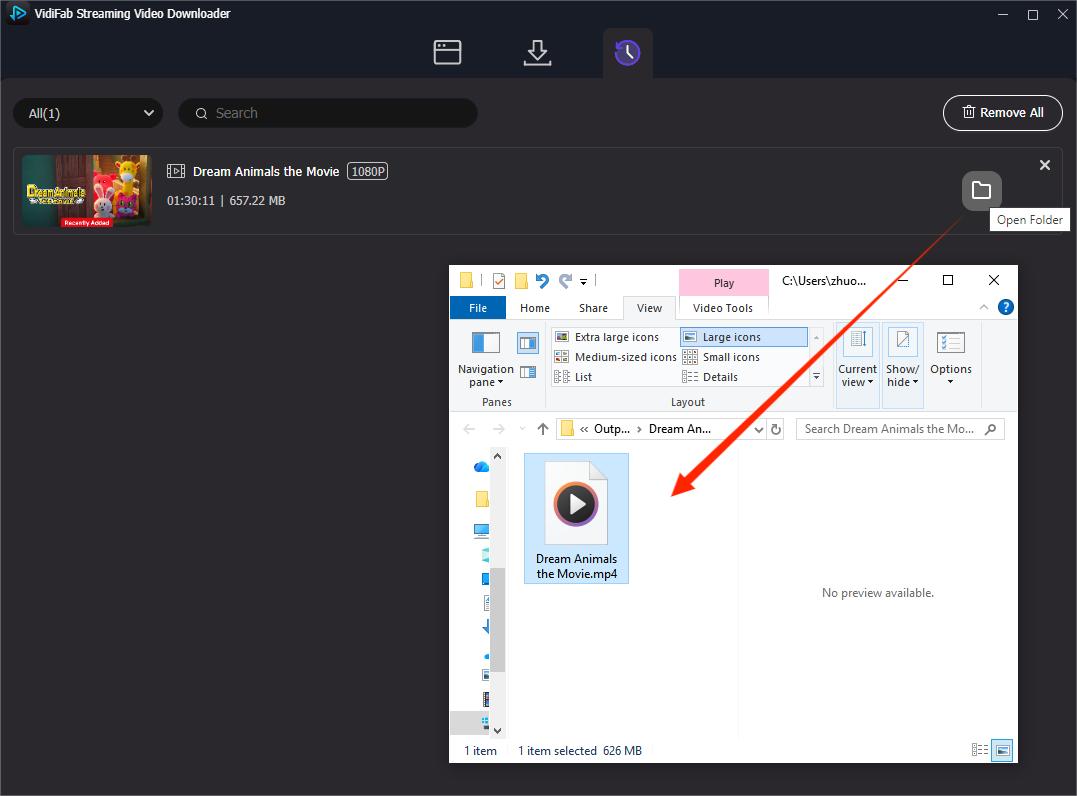
Video Tutorial: How to Download Netflix Movies to PC for Local Playback
Method 2. Roll Back the Netflix App (May No Longer Work)
The rollback method restores downloads by installing an older Netflix Windows app version 6.99.5.0, which still supports offline viewing. It requires Windows 10 or later. After rolling back, you may also get Dolby Digital Plus passthrough and 5.1 surround sound.
How to Use the Rollback Hack to Download Netflix Movies on PC
Follow these steps to replace the current web-wrapped app with the legacy version.
Step 1. Prep Your PC and Disable Auto-Updates
You must remove the restricted version of Netflix and stop Windows from automatically updating it back.
-
01
Go to Settings > Apps > Installed Apps.
-
02
Find Netflix, click the three dots, and select Uninstall.
-
03
Open the Microsoft Store, click your Profile icon, and select Store Settings.
-
04
Turn off App updates. Pick a pause for 1 to 5 weeks. I recommend going for 5 weeks to prevent any future problems.
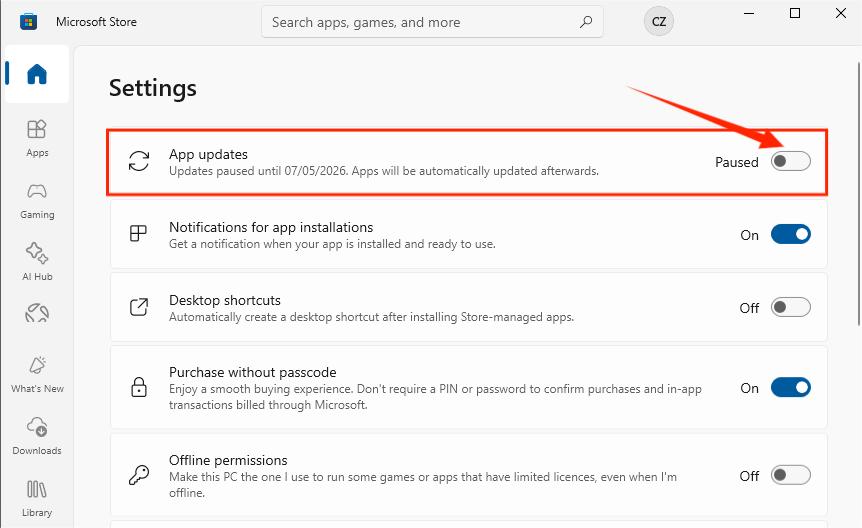
Step 2. Download Version 6.99.5.0
You need the specific installer file for the last native version of the app.
-
01
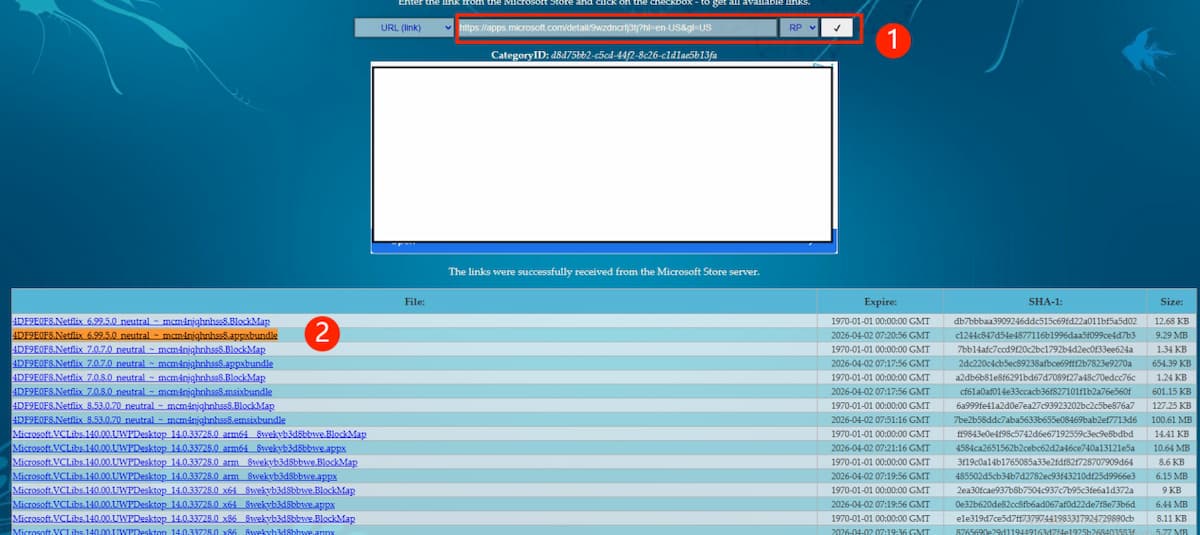
Visit the Adguard store page. It is a tool that generates direct download links for historical versions from Microsoft's servers.
-
02
Paste the official Netflix Microsoft Store URL into the search bar.
-
03
Locate the file: 4DF9E0F8.Netflix_6.99.5.0_neutral_~_mcm4njqhnhss8.AppxBundle. Or, download the version 6.99.5.0 file from a trusted Google Drive mirror.
-
04
Download this file to your Downloads folder.
Step 3. Install via Windows PowerShell
Standard installers may not work for this bundle, so you must use the command line.
-
01
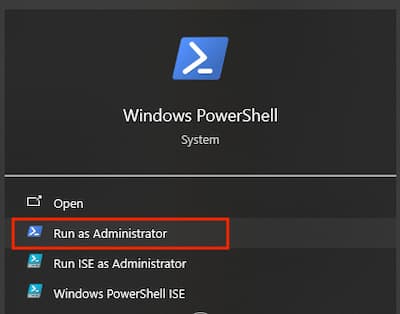
Press Win + R, type PowerShell, and hit Run as Administrator.
-
02
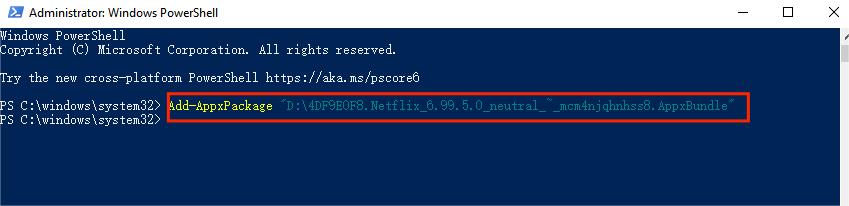
Paste the following command. If you saved the file elsewhere, update the file path in the command.
-
03
Hit Enter to run the installation.
Step 4. Launch and Sign In
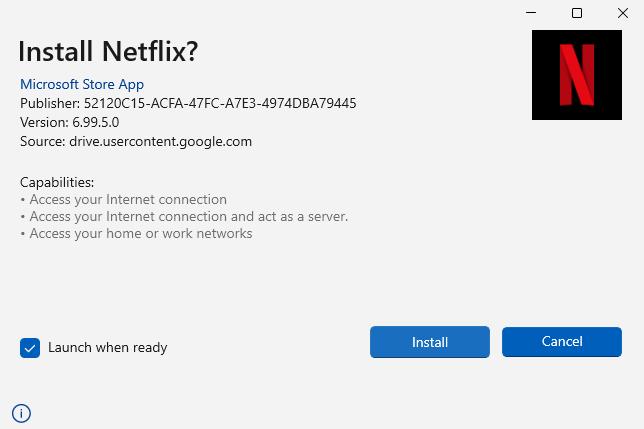
Open the AppxBundle file in the folder. Hit Install in the pop-up window. Now, log into your Netflix account. You'll see the old interface and find the download option for supported titles.
- The "Kill Switch": Netflix frequently blocks older versions. You may see a mandatory pop-up that prevents you from accessing the interface.
- Login Failures: You may face frequent login errors (such as Error Code C1-U7135-1957-205007), which render the app unusable even if it installs correctly.
- Security Risk: Disabling Microsoft Store updates leaves your other Windows apps vulnerable to security threats.
Method 3. Use an Android Emulator to Download Netflix Movies on PC
The Android version of the Netflix app still supports offline downloads. By running an Android emulator on your Windows PC, you create a virtual phone environment that lets Netflix display its mobile interface, including the download option.
Is Using an Emulator Safe?
Generally, yes. The risk of Netflix banning an account for using an emulator is "very low." Most experts agree that Netflix focuses its security efforts on mass piracy rather than individuals trying to watch a movie on a plane. To protect your computer from malware, always download emulators from reputable, official sources and scan all installation files with anti-virus software.
Which Emulators Support Netflix Downloads?
These emulators can run the Netflix app on Windows. The download success may require Widevine DRM L1 certification, but they are commonly used:
- BlueStacks: The most popular choice. It is highly stable and includes a "Performance Mode" to improve video playback.
- LDPlayer: A great lightweight alternative. If you have an older laptop or a mid-range PC, LDPlayer uses fewer resources than BlueStacks.
- NoxPlayer: Known for its "Multi-Instance" feature, which helps if you want to manage multiple apps at once, though it can be heavy on your CPU.
- MEmu Play: A fast-loading option that focuses on high compatibility with the Google Play Store.
How to Use an Android Emulator to Download Netflix Movies on PC
-
01
Download and install a reliable emulator like MEmu Play from its official website.
-
02
Launch the emulator and sign in with your Google account.
-
03
Search for the official Netflix app in the Play Store and install it just as you would on a smartphone.
-
04
Open the app inside the emulator and sign in using your active subscription.
-
05
Once logged in, the "Download" button should reappear next to available titles. Click it to start saving content to the emulator's virtual drive.
-
06
To watch without internet, open the emulator, go to the Downloads section within the Netflix app, and press play.
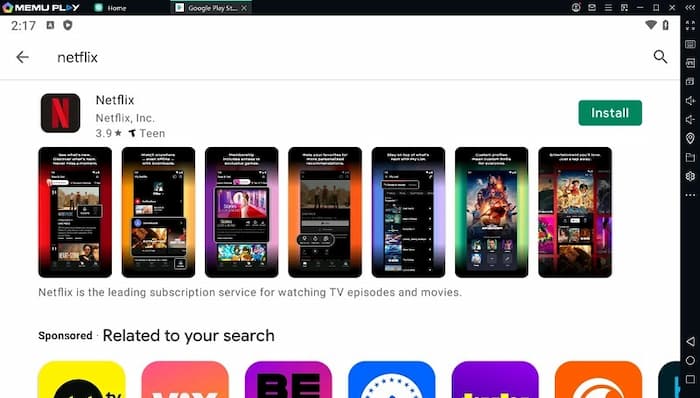
- Resolution Constraints: This is best for users who aren't "picky" about quality. Due to DRM security protocols, emulators often cap out at SD or 720p resolution.
- System Intensity: Emulators require significant CPU and RAM. Running one may slow down older laptops or cause loud fan noise.
- Sandboxed Files: These are in-app downloads, not permanent files. They are heavily encrypted and hidden. You cannot move them to a USB drive or play them in other media players.
- Strict Expiration Rules: Most titles expire within 7 to 30 days if unwatched, or 48 hours after you first press play.
- Plan Limits: Your download limit depends on your plan. Ad-supported plans allow 15 downloads per month, while ad-free plans allow up to 100.
Which Method Should You Choose to Download Netflix Movies on PC
To help you decide, I have compared the three methods for downloading movies in Netflix on Windows PC. While each can technically get the job done, they vary greatly in terms of video quality, file permanence, and overall stability.
| Aspect | Using the VidiFab Downloader | Using the Rollback Hack | Using the Android Emulator |
|---|---|---|---|
| OS Compatibility | Windows 7, 8, 10, 11 | Windows 10 & 11 only | Windows 10 & 11 |
| Video Quality | Full HD (1080p) | Variable (Up to 1080p) | Often capped at SD (480p) |
| Audio Quality | 5.1 Surround / Atmos | 5.1 Surround Sound | Standard Stereo |
| File Expiration | Never (Permanent) | 7–30 days (Official limit) | 7–30 days (Official limit) |
| Subtitles Handling | External SRT or Embedded | In-app captions only | In-app captions only |
| Internet Required | No (Once downloaded) | Yes (For periodic license check) | Yes (For periodic license check) |
| Device Portability | High (Move to USB/TV) | None (Locked to App) | None (Locked to Emulator) |
| Stability & Reliability | High | Low (Prone to "Kill Switches") | Medium (Resource Heavy) |
How to Choose the Right Method?
Each method offers a different balance between convenience, flexibility, and technical complexity.
- Go for Method 1 (VidiFab) if you want top-notch quality and complete freedom. This method lets you save movies as permanent MP4 files that last forever. You can easily move them to a USB drive or watch them on your big-screen TV without needing the internet. It's the best "set it and forget it" option for 2026.
- Pick Method 2 (Rollback Hack) if you're tech-savvy and like the official Netflix interface. Just be ready to troubleshoot, as the app might stop working due to Netflix's annoying update "kill switches."
- Choose Method 3 (Android Emulator) if you want a free, official workaround and don't mind lower video quality. This is a solid choice for a quick trip, provided your laptop has a powerful enough CPU to handle the heavy system load of an emulator.
FAQs about Downloading Netflix Movies on PC
How to officially download Netflix movies to a Windows computer?
Why is the Netflix download button missing on Windows?
Can I move Netflix downloads to a USB drive?
Are there limits on how many Netflix titles I can download to my laptop?
- Standard with Ads: Up to 15 total downloads per device per month.
- Standard & Premium: Up to 100 active downloads per device.
- You can only have downloads on a specific number of devices (2 for Standard, 6 for Premium).
- If you use a third-party tool like VidiFab, these limits do not apply, and you are only restricted by your own hard drive space.
Why are some movies unavailable for download on my computer?
- Licensing Rights: Netflix doesn't own everything in its library. Licensing deals with studios or TV networks, like CBS or ABC, often don't allow for offline viewing.
- Regional Restrictions: Licensing agreements can differ by country, so a title might be available for download in one area but not in another.
- Content Status: Some titles might just be trailers for upcoming shows or movies that aren't fully released yet.
- Plan Type: Sometimes, certain titles can't be downloaded depending on your subscription plan.
Final Thoughts
To sum it up, downloading Netflix movies on your PC really depends on how you want to do it and how much control you need. Sure, rolling back app versions or using emulators can be free quick fixes, but they usually come with some tech issues and lower quality. If you're looking for more flexibility, consider using third-party tools like VidiFab Netflix Movies Downloader. It gives you formats like MP4 or MKV and lets you access movies offline for good. By knowing your options, you can pick the best method that suits your viewing style, storage space, and device setup.
 Free Download
 Secure Download
 Free Download
Secure Download
Free Download
Secure Download


I'm a video tech specialist with over 10 years of experience in digital media and streaming. I focus on making complex workflows simple and practical. Through my guides, you'll learn how to convert media, keep high-quality playback across devices, and manage your streaming video library with ease.
 Leave Your Comment