How to Watch Netflix on a Plane (iPhone, Android, Mac & PC)
 By Miles Kent
On long flights, watching movies is a great way to pass the time. You may wonder how to watch Netflix on a plane. If the in-flight Wi-Fi is blocked, your videos have expired, or your Mac can't download them, this article will guide you through offline streaming options for smartphones and computers. It will also provide tips to avoid problems with Netflix offline downloads and recommend some Netflix movies that are perfect for watching on a plane at the end.

Part 1. Can You Watch Netflix on a Plane?
Yes, you can watch Netflix on a plane, but the method depends on the device you bring and whether the airline offers usable Wi-Fi. The most reliable option is offline playback through the Netflix app, which means downloading your movie or show before boarding. Once you are in the air, you switch to Airplane Mode and watch the saved title with no internet connection needed.
If you want to watch Netflix on your Mac or Windows PC offline, officially speaking, it is not possible. So, you'll need to use a practical downloader such as VidiFab Netflix Video Downloader to download it directly to your computer's drive for local playback.
| Device | Offline Netflix downloads? | Best in-flight option |
|---|---|---|
| iPhone / iPad | ✅ YES | Download first, then use Airplane Mode |
| Android phone / tablet | ✅ YES | Download first, then use Airplane Mode |
| Amazon Fire tablet | ✅ YES | Download first, then use Airplane Mode |
| Chromebook (with Google Play Store) | ✅ YES | Download first, then use Airplane Mode |
| Mac | ❌ NO | Use VidiFab Netflix Video Downloader to save locally to your device for offline playback |
| Windows PC | ❌ NO | Use VidiFab Netflix Video Downloader to save locally to your device for offline playback |
Part 2. How to Watch Netflix on a Plane on iPhone/Android
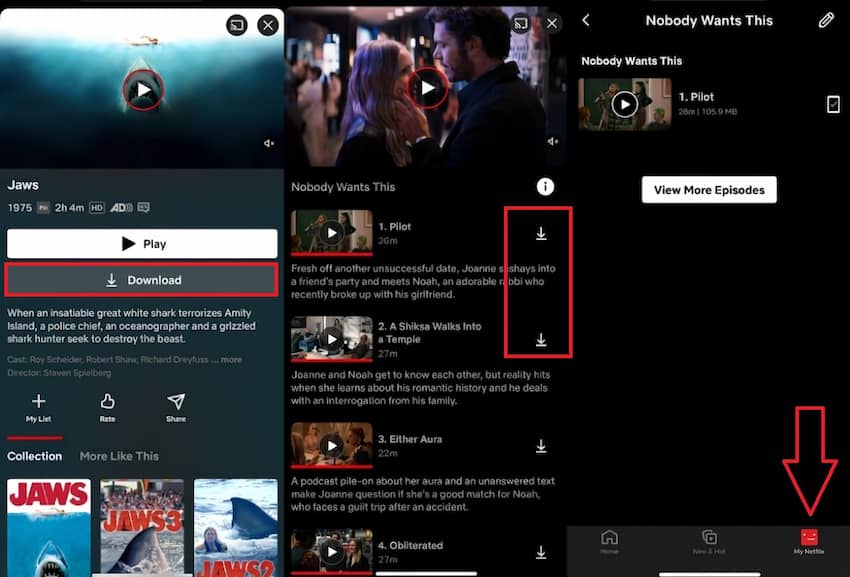
If you want the most dependable airplane mode movie Netflix setup, mobile is the best path. Open the Netflix app, find the title you want, and download it while you still have Wi-Fi. After that, you can play the download offline without needing a network connection.
Use this approach before every flight:
-
01
Open the Netflix app and find the movie or show you want to watch.
-
02
For a movie, tap the Download icon below the play button. For a TV series, scroll to the episode list and tap the download icon next to each episode or use the Download Season button to grab the whole thing at once.
-
03
Once it's done, the icon turns into a checkmark.
-
04
Open your Downloads section and test-play the title before you leave home.
-
05
Once you board, switch your phone to Airplane Mode and press Play.
A few limits are worth knowing before you pack up. Netflix does not make every title downloadable, and some titles expire after a period of time. On ad-free plans, Netflix allows up to 100 active downloads per device, while ad-supported plans are limited to 15 total downloads per device per calendar month. If you get a message saying you have too many download devices, remove downloads on the Manage Download Devices page.
If a title shows as expired, delete it and download it again while you are still online. On iPhone and iPad, it also helps to keep Date & Time set correctly, because a bad clock can make a download look expired when it really is not. That tiny check can save you a lot of frustration at gate time.

Part 3. How to Watch Netflix on a Plane on Mac & Windows PC
Watching on a laptop screen is a genuinely better experience than squinting at a phone for six hours. However, there's no official Netflix app for Mac, and the browser-based web player doesn't support downloading anything. Windows users have it slightly better with a native app, but Netflix has also stripped the download button out of the Windows app.
So if you want offline Netflix on a laptop, you need a dedicated Netflix video downloader. I've tested a few, and VidiFab Netflix Video Downloader is the one I'd actually recommend.
VidiFab Netflix Video Downloader
Download Netflix videos as MP4/MKV in 1080p with Dolby Atmos for offline viewing on your Windows PC, Macbook, mobile phone, tablet, and more devices.
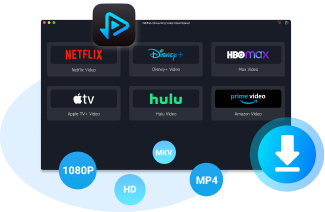
- True MP4/MKV export: Downloads Netflix movies and episodes as standard MP4 or MKV files you can play in QuickTime, VLC, or any media player.
- Downloads never expire: Because you're saving an independent local file rather than a licensed Netflix cache, there's no expiration timer. Download before your trip, watch whenever you want, as many times as you want, even in a country where that title isn't licensed.
- 1080p with multi-language audio and subtitles: Full HD downloads with the option to keep original Dolby 5.1 audio tracks and embed subtitles in multiple languages.
- Batch downloads at up to 7x speed: Useful when you're packing at the last minute and need to grab a whole season before you leave for the airport.
How to Use VidiFab to Download Netflix Movies for Your Flight
Step 1. Install VidiFab and set your download format
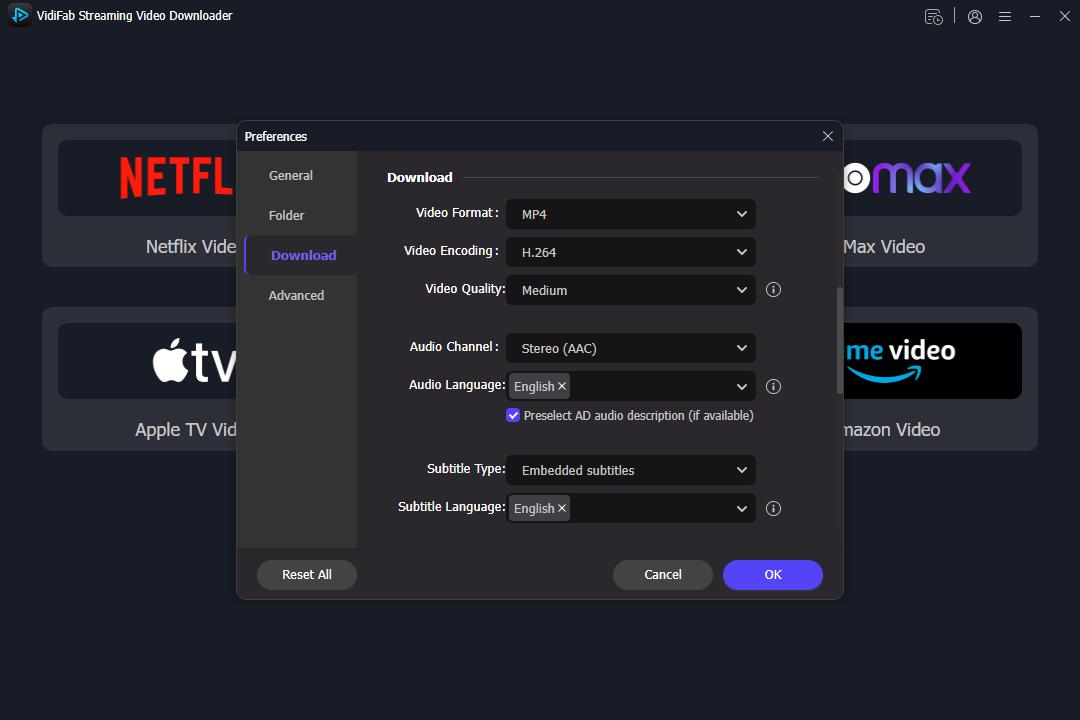
Install VidiFab on your Mac or PC. Click the menu icon in the top-right corner, go to Preferences > Download, and set your output format to MP4 or MKV. Then click the Netflix icon on the main screen and log in.
Step 2. Find what you want to watch
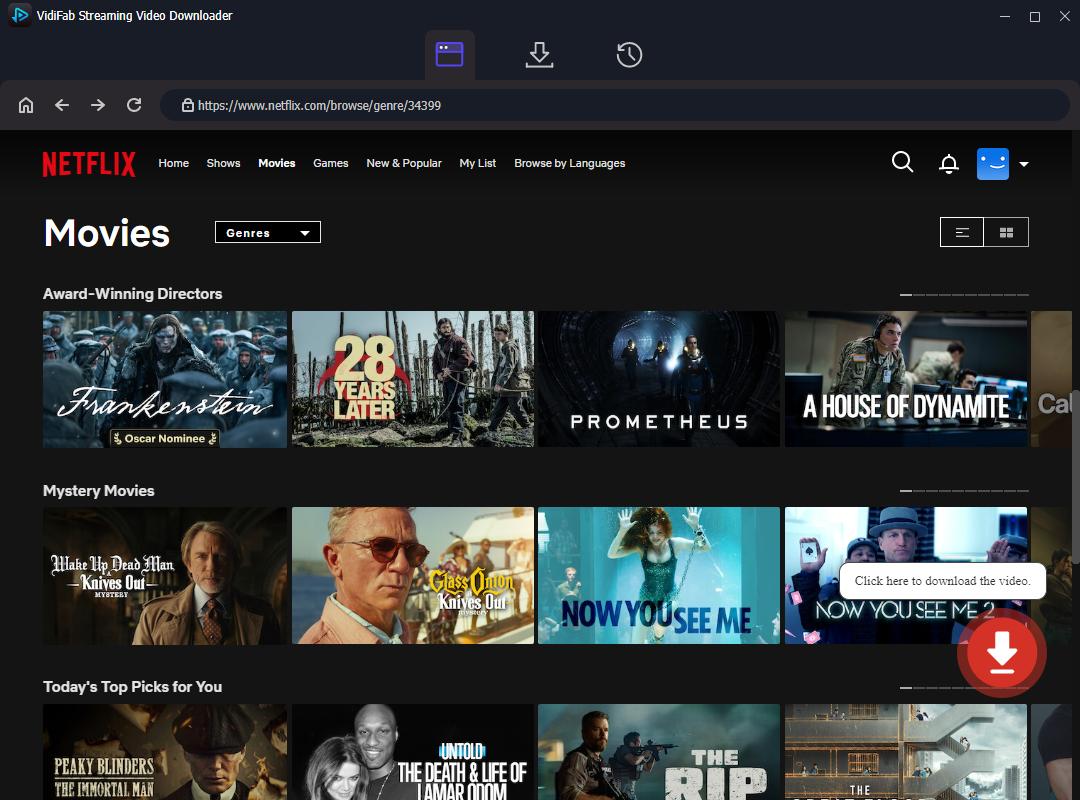
Use VidiFab's built-in browser to search for the movie, documentary, or series you're after. Open the title's detail page, and VidiFab will automatically detect the video and offer you a download icon in the bottom-right corner. Click it to open the customization panel.
Step 3. Set resolution, audio, and subtitles
Choose 1080p for the sharpest picture on your laptop. Pick your preferred audio language and quality; I'd suggest standard stereo over 5.1 if you're using regular travel headphones, since 5.1 doesn't add much on earbuds. Select your subtitle language and set it to embedded so it's burned directly into the video file.
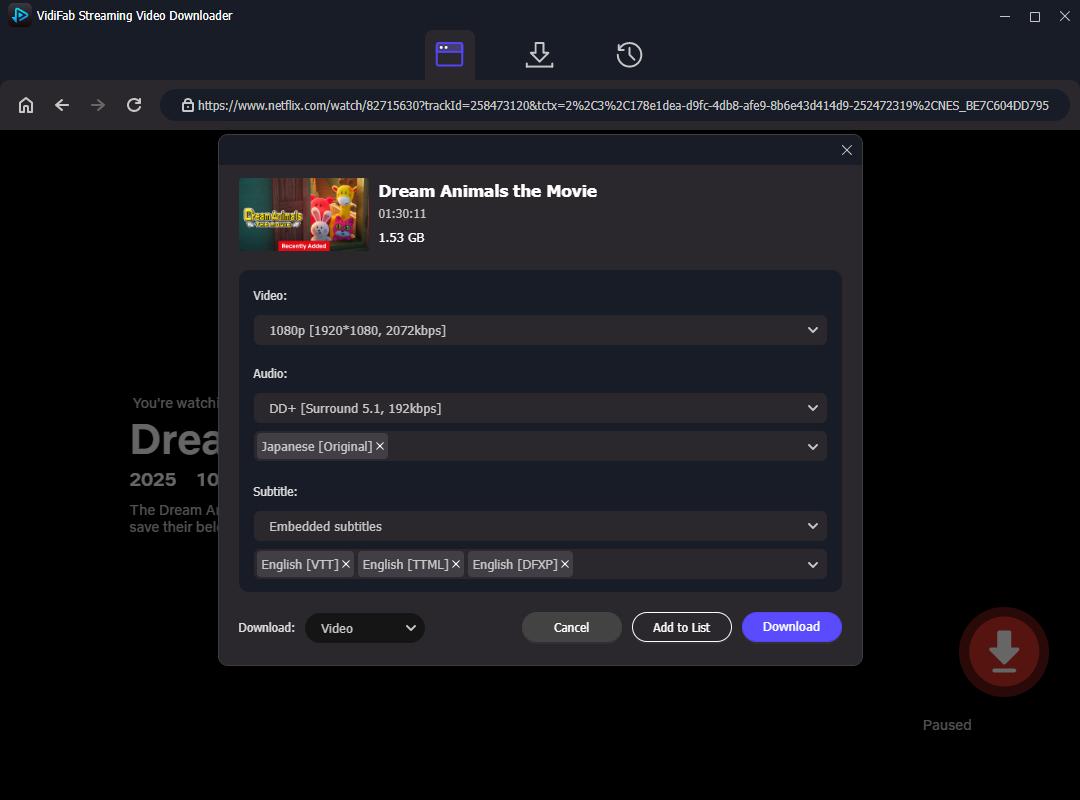
Step 4. Start the download
Hit download. VidiFab's hardware acceleration lets it grab an entire season or several movies in the time it takes you to finish packing. Once it's done, check the History tab to locate your MP4 files, then open them with any media player for offline viewing on the plane.
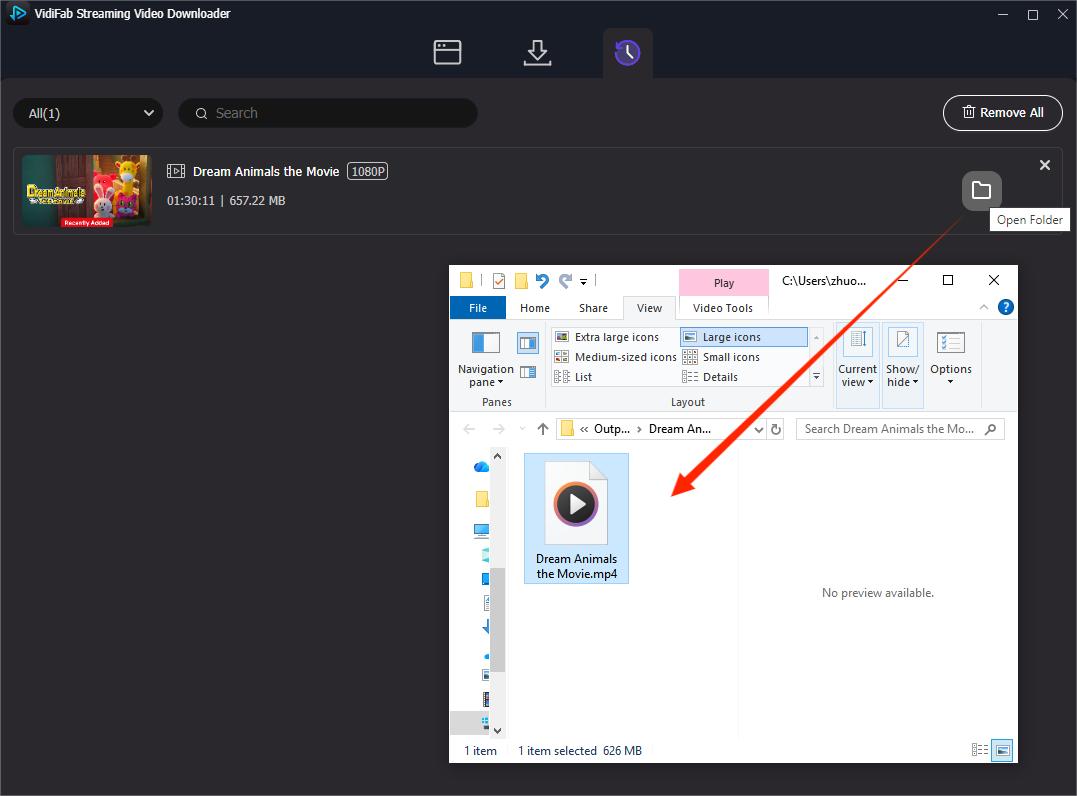
From there, you can play the video with your built-in media player, or transfer the Netflix video files to a USB drive, external hard drive, cloud storage, or AirDrop it to your iPhone. The files can be played offline on most devices.
Part 4. How to Watch Netflix Using In-Flight Wi-Fi
Modern aircraft increasingly come equipped with high-speed satellite internet, and a growing list of airlines now support streaming platforms like Netflix over in-flight Wi-Fi, including: Delta Airlines, United Airlines, American Airlines, JetBlue, Qatar Airways, and Emirates.
Here's how to connect and stream:
-
01
Turn on Wi-Fi and connect to the airline's network (e.g., DeltaWiFi, United_Wi-Fi).
-
02
A login or purchase page should pop up automatically. If it doesn't, open your browser and type in any URL to trigger the portal.
-
03
Choose the right tier. Most airlines split their Wi-Fi into pricing levels: a basic Messaging Pass (cheap or sometimes free) usually only allows messaging apps and basic browsing, not video. You'll need to buy the Streaming Pass or Premium/High-Speed tier, or video simply won't load. Expect to pay somewhere between $10 and $35, typically as a one-time purchase for the flight.

According to an in-flight Wi-Fi performance report by Ookla (published on ZDNet), internet speed and latency vary drastically by carrier. If you plan to purchase on-board Wi-Fi specifically to stream Netflix, Hawaiian Airlines, Qatar Airways, and Spirit Airlines deliver the top-performing, most stable connections for smooth video playback.

Even with a streaming pass, in-flight satellite bandwidth is shared across the whole cabin. Expect occasional buffering, especially during peak hours or over crowded routes.
Part 5. Pro Tips for Watching Netflix on a Plane
The best flight setup starts before you leave for the airport. I always download at least one extra title, because the movie I think I want at home is not always the movie I want at 35,000 feet. A backup keeps you from getting stuck scrolling through options with zero signal and low patience.
- Download over Wi-Fi, not mobile data, so the process is faster and cheaper.
- Open the app once before you leave to confirm the title plays correctly.
- Keep enough battery and bring a charger or power bank if your airline allows it.
- Stay signed in to Netflix so your downloads are accessible offline.
- Delete old downloads after the trip to free up storage for the next one.
If a download refuses to play, check whether the title expired, whether your app is up to date, and whether your account has hit a device limit. If you encounter any issue, check out The Ultimate Guide to Netflix Download Limits: Rules, Errors, and Bypassing
Part 6. Best Movies to Watch on a Plane on Netflix
Cabins are noisy, cramped, and honestly not the place for a slow, moody art-house film, and you'll probably be asleep in ten minutes. What works best is fast pacing, visual spectacle, and a plot that doesn't require perfect focus if you get interrupted by turbulence or a drink cart. Here are three of my go-to picks:
1. Glass Onion: A Knives Out Mystery

A tech billionaire invites his circle of "friends" to his private Greek island for a murder-mystery party game, which turns into an actual killing spree. Detective Benoit Blanc has to untangle the truth before the island is cut off from the outside world. Between the twisty plotting and the gorgeous island scenery, it is genuinely absorbing enough to make you forget you are crammed into a middle seat.
2. Green Room

If you are on a red-eye and need something to keep you awake, this is it. A young punk band finishes a gig at an isolated club and accidentally witnesses a murder, then gets locked in the backstage "green room" by the club's owner and has to fight their way out. Tense, brutal, and impossible to look away from.
3. Spider-Man: Across the Spider-Verse

This is not just a superhero movie; it is one of the most visually ambitious animated films of the last decade, and it genuinely works whether you are flying solo or traveling with kids. Miles Morales accidentally crosses into the headquarters of a multiverse-spanning "Spider-Society" while trying to save the people he loves, and ends up hunted by hundreds of alternate Spider-People who disagree with his methods.
Final Thoughts
The easiest answer to how to watch Netflix on a plane is also the most reliable one: download first, stream second. If you are using an iPhone, Android, Fire tablet, or a supported Chromebook, you can build a perfect offline queue before takeoff and watch without worrying about Wi-Fi. If you are using a Mac or Windows laptop, plan on using the VidiFab Netflix Video Downloader to save the videos to your device, ready for direct playback.
After that, you are all set to charge your devices, plug in your headphones, and turn your seat into your own private theater. Safe travels and happy watching.
 Free Download
 Secure Download
 Free Download
Secure Download
Free Download
Secure Download


I'm a video tech specialist with over 10 years of experience in digital media and streaming. I focus on making complex workflows simple and practical. Through my guides, you'll learn how to convert media, keep high-quality playback across devices, and manage your streaming video library with ease.
 Leave Your Comment