How to Stream Netflix on Discord Without Black Screen
 By Miles Kent
Can you stream Netflix on Discord? Yes, absolutely. But if you try it without the right setup, you will hit a Netflix black screen on Discord every single time. The most important step is simple: turn off hardware acceleration in your web browser.
In this guide, I will walk you through how to screen share Netflix from your computer browser without the black screen. I will also share tricks to prevent frame drops and lag during your stream. Plus, I will explain whether you can stream Netflix on mobile, and whether a Netflix Discord bot can do the work for you.

Part 1. Can You Stream Netflix on Discord?
Yes, you can stream Netflix on Discord. Even if you are just using Netflix on a web browser, it works. Whether you prefer Chrome, Edge, or Firefox, the screen-sharing feature will pick up your browser tab and let you watch Netflix with your friends together.
Why Can't I Stream Netflix on Discord?
The black screen problem comes down to one thing: Digital Rights Management (DRM). Netflix, Disney+, and other streaming platforms use strict encryption to protect their movies and shows from being recorded or pirated. When the system detects that you are using Discord's screen-sharing feature, DRM steps in instantly. It cuts the video output like an invisible black curtain, leaving only the audio playing.
Hardware acceleration in your browser makes things worse. This feature is designed to use your GPU for smoother browsing. But when you play encrypted video, this low-level rendering exposes itself to the system. That is exactly what triggers the DRM black screen with sound issue.
Is It Legal to Screen Share Netflix on Discord?
Strictly speaking, screen sharing Netflix on Discord is a gray area. It technically goes against Netflix's Terms of Use. But here is the reality: if you are just watching with two or three close friends in a private voice channel, Netflix has no way to detect it. Your account will not get banned.
Part 2. How to Stream Netflix on Discord Without Black Screen on PC/Mac
To bypass the Netflix black screen on Discord, you have two solid options. You can modify your browser settings to disable hardware acceleration, or you can download the video for local playback. Let me walk you through both methods.
Method 1. Disable Hardware Acceleration in Your Browser
To fix the black screen instantly, you must disable hardware acceleration. This forces your browser to render the video using software instead of the GPU. Once the GPU is out of the picture, Discord can capture the stream without triggering DRM.
Step 1. Turn off hardware acceleration in your browser
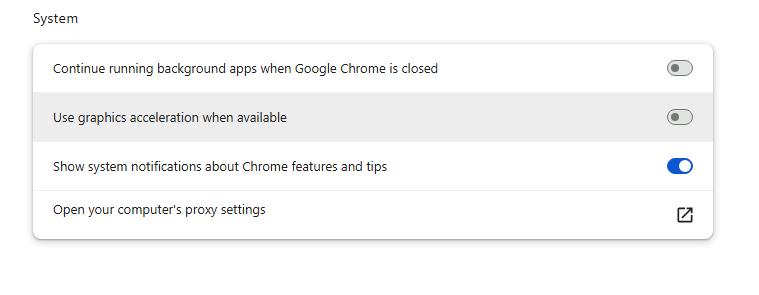
- Google Chrome: Go to Settings ➔ System ➔ Toggle off "Use graphics acceleration when available" ➔ Click Relaunch.
- Microsoft Edge: Go to Settings ➔ System and performance ➔ Select System ➔ Toggle off "Use graphics acceleration when available" ➔ Click Restart.
- Mozilla Firefox: Go to Settings ➔ Tabs and browsing ➔ Scroll to Performance ➔ Uncheck "Use recommended performance settings" ➔ Restart the browser.
- Safari (Mac): Safari handles DRM at the macOS system level. You cannot disable it. Mac users must use Chrome, Edge, or Firefox instead.
Step 2. Stream the browser on Discord
-
01
Open Netflix in your newly restarted browser and start playing your video.
-
02
Open Discord and join a voice channel.
-
03
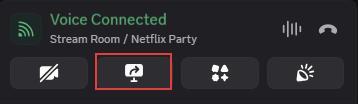
Click the Share Your Screen icon (the monitor with an arrow). Select your browser tab or window from the list. Do not share your entire screen, or the audio may not transfer.
-
04
Click Share Screen.
-
05
You should now see Netflix playing in Discord with both audio and video.
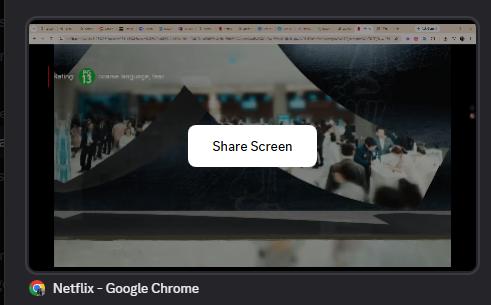
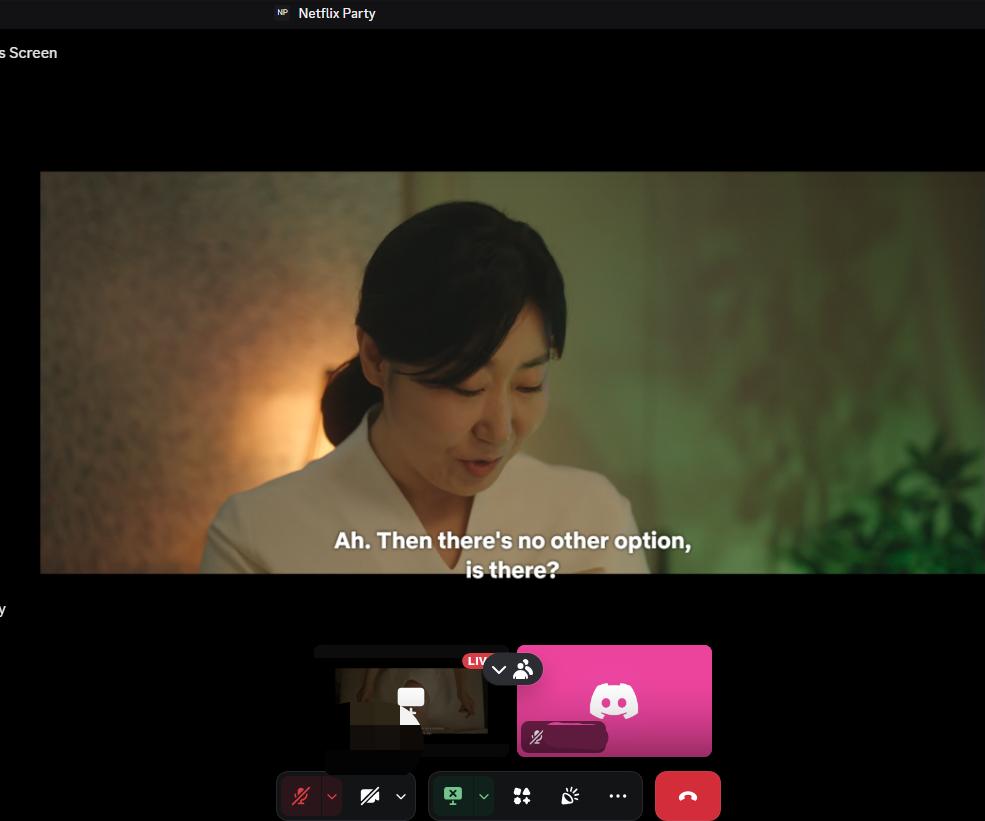
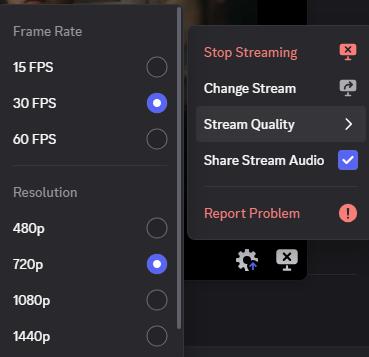
If you are using the Discord desktop app for streaming, click the gear icon in the bottom-right corner of the preview window. There you can change the frame rate up to 60fps and set the resolution to 1080p or 4K, if you have a Nitro plan.
Pros:
- Quick to set up, usually under two minutes
- Completely free, no extra software needed
- Works in both Discord web and the desktop app
Cons:
- Maximum resolution is often capped at 720p at 30fps for free Discord accounts
- High risk of lag, buffering, and audio desync over unstable internet connections
- Must redo the browser settings every time you update or reinstall your browser

Note: If your friends still see a black screen after disabling hardware acceleration, make sure you are sharing the browser tab or application window, not your entire screen. Sharing the full desktop often triggers DRM even with hardware acceleration turned off.
Method 2. Download Netflix Videos for a Smoother Discord Watch Party
Online streaming often causes frame drops and buffering. This leads to spoilers in text chat if one friend is running a few seconds behind. Downloading the file locally and watching it together through a video player can deliver a much smoother experience for your Discord movie night.
Using VidiFab Netflix Video Downloader, you can download Netflix videos in 1080p MP4 or MKV formats. It preserves Dolby Atmos audio and complete multilingual subtitles and audio tracks that you can toggle mid-stream. Once the video is a local file, DRM no longer applies. Discord can capture it perfectly.
VidiFab Netflix Video Downloader
Download Netflix videos as MP4/MKV in 1080p with Dolby Atmos for offline viewing on your PC, Mac, iPhone, Android, and more devices.
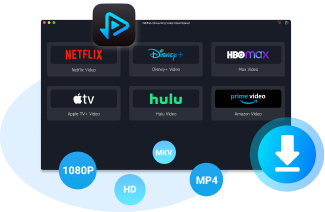
Note: Beyond Netflix, VidiFab can also download high-quality videos from five other major platforms: Amazon Prime Video, Disney Plus, Max (HBO), Apple TV+, and Hulu. One tool covers almost all your streaming needs.
How to Download and Stream Netflix via VidiFab
Step 1. Configure Your Download Preferences
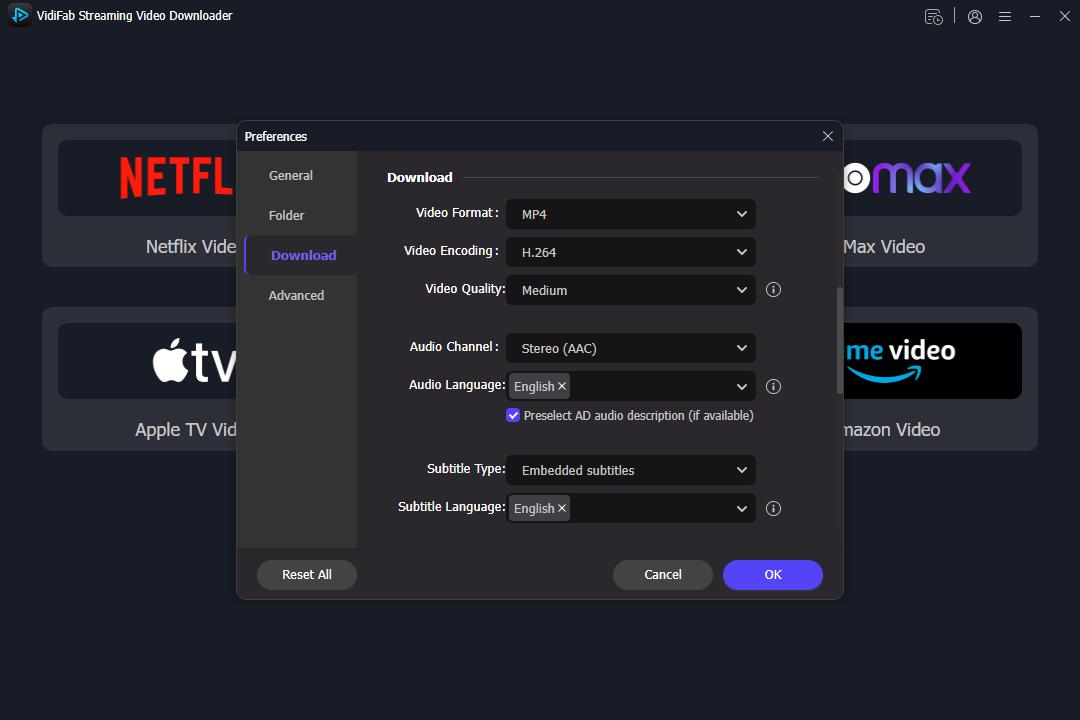
Open VidiFab Netflix Video Downloader. Click the menu icon in the top-right corner, go to Preferences, and set your output format to MP4 or MKV. Choose your preferred download saving folder.
Step 2. Log In to Netflix
From the main screen, click the Netflix logo to open the built-in web player. Log in with your account details. This step safely accesses your local regional library. Your personal data is never stored by the tool.
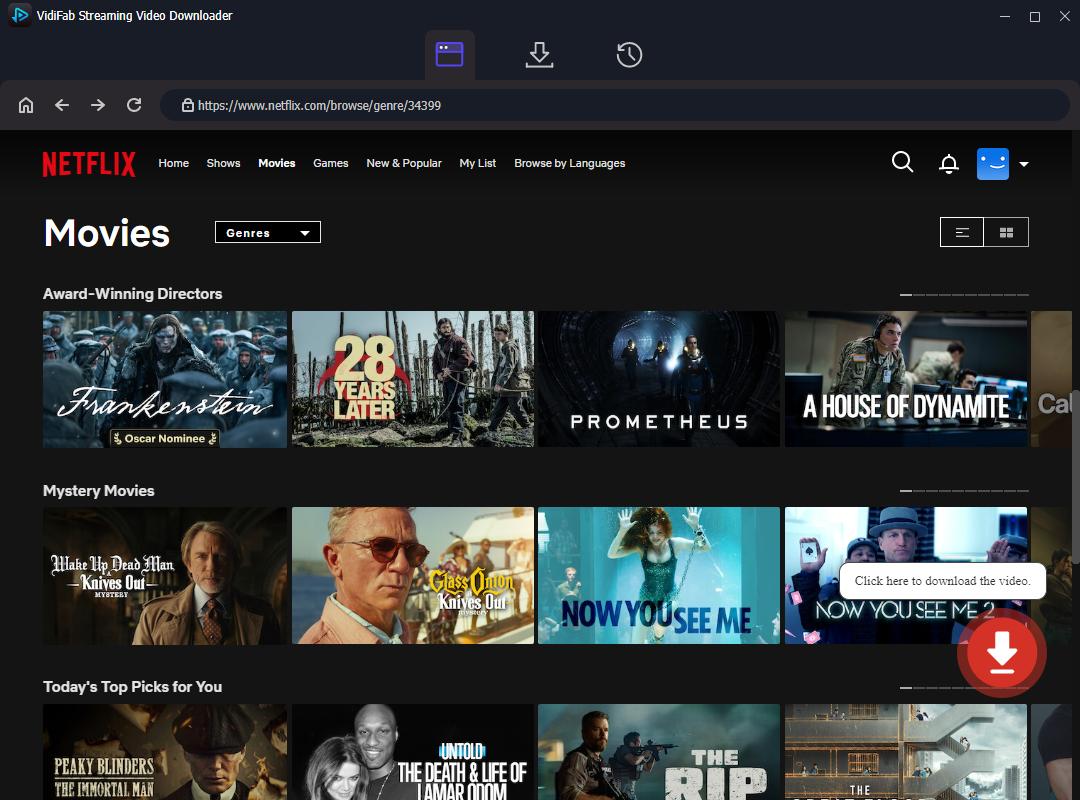
Step 3. Find the Title and Configure Download Settings
Search for the movie or series you want to watch. VidiFab will analyze the video stream and display a Download button in the bottom-right corner. Click it to open the advanced settings window. Here, select your resolution (up to 1080p), audio language, and subtitle preference. Click Download to start.
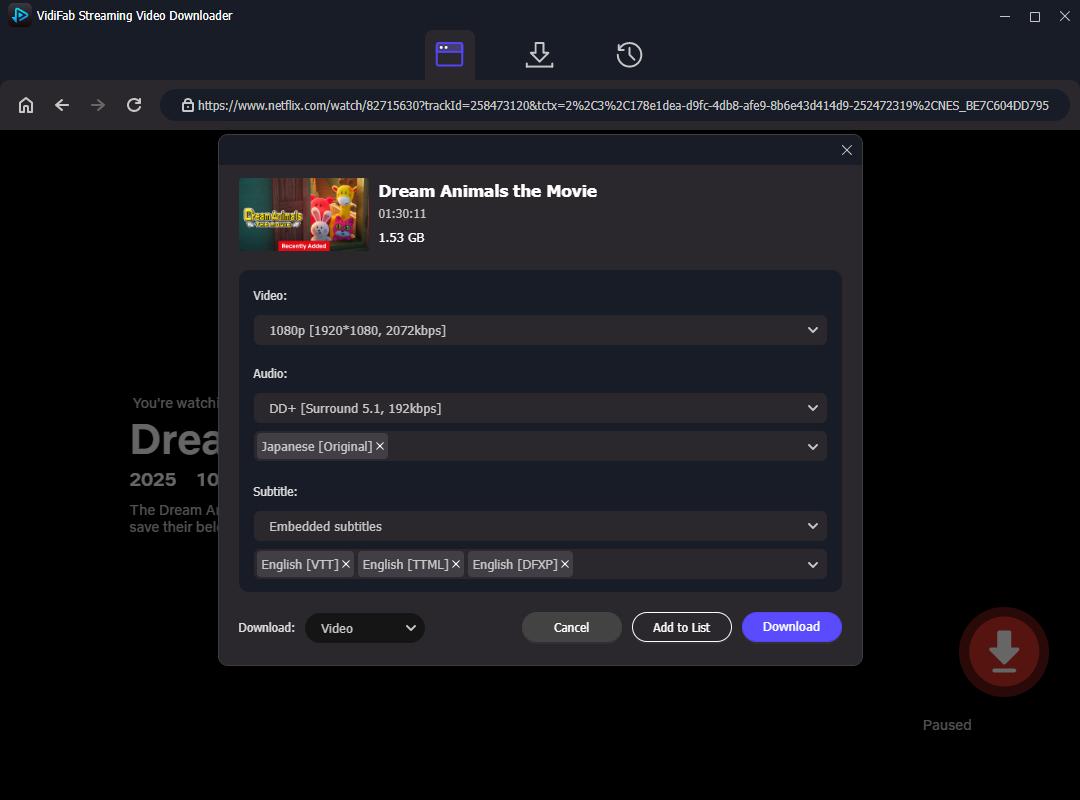
Step 4. Locate Your Completed Download File
Once the download finishes, click the History section (the clock icon). Click the Folder icon next to your completed video to instantly open its location in Windows File Explorer or Mac Finder.
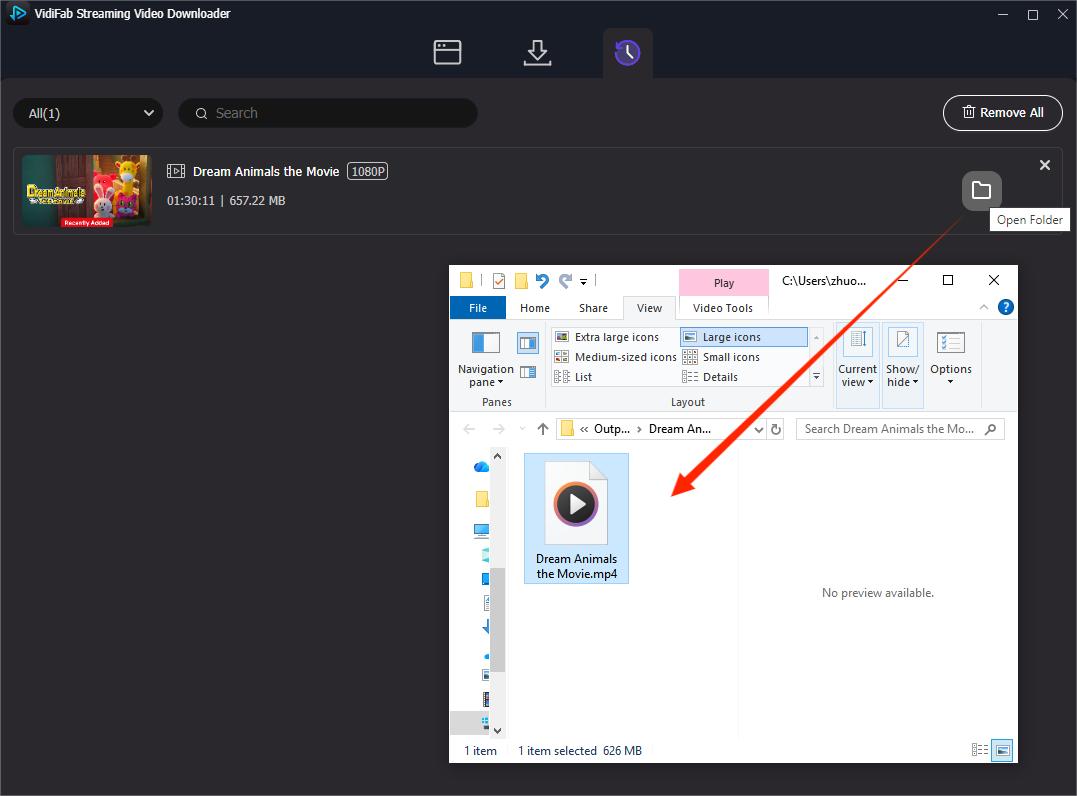
Step 5. Stream the Local File on Discord
Open the downloaded file using a local media player like VLC Media Player or QuickTime. Open Discord, enter your voice channel, and click Share Your Screen. Select your media player window from the Applications list. Click Screen Share to enjoy a flawless, zero-lag 1080p movie night.
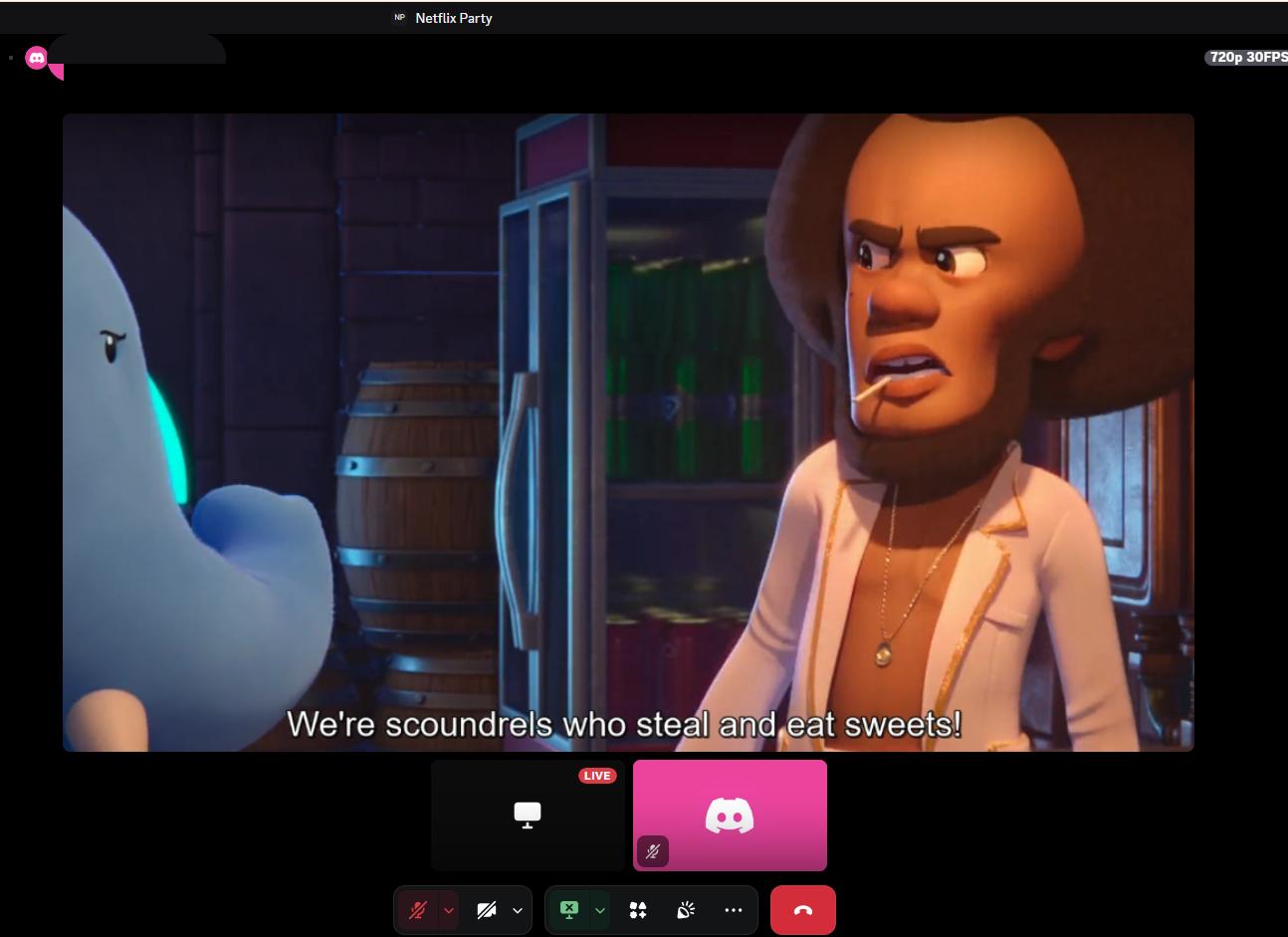
Pros:
- Better video quality with Dolby Atmos audio
- Zero buffering, zero lagging, and zero audio-to-video desync
- Full control over multilingual audio tracks and subtitle tracks during the stream
- You can transfer the video to your phone for mobile Netflix streaming on Discord
Cons:
- Requires hard drive storage space to save the video files locally
- VidiFab is a paid software with a free trial
- Requires time to download the file before the watch party begins
Part 3. Can You Screen Share Netflix on Discord on Mobile?
If you open the Netflix app on your iPhone or Android phone and start Discord screen sharing, your friends will only see a black screen. And they will not hear any sound either.
This is because mobile devices (iOS and Android) have system-level DRM protection with very high permissions. Once the phone detects screen recording or live streaming, it automatically cuts the video signal. Worse, mobile browsers do not let you turn off hardware acceleration like you can on a computer. So you cannot bypass this restriction directly on your phone.
But there is a workaround: download the video on your computer first, then transfer it to your phone and play it locally. Since the file is a standard MP4 with no DRM, Discord can capture it without any issues.
How to Stream Netflix on Discord Mobile Without Black Screen
Step 1. Download Netflix Videos with VidiFab
Open VidiFab Netflix Video Downloader on your computer and download the Netflix video you want to watch. The video can be saved as a standard MP4 file with up to 1080p quality, Dolby Atmos audio, and subtitles.
Step 2. Transfer the Video to Your Phone
Move the downloaded MP4 file to your phone. The transfer method depends on your device:
- iPhone on Mac: Use AirDrop to send the video directly to your phone.
- iPhone on Windows: Use iTunes File Sharing with a USB cable, or upload the file to iCloud and download it on your phone.
- Android: Connect your phone to your computer via USB and copy the MP4 file to the Download or Movies folder.
Step 3. Open the Video with VLC Media Player
Install a third-party media player on your phone. Your default gallery app may not support subtitles or multi-channel audio properly. For the best experience, download VLC Media Player from the App Store or Google Play, then open the transferred MP4 file in VLC.
Step 4. Start Screen Sharing on Discord
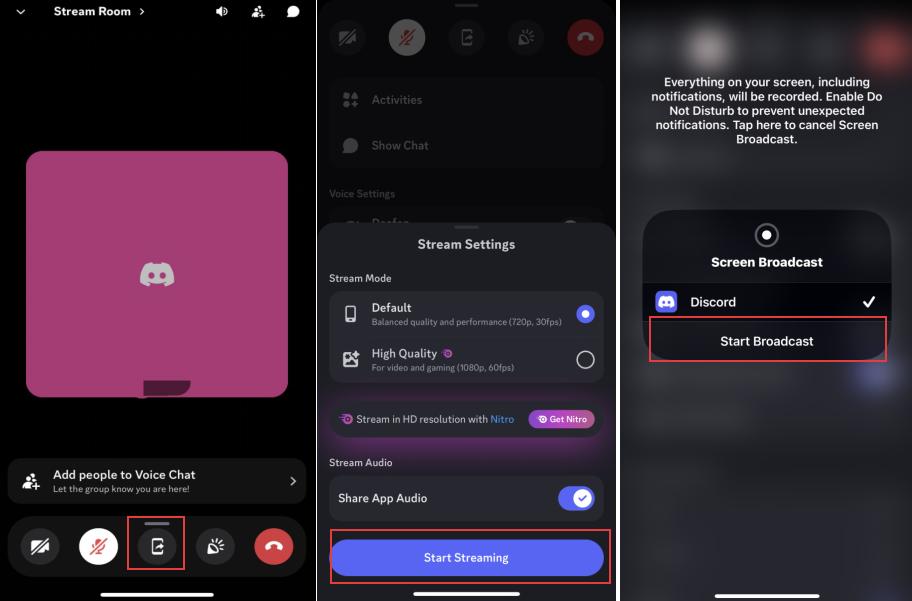
Open Discord on your phone and join a voice channel. In the call interface, swipe up from the bottom control bar and tap Share Your Screen. Confirm the action by tapping Start Streaming, then tap Start Broadcast when the screen recording window appears.
Step 5. Play the Movie and Watch Together
Switch back to VLC Media Player and start playing your movie. Since the video is a local, unencrypted file, your friends can watch a smooth stream with synchronized audio. You won't run into Netflix black screens or DRM playback blocks.
Pros:
- Completely solves the Netflix Discord mobile black screen problem
- Watch movies with friends while lying in bed on your phone
- No lag or buffering since the file plays locally
Cons:
- Cannot be done entirely on the phone; requires a computer with VidiFab for the initial download
- High-quality video files take up significant phone storage space
Part 4. Can You Use a Netflix Discord Bot to Watch Movies?
No. There is currently no Discord bot that can directly play, stream, or broadcast Netflix video inside a server. You might come across a bot called "Hey, Netflix" and think it can stream movies for you. But this bot is just a viewing assistant and social interaction tool. It cannot play Netflix videos in your Discord channel.
The reason is simple: DRM protection applies to bots too. No bot has the legal or technical ability to decrypt and redistribute Netflix content. If a bot claims to stream Netflix, it is likely a scam or a clickbait tool that does not actually work.
Part 5. FAQs About Streaming Netflix on Discord
Are there any other ways to stream Netflix with your friends?
Yes. Another option is using a watch party service like Teleparty. Install the browser extension or mobile app, open Netflix, start a watch party, and share the invite link with your friends. Everyone can join and control playback together. However, each viewer usually needs their own Netflix account and access to the same content.
Can you stream Netflix on Discord without Nitro?
Yes. Discord Nitro is not required to share your screen or stream Netflix. However, Nitro users get higher streaming quality options, such as higher resolutions (up to 4K) and higher frame rates (up to 60fps). Free accounts are typically limited to 720p at 30fps.
Can my friends hear Netflix audio when I stream on Discord?
Yes, they can hear Netflix audio if you share the correct application window and enable audio sharing, which is turned on by default. If your friends can see the video but cannot hear the sound, check Discord's audio sharing settings. Try sharing the browser window instead of the entire screen.
Which browser works best for streaming Netflix on Discord?
Mozilla Firefox or Google Chrome. Both browsers allow you to easily turn off hardware acceleration to fix the black screen bug. Edge works too, but Firefox and Chrome are the most reliable choices for Discord screen sharing.
Can I stream Netflix on Discord using the Netflix app?
No. The mobile Netflix apps have strict, unbypassable DRM restrictions. If you try to screen share the official app, your friends will only see a black screen. You must use a web browser with hardware acceleration disabled, or use a local video downloader like VidiFab.
Can I stream Netflix on Discord from a smart TV?
No. Discord screen sharing is mainly designed for computers and mobile devices. Smart TVs usually cannot run Discord screen sharing directly. You would need another device, such as a PC or Mac, to share Netflix content through Discord.
Final Thoughts
Streaming Netflix on Discord is possible, but issues like black screens, audio problems, and DRM restrictions can make the experience challenging. By adjusting browser settings, using Discord screen sharing correctly, or trying alternatives like watch party tools, you can find a method that works for your setup. Whether you want to stream Netflix on Discord from a PC, Mac, or mobile device, choosing the right approach can help you enjoy a smoother watch party with friends.
 Free Download
 Secure Download
 Free Download
Secure Download
Free Download
Secure Download


I'm a video tech specialist with over 10 years of experience in digital media and streaming. I focus on making complex workflows simple and practical. Through my guides, you'll learn how to convert media, keep high-quality playback across devices, and manage your streaming video library with ease.
 Leave Your Comment