Why Does Prime Video Have Ads? How to Go Ad-Free
 By Miles Kent
If you've been a long-time Amazon Prime member, you may have noticed a new change: ads. So, does Prime Video have ads now? Yes, it does. When did Prime Video start having ads? In the U.S., Amazon announced this change in September 2023 and began showing ads in January 2024. As of April 10, 2026, the previous ad-free add-on has been replaced by Prime Video Ultra, which costs $4.99 per month in the U.S.
You might be wondering why Amazon introduced ads, whether it's worth paying for the ad-free Prime Video Ultra, and if there are any cost-effective ways to watch Prime Video without advertisements. This guide will answer all of these questions, helping you decide the best way to enjoy Prime Video without ads.
- Why the ads exist: Amazon runs Prime Video as an ad-supported service by default, so it can grow advertising revenue and fund new shows and live sports without raising the price of Prime.
- Why you still see ads even though you pay: Your Prime fee covers the whole bundle — shipping, video and music. Ad-free video was never part of that price. It is a separate add-on.
- Why you may still see ads after buying Ultra: "Free with ads" titles, third-party Channels, and live sports keep their own commercials.
- Fastest fix: Add Prime Video Ultra to clear ads from core Prime titles and unlock 4K. For a copy that stays ad-free forever, download the title or buy the digital title from the Amazon Store.
Part 1. Why Does Prime Video Have Ads If I Pay for Prime?
Why are there commercials on Amazon Prime if you already pay for Prime? The short answer is that your Prime membership and an ad-free Prime Video subscription are now two different things.
Amazon explained the move in its official September 22, 2023 update:
Prime Video would begin showing limited advertisements in order to continue investing in compelling content over time while keeping Prime membership pricing unchanged.
Ads rolled out in the U.S., U.K., Germany, and Canada on January 29, 2024, and the company later expanded the ads business to more markets such as France, Italy, Spain, Mexico, and Australia.

This is also part of a wider industry trend. Netflix's U.S. offers a lower-priced Standard with ads plan, while Disney+ offers both with ads and no ads options in the U.S. In other words, Prime Video is not an outlier anymore. It is following the now-standard "ad-tier + paid upgrade" model used by major streaming services.
What Your Prime Membership Actually Pays For
Your membership gives you access to the Prime Video library, along with other Prime benefits such as shipping, music, reading, and photo storage. However, ad-free Prime Video is a separate upgrade.
| What you pay for | Does your Prime fee cover it? | Where the money goes |
|---|---|---|
| Two-day shipping & Prime delivery | Yes — this is the core of Prime | Logistics and fulfillment |
| Access to the Prime Video library | Yes — but with ads by default | Video licensing and originals |
| Prime Music, Reading, Photos | Yes | Bundled digital services |
| An ad-free Prime Video library | No — requires the $4.99/mo Ultra add-on | Offsetting the ad revenue you opt out of |
| Movies you rent or buy | No — this requires a separate purchase | Direct transactional purchase (ad-free) |
Part 2. How Much Does It Cost to Watch Prime Video Without Ads?
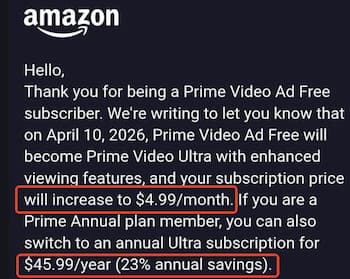
In the U.S., going ad-free on Prime Video means adding Prime Video Ultra for $4.99/month (or $45.99/year for annual Prime members). That fee sits on top of whatever you already pay for Prime. Here is the current structure:
| Subscription | What it includes | Monthly | Annual | Quality & limits |
|---|---|---|---|---|
| Prime Video only (with ads) | Streaming only | $8.99 | — | 1080p HD, HDR, Dolby Vision, ads, 4 streams, 50 downloads |
| Prime Video Ultra (standalone) | Streaming + ad-free | $13.98 | — | 4K UHD, no ads, Dolby Atmos, 5 streams, 100 downloads |
| Amazon Prime (with ads) | Shipping + Video + Music | $14.99 | $139.00 | 1080p HD, HDR, Dolby Vision, ads, 4 streams, 50 downloads |
| Amazon Prime + Prime Video Ultra | All Prime benefits + ad-free | $19.98 | $184.99* | 4K UHD, no ads, Dolby Atmos, 5 streams, 100 downloads |
What the Extra $4.99 Actually Gets You
Ultra is not just an ad switch. Amazon bundled the highest-quality playback into it, so the gap between the two tiers is now wider than "ads or no ads."
| Feature | Prime Video (with ads) | Prime Video Ultra |
|---|---|---|
| Ads on the on-demand catalog | Limited pre-roll and mid-roll ads | None |
| Max resolution | 1080p Full HD | 4K UHD |
| HDR Compatibility | HDR10 / Dolby Vision | HDR10 / Dolby Vision |
| Audio format | Stereo / 5.1 surround | Dolby Atmos |
| Concurrent streams | 4 devices | 5 devices |
| Offline downloads | 50 titles | 100 titles |
Part 3. Does Prime Video Ad-Free Remove All Ads?
No. Prime Video Ultra removes commercial breaks from the Included with Prime on-demand catalog. It does not touch everything else that lives inside the same app. Amazon's own wording is that live TV and events, plus select ad-supported content and subscriptions, may still include ads.
Content that Still Shows Ads After You Upgrade
-
"Free with ads" titles (the former Freevee catalog): Shows and movies labeled
Watch now: Free with ads belong to Amazon's separate catalog and retain commercials on Ultra.
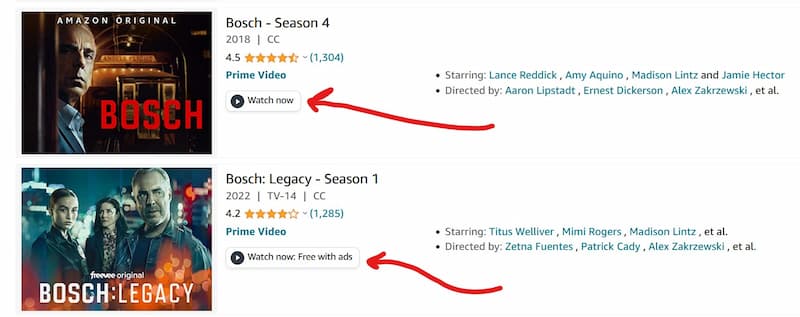
As shown above, Bosch: Legacy – Season 1 keeps its ads, while Bosch – Season 4 plays ad-free.
- Third-party Channels: Add-on subscriptions keep their own ad policies.
- Live sports and events: Live broadcasts keep commercials.
- Promotional trailers: Short skippable promos may still autoplay.

What Stays Ad-Free
- Movies and shows you buy or rent: Purchased titles never carry ads.
- Kids profiles: Kept ad-free on Prime Video.
- The on-demand catalog with Ultra: Covered by the add-on.
Part 4. How to Get Rid of Ads on Prime Video
There are three ad-free ways, and they do different jobs. One removes ads and unlocks 4K but only while you keep paying. One is free but only works in a desktop browser. One gives you a permanently ad-free file that plays on any device. Pick based on where you actually watch.
Method 1: Upgrade to Prime Video Ad Free
This is the only official method to remove ads from the on-demand catalog across all your signed-in devices. Note that Amazon manages this feature regionally: it is called Prime Video Ultra for $4.99/month in the U.S., while in international markets it remains Prime Video Ad-free (typically around $2.99/month).
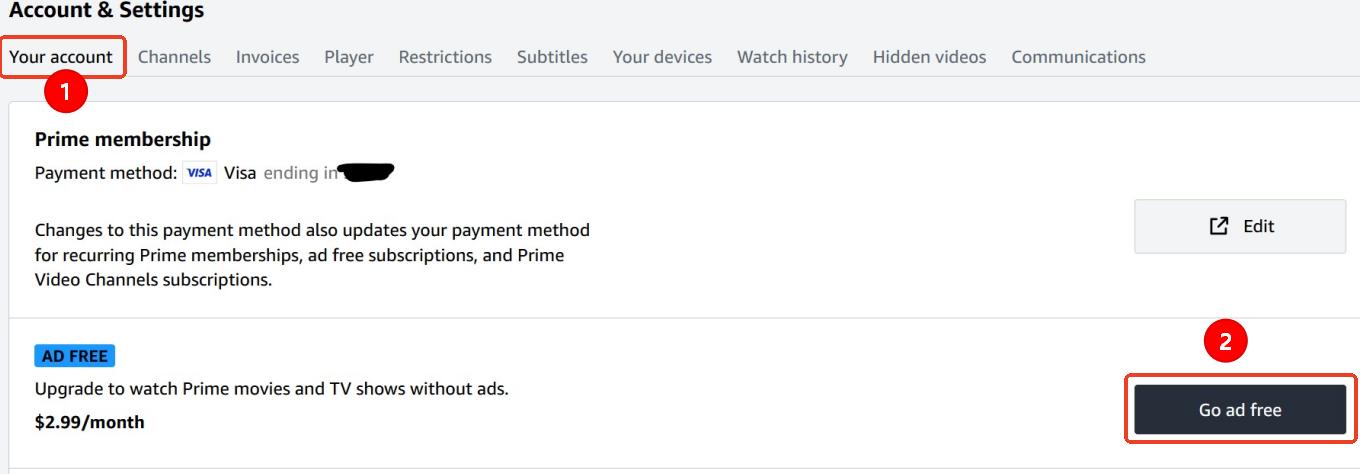
Option A: Via the Prime Video Website
Step 1. Go to Prime Video and sign in to your Amazon account.
Step 2. Open Your Account or Account & Settings.
Step 3. Select Go Ad Free with Ultra.
Step 4. Select Start Subscription to confirm your upgrade.
Option B: Via Fire TV, Smart TVs, or Gaming Consoles
Step 1. Open the Prime Video app on your device.
Step 2. Open the side menu and go to Settings.
Step 3. Select Prime or your subscription settings.
Step 4. Choose Go Ad Free.
Step 5. Select Start Subscription to activate the ad-free upgrade.
Note: Once your subscription starts, your benefits (including the 100-title offline download capacity) apply immediately to all profiles linked to your Amazon account.
Method 2: Use An Ad Blocker (Desktop Only)
If you mainly watch on a laptop or desktop in a browser, an extension is the cheapest workaround. Free options that people commonly use include uBlock Origin, AdGuard and dedicated "ad skipper" extensions on Chrome. They block requests to the ad server or fast-forward short commercial breaks when they appear in the player.

Be realistic about the limits. Ad blockers do not work in the Prime Video apps on smart TVs, phones, consoles or Fire TV — only in a desktop browser. Even there, you may still catch a few seconds of an ad. And because they intercept ad requests, some setups break playback entirely.
We compare the extensions that actually work and the ones that quietly do nothing in our test of the best ad blockers for Amazon Prime Video.
Method 3: Download Prime Video Titles for Offline, Ad-Free Viewing
If you want ads gone and the ability to watch on a TV, tablet or laptop without depending on a browser extension or a monthly fee, downloading is the most durable option. The idea is simple: you save the title as an MP4 or MKV file while the ad-supported session is running, and the finished file contains only the show — no commercial breaks — so it plays cleanly anywhere.
Using VidiFab Streaming Video Downloader, you can save titles from the Prime catalog, the free-with-ads catalog, and anything you have rented or purchased. The output is a standard ad-free MP4 or MKV file in up to 1080p, with the subtitles and audio tracks you choose kept intact. Because it is a normal video file, it plays on a TV, phone, USB drive or media server with no app and no account required.
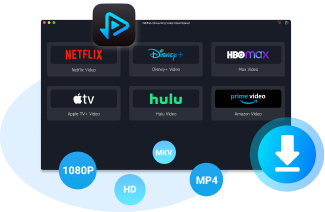
VidiFab Prime Video Downloader
Save Prime Video titles as ad-free MP4/MKV files in up to 1080p with 5.1 surround sound, so ads never interrupt playback and the file works offline on any device.
How to Get an Ad-Free Prime Video Playback
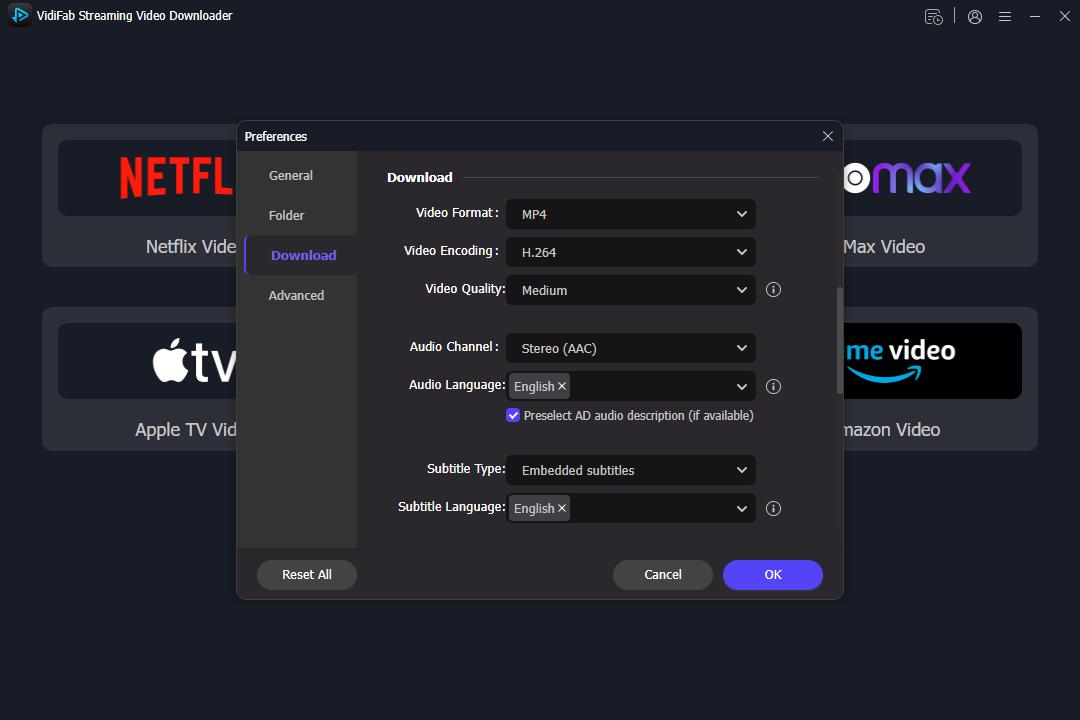
Step 1. Set the Output Format
Install and open the downloader, click the menu icon, then go to Preferences > Download > Output Format. Choose MP4 or MKV, and set quality, audio and subtitles. Then open the Amazon Prime Video service and sign in. This only grants access to the Prime library in your region.
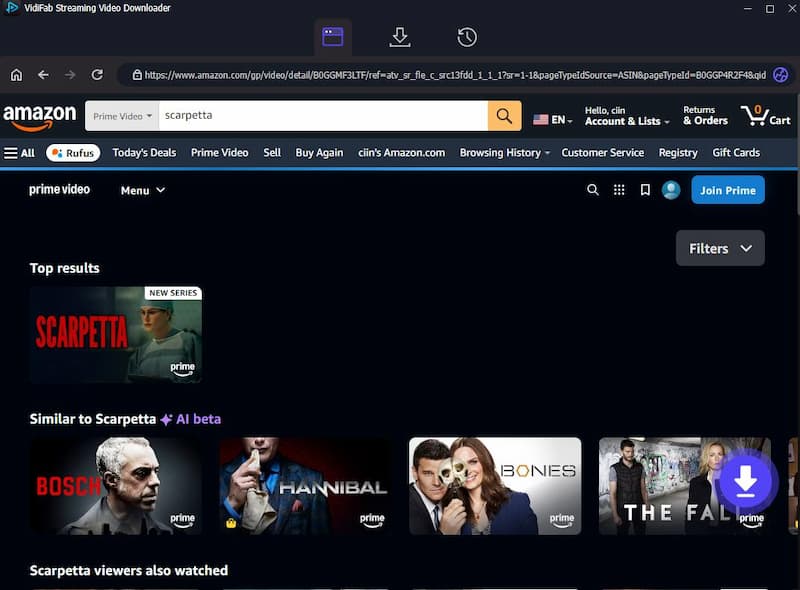
Step 2. Find the Title
Search the Prime library or paste a movie or episode URL. When the detail page opens, the downloader analyzes it and shows a Download button; click it to continue.
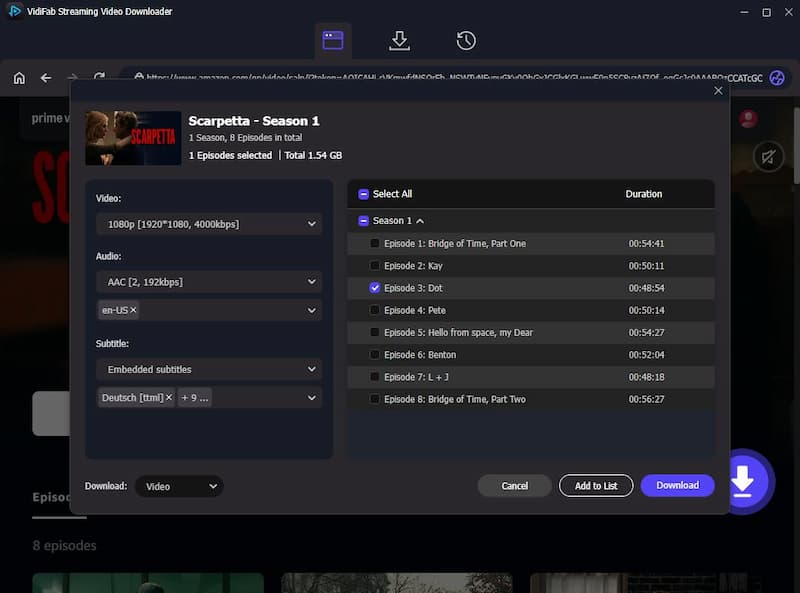
Step 3. Pick Quality, Audio and Subtitles
In the settings window, choose 1080p, your preferred audio track and the subtitle language you want. To save a whole season, tick Select All at the top right.
Step 4. Download and Play Anywhere
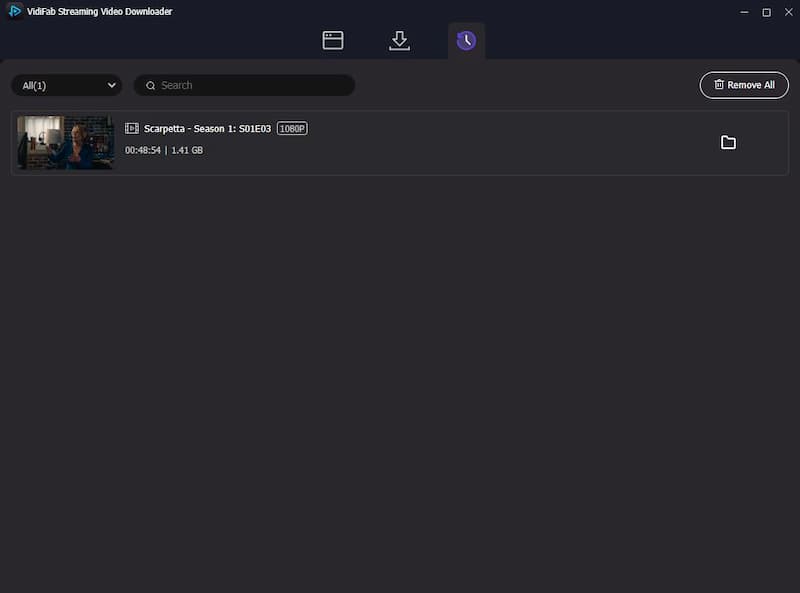
Click Download. When it finishes, open the History tab (the clock icon) and click the folder icon to find the file. It plays in any media player — on your computer, a USB stick, a phone or a smart TV — with no ads and no account needed.
Which Method Should You Choose?
| Method | Cost | Removes ads on | Works on your TV? | Best for |
|---|---|---|---|---|
| Prime Video Ad-Free / Ultra | $2.99 to $4.99/mo | On-demand Prime catalog | Yes, in the app | Official streaming (Ultra in US unlocks 4K; Ad-Free globally removes ads) |
| Ad blocker | Free | Some ad breaks in a desktop browser | No | Casual laptop or desktop viewing |
| Download to MP4/MKV | One-time software | All ads, and offline playback | Yes, as a file | Travel, permanent collections, and any offline device |
Part 5. Should You Pay for Ad-Free Prime Video?
It really depends on what you watch and how often you use Prime Video.
- Stream Prime Video several times a week.
- Mainly watch core movies and TV shows included in the standard catalog.
- Find the expanded 4 to 6-minute ad breaks too disruptive to ignore.
- Live in the U.S. and actively want to restore 4K/UHD resolution and Dolby Atmos audio.
- Frequently download titles to your mobile device for travel or offline usage.
- Use Prime Video only occasionally or as a secondary streaming service.
- Mostly watch live sports broadcasts, which retain live commercials regardless of your plan.
- Mainly stream from the "Free with Ads" catalog (former Freevee titles) which keep their ads on all tiers.
- Are outside the U.S. and already get 4K resolution included in your base tier without needing Ultra.
- Are trying to cut down on total subscription expenses by cycling through different apps.
To wrap up, if you just watch occasionally, the standard plan with ads might work for you.
But if you stream several times a week, it can get pretty annoying. Adweek reported that Amazon has bumped up the ad load on Prime Video to about 4 to 6 minutes per hour, which is double what it was when ads first started rolling out in early 2024. Plus, some Reddit users are saying they're seeing even longer ad break, sometimes close to 7 minutes per hour, and many of those ads can't be skipped.
Part 6. FAQs About Prime Video Ads
Why am I seeing ads after paying for the Ultra/Ad-Free upgrade?
Is the ad-free experience available on all devices?
Will Prime Student members get ads?
Can I cancel the ad-free add-on at any time?
Can you skip ads on Prime Video?
Does Prime Video have ads on Kids profiles?
Final Thoughts
The reason Prime Video has ads is simple: it allows Amazon to keep investing in high-budget original content and live sports without hiking the base price of your Prime membership.
As a viewer, you need to decide if the "uninterrupted" experience is worth the extra monthly fee. After reading this guide, you probably have your answer. Whether you decide to upgrade, use an ad blocker, or download shows using the VidiFab Prime Video Downloader, the key is to take charge of your entertainment. So, get ready to stream Prime Video smoothly and enjoy your shows, hopefully without ads! Happy watching!
 Free Download
 Secure Download
 Free Download
Secure Download
Free Download
Secure Download


I'm a video tech specialist with over 10 years of experience in digital media and streaming. I focus on making complex workflows simple and practical. Through my guides, you'll learn how to convert media, keep high-quality playback across devices, and manage your streaming video library with ease.
 Leave Your Comment