How to Cancel Your Netflix Subscription (Step-by-Step)
 By Miles Kent
Canceling Netflix should take about a minute. When I tested it on a computer and on a phone, the whole process was just a few clicks. But plenty of people get stuck because there's no "Cancel Membership" button in their account. That usually means Netflix is billed through Apple, Google Play, or a mobile carrier, and those subscriptions have to be canceled where you pay for them.
To cancel your Netflix membership, sign in to your account on a web browser or mobile app. Click your profile icon in the top-right corner and select Account. Scroll to the Membership section and click Cancel Membership. Click Finish Cancellation to confirm and stop future charges.
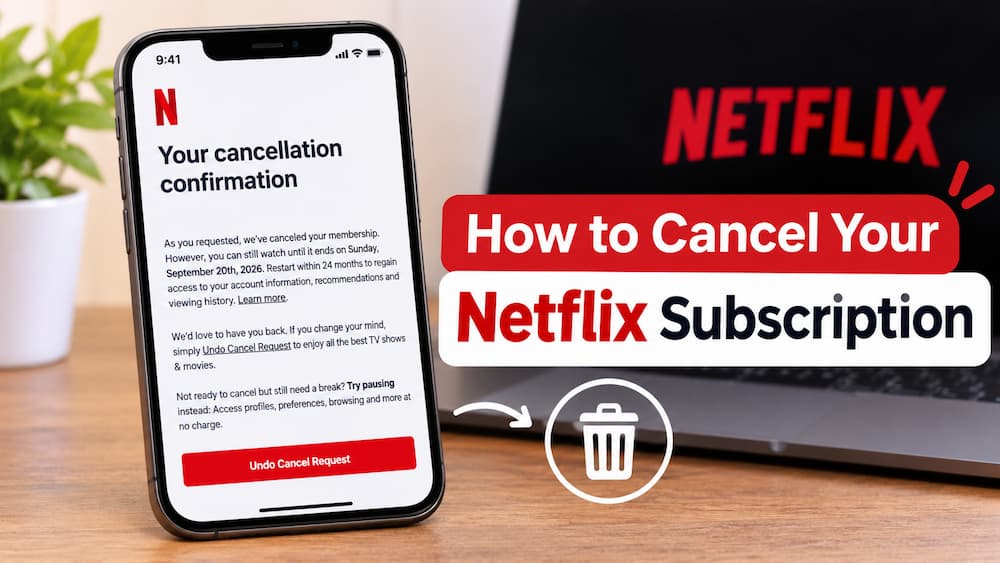
Part 1. What Happens After You Cancel Netflix?
Canceling your Netflix subscription does not necessarily mean you lose access to your account immediately. Here are the main things you should know after canceling your Netflix membership.
- You keep access until your billing period ends. For example, if your subscription renews on December 20 and you cancel on December 5, you can generally keep streaming until December 20. You can check your exact account closing date under Account > Membership Details section.
- You won't be charged again. Billing stops after the current period. You should receive a confirmation email, and your Account page will show a "Restart Membership" option instead of a billing date. If you see neither, check whether a second subscription (such as Apple or Google Play) is still active.
- Your profiles and preferences are saved for 10 months. Netflix keeps your profiles, viewing history, My List, and recommendations for 10 months after cancellation. If you rejoin within that window, everything is restored.
- You can rejoin anytime. Sign in with the same email and select Restart Membership. There's no penalty for coming back.
- Your Netflix downloads stop working. Once your final billing day passes and your account closes, all downloaded titles stored in the official Netflix app will immediately become unplayable and disappear.

Pro Tip: If you want to keep a copy of a movie or series for personal offline viewing, you can save it before your plan ends. Vidifab Streaming Video Downloader lets you download Netflix videos as MP4 or MKV files to your computer, with your choice of resolution, audio tracks, and subtitles.
 Free Download
 Secure Download
 Free Download
Secure Download
Part 2. How to Cancel Your Netflix Subscription Online (Web Browser)
If you pay Netflix directly with a credit card, debit card, or PayPal, using a web browser is the fastest and most reliable way to end your plan.
-
01
Sign in via a web browser: Open Chrome, Safari, Edge, or any browser on your computer or phone and go to Netflix.com or jump straight to netflix.com/cancelplan to skip the menu navigation.
-
02
Open your Account settings: Hover over or click your Profile Icon in the top-right corner of the home screen, then select Account from the dropdown menu. (Note: Make sure you are on an adult profile, as Kids profiles cannot access account settings).
-
03
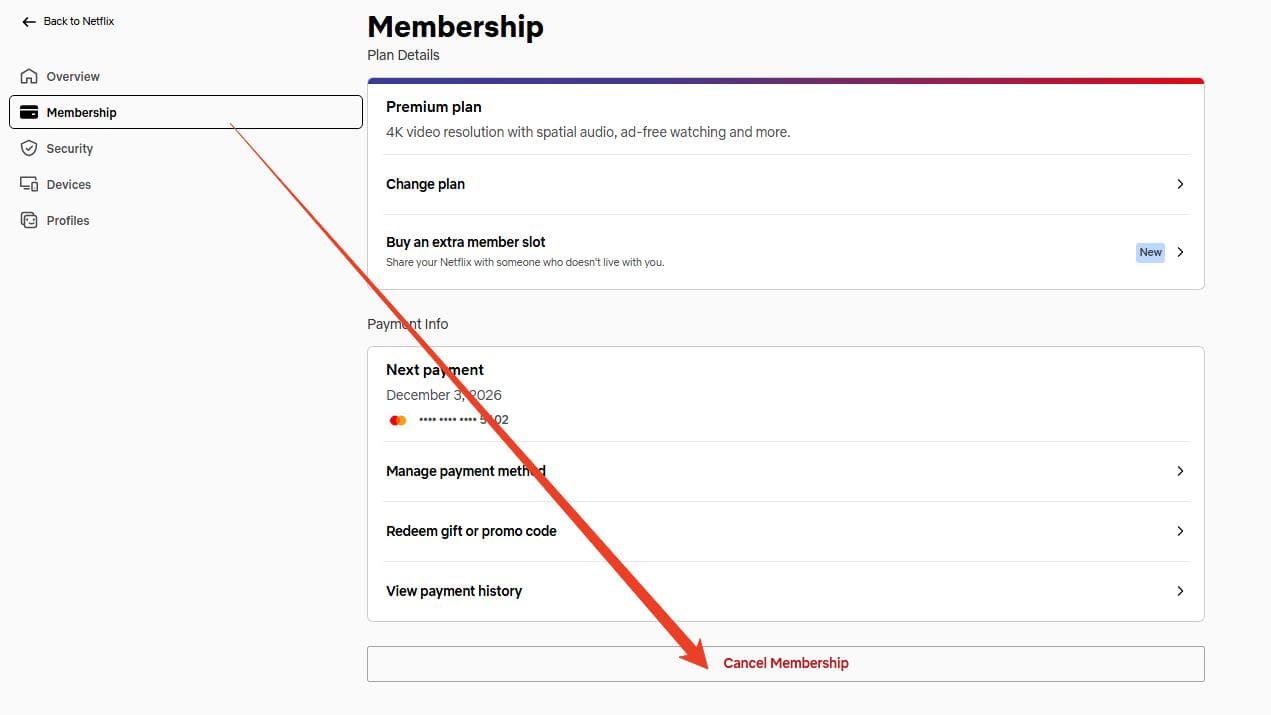
Locate the Membership section: On the Account overview page, look at the left sidebar (or scroll down on mobile browsers) and select Membership.
-
04
Click "Cancel Membership": Scroll down, and you'll see a Cancel Membership button. Click it.
-
05
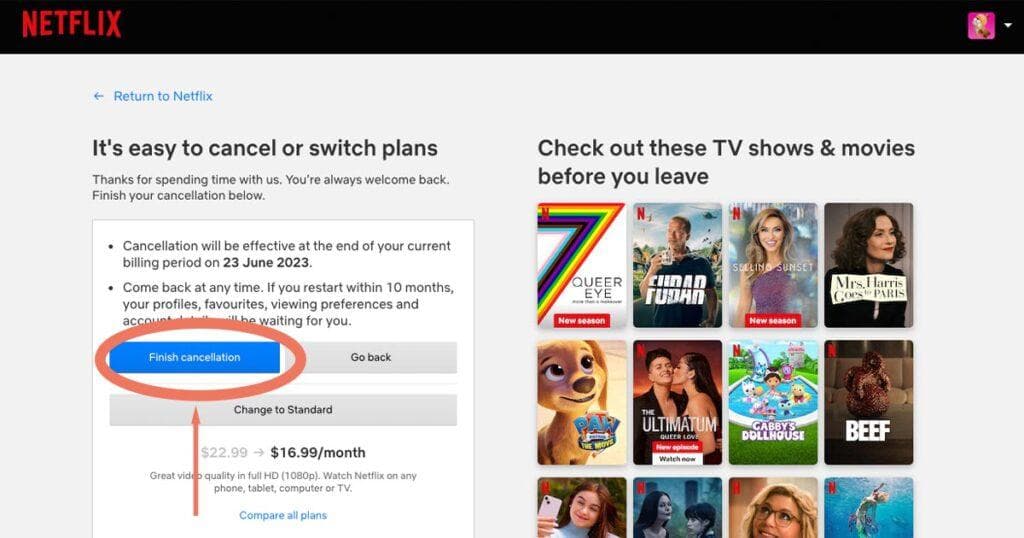
Confirm on the retention screen: Netflix will load a confirmation screen showing when your billing cycle ends, alongside an option for a cheaper ad-supported tier. Ignore the offer and click the blue Finish Cancellation button.
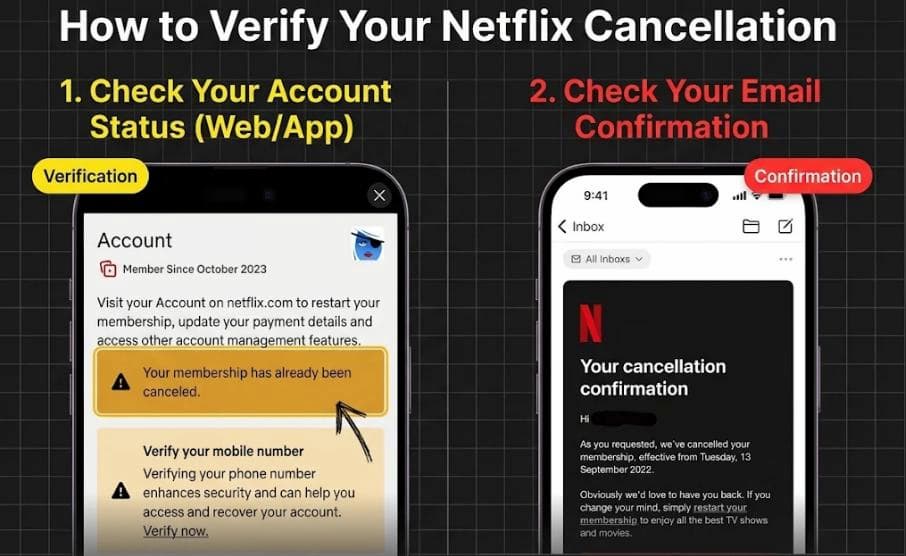
- Your Account page shows a banner something like "Your membership will be canceled at the end of your current billing period" or "Your membership has already been canceled."
- You receive a confirmation email from Netflix. The email might come with the subject line "Your Cancellation Confirmation" to your registered email address. Keep this email as proof of cancellation.
Part 3. How to Cancel Netflix Subscription on Mobile (iPhone & Android)
You can also cancel your Netflix subscription using your iPhone, iPad, or Android phone. However, the cancellation method depends on how you pay for Netflix. If Netflix bills you directly, cancel it directly in the Netflix app. If your subscription is billed through Apple or Google Play, you need to cancel it through your device's subscription settings.
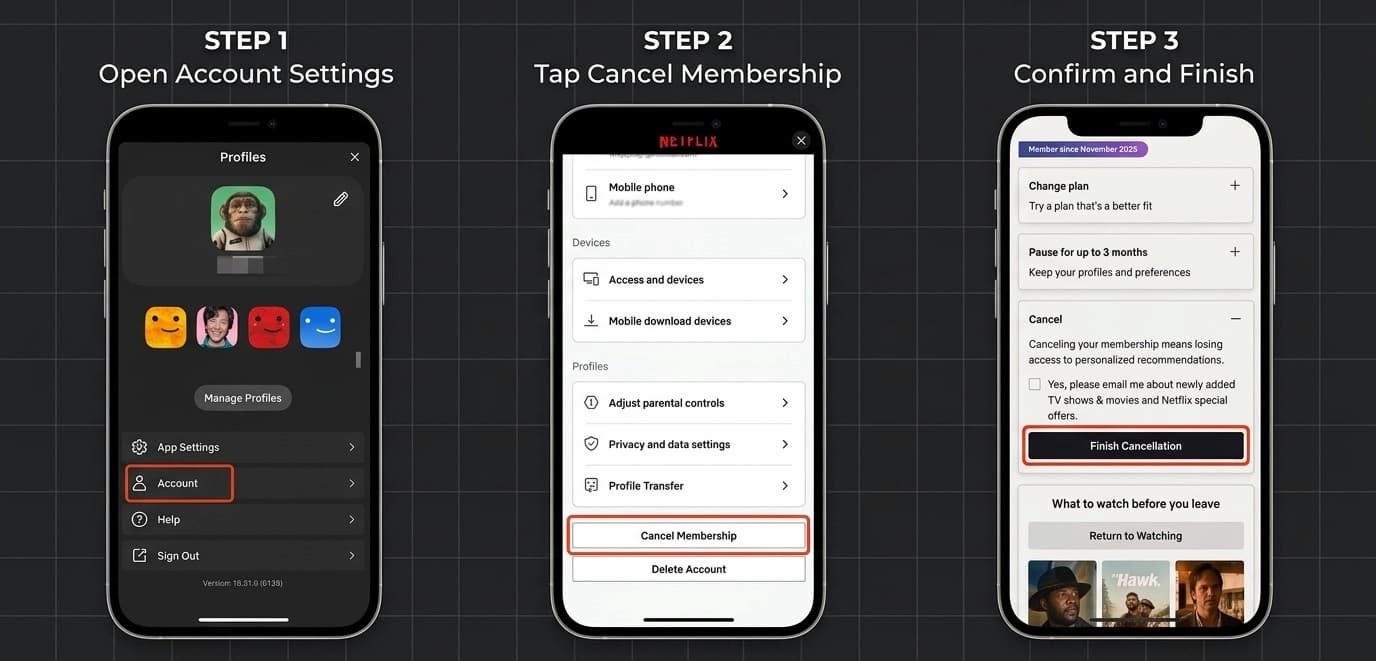
How to Cancel Subscription on the Netflix Mobile App
-
01
Open the Netflix app and tap My Netflix at the bottom.
-
02
Tap your profile icon in the top-right corner.
-
03
Tap Account.
-
04
Scroll down and tap Cancel Membership.
-
05
Open the Cancel category, and you will see the Finish Cancellation button. Tap on it.
How to Cancel Netflix on iPhone / iPad (Apple App Store Billing)
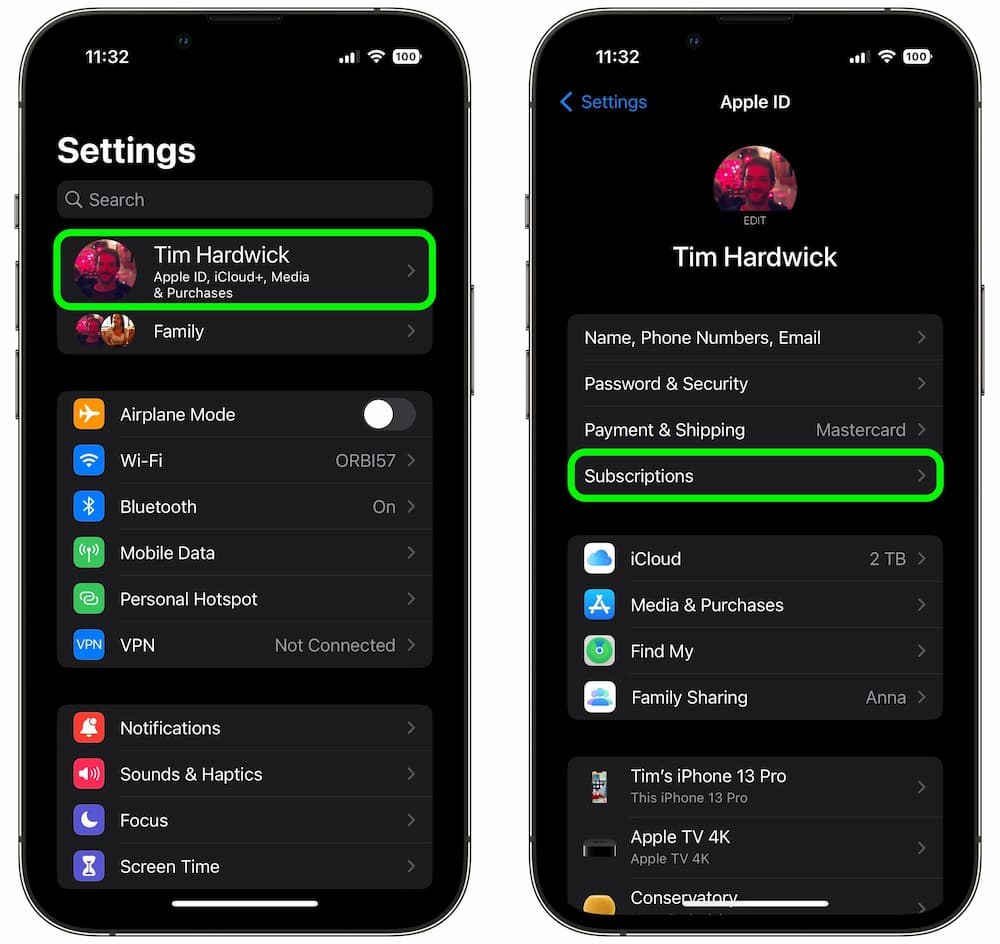
If your Netflix subscription is billed through your Apple Account, follow these steps to stop automatic renewal:
-
01
Open the Settings app on your iPhone or iPad.
-
02
Tap your Apple ID name/banner at the very top of the screen.
-
03
Tap Subscriptions.
-
04
Find and select Netflix from your active subscriptions list. (Tip: If it is listed under "Inactive" or missing completely, Apple is not billing you).
-
05
Tap Cancel Subscription (or Cancel Free Trial) at the bottom and confirm when prompted.
How to Cancel Netflix on Android (Google Play Billing)
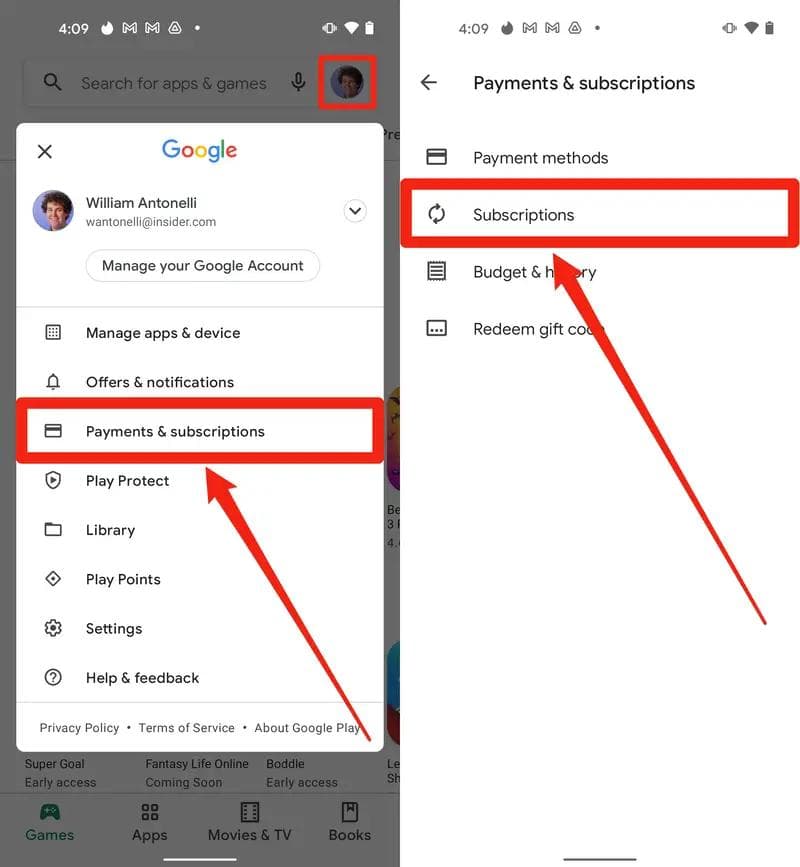
If you pay for Netflix through Google Play, you can cancel your membership directly from the Play Store:
-
01
Open the Google Play Store on your Android phone.
-
02
Tap your profile picture in the upper-right corner.
-
03
Select Payments & subscriptions > Subscriptions.
-
04
Find and select Netflix from your active subscriptions.
-
05
Tap Cancel subscription and follow the on-screen instructions to complete the cancellation.
Part 4. How to Cancel Netflix Bundled with a Carrier or TV Package
If you open your Netflix Account page and do not see a Cancel Membership button, a third-party partner manages your billing. Look directly under the Membership section to see which provider is listed: if it names a mobile carrier or cable provider, such as T-Mobile, Verizon, or Xfinity, you must remove the subscription through that provider's portal.
Mobile Carriers (T-Mobile, Verizon, and Others)
- T-Mobile: Open the T-Life app or log in at t-mobile.com, navigate to Manage > Manage Add-ons, and toggle off or remove the Netflix benefit, such as Netflix On Us.
- Verizon: Sign in to your My Verizon app or online account, go to Account > Services & perks (or Add-ons), select Netflix, and follow the prompts to remove the perk or cancel the +play subscription.
- Other Carriers: Log in to your carrier's online dashboard or mobile app, look under Account, Add-ons, or Entertainment, and cancel the Netflix bundle. You can also call your carrier's customer support to remove the feature from your wireless plan.
Cable and TV Providers (Xfinity, Spectrum, Cox, Sky, etc.)
-
01
Sign in to your cable or internet provider's online account portal. For example, Xfinity users can visit xfinity.com/yoursubscriptions.
-
02
Navigate to Services, TV Packages, or App Subscriptions.
-
03
Select Netflix to remove it as a standalone add-on, or downgrade to a TV tier that no longer bundles streaming services.
-
04
If the self-service option is unavailable online, call your provider's billing support directly to drop the Netflix package.
Canceling through your mobile carrier or cable provider does not always prevent future charges. If you previously saved a personal credit or debit card as a backup payment method on Netflix, Netflix will automatically charge that card once your partner stops paying. Here is how to make sure you will not be billed again:
- After removing Netflix from your carrier or TV account, sign back in to Netflix.com/account.
- Check the Membership section. If it now displays a personal card and an upcoming renewal date instead of a cancellation notice, click Cancel Membership > Finish Cancellation.
- Go to Manage payment info to remove any leftover cards once your subscription period fully expires.
Part 5. Alternative: How to Pause Your Netflix Membership
If you don't want to cancel Netflix permanently but need a break from streaming, you can pause your membership instead. Netflix allows eligible subscribers to pause their membership for one month without paying for that month. Your membership will automatically resume afterward unless you extend the pause or cancel it.
How to Pause Your Netflix Membership
-
01
Sign in and go to the Cancel Membership page (Account > Membership > Cancel Membership).
-
02
Look for the Pause for up to 3 months option and select Pause for 1 Month.
-
03
Confirm. You can keep watching until your next billing date.
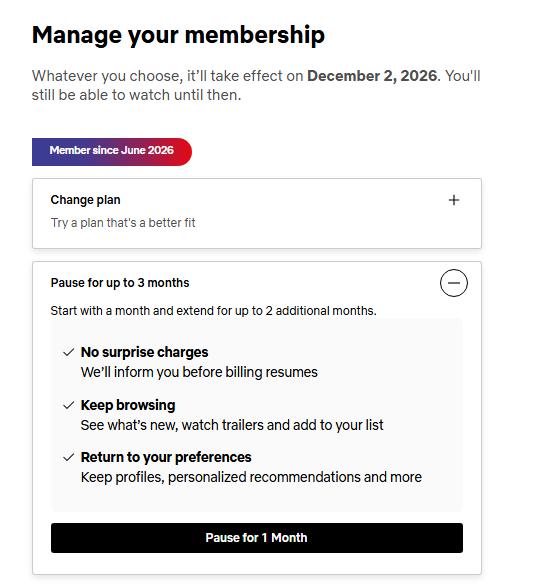
Your membership will remain active until your next billing date. On that date, Netflix will stop charging you and pause your membership for one month.
- Pausing isn't available on every account. It's unavailable for Direct Debit, gift cards, and some partner payments.
- You cannot stream or download Netflix content while your membership is paused, but you can still browse the catalog and add titles to My List.
- After one month, Netflix will automatically resume your membership and charge your current plan price.
- About a week before your pause ends, Netflix offers an Extend Pause option in your Account page. Each extension adds 1 more month. Netflix limits pausing to 3 months in total.
- You can also unpause your membership at any time from your Account page by selecting Unpause Now. Netflix will charge you immediately, and you can start streaming again.
Cancel vs Pause vs Downgrade: Which Is Better?
| Feature | Cancel Membership | Pause Membership | Downgrade Plan (Standard with Ads) |
|---|---|---|---|
| Monthly Cost | $0 (Stops permanently) | $0 (For 1 to 3 months) | Lower monthly rate (Starts at $8.99/mo in the US) |
| Auto-Resume Risk | None — stays canceled until you manually restart | High — automatically charges your card once the pause ends | Billed every month continuously |
| Streaming Access | Ends after current billing cycle | Ends after current billing cycle | Uninterrupted access with commercial breaks |
| Profiles & My List | Saved for 10 months | Saved continuously | Saved continuously |
| Offline Downloads | Deleted when cycle ends | Deleted when cycle ends | Limited (capped per month on ad-supported plans) |
| Best For | Leaving long-term or saving shows locally before quitting | Short vacations or busy seasons (1–3 months) | Cutting monthly costs without losing access |
Part 6. Want to Watch Your Favorite Netflix Shows After Canceling?
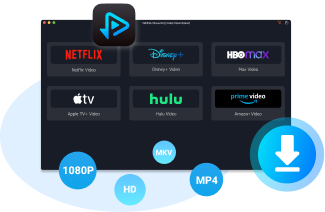
Canceling Netflix is easy, but your Netflix downloads are tied to your membership. If you're about to cancel and want to rewatch a series later, on a flight or without paying for another month, you can save it with VidiFab Streaming Video Downloader first.
VidiFab lets you download movies and TV shows from Netflix to your Windows or Mac computer as regular MP4 or MKV files, so they don't depend on your subscription or the Netflix app.
It supports downloads up to 1080p, along with multilingual audio tracks and subtitles, either embedded in the video or saved as SRT files. That means you can keep your preferred audio and subtitle setup even after you stop paying for Netflix.
VidiFab Streaming Video Downloader
Save Netflix videos as MP4 or MKV with multilingual audio and subtitles for offline playback on any device that supports these formats.
How to Download Netflix Videos with VidiFab Before Your Plan Ends
-
01
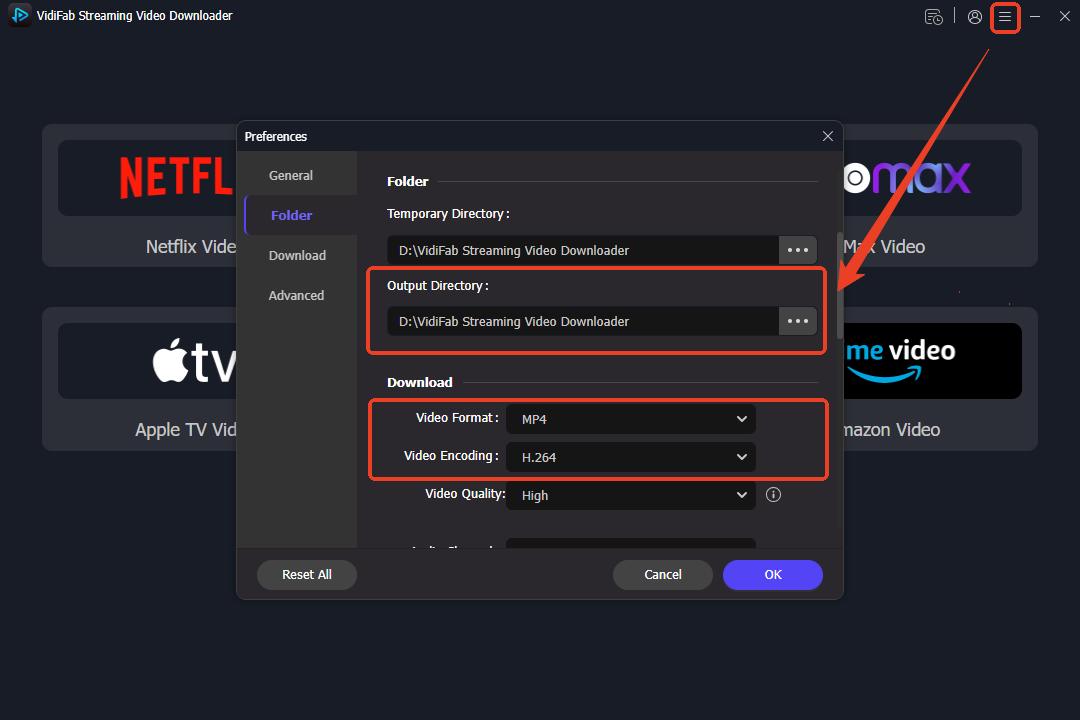
Install VidiFab on your Windows or Mac computer. Open Preferences, choose MP4 or MKV as the output format, and select a folder for your downloads.
-
02
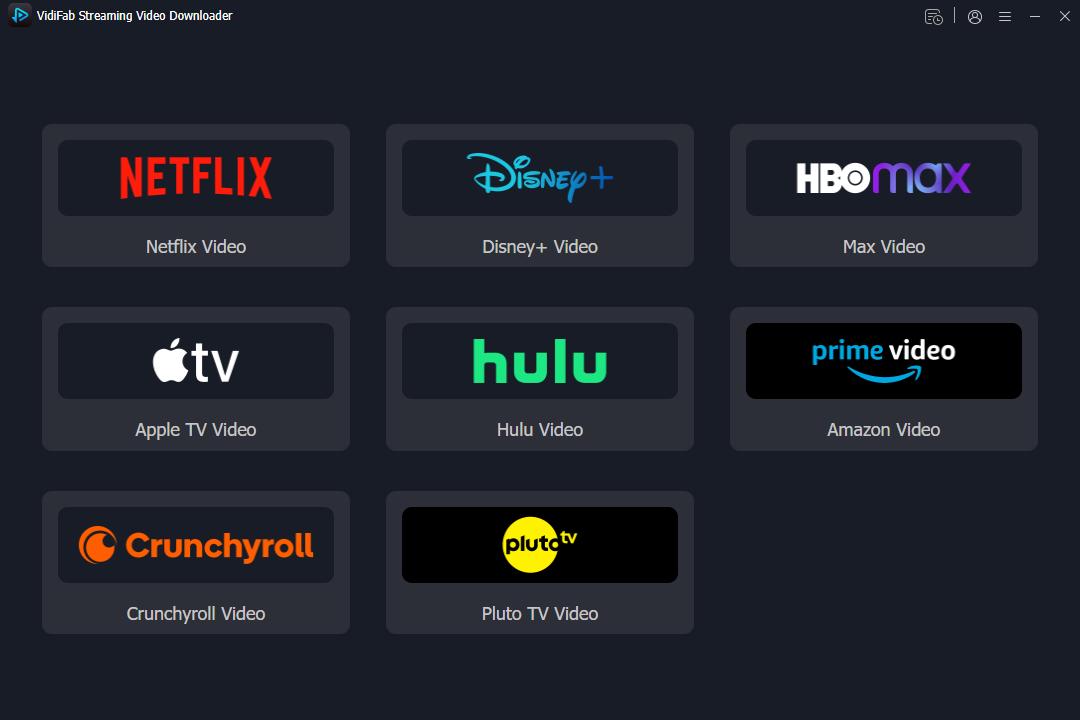
Go back to the home screen, click Netflix, and log in to your account in the built-in browser. You sign in on Netflix's own page, so VidiFab doesn't see or store your account details.
-
03
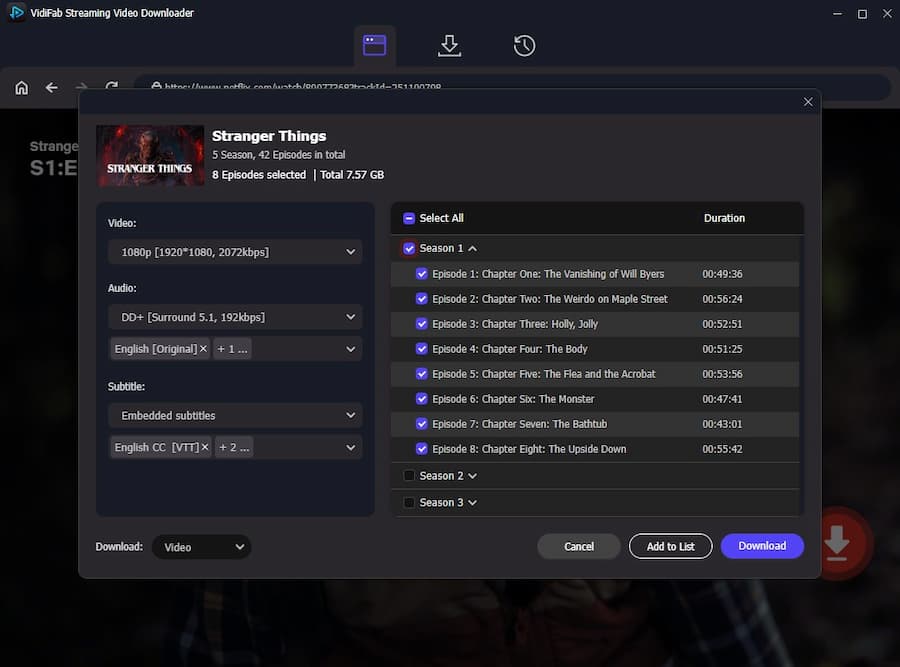
Find the title you want. Click the download icon, then choose the resolution, audio tracks, and subtitles. For a series, select individual episodes or the whole season.
-
04
Click Download. When it finishes, you'll find the MP4 or MKV files in your output folder.
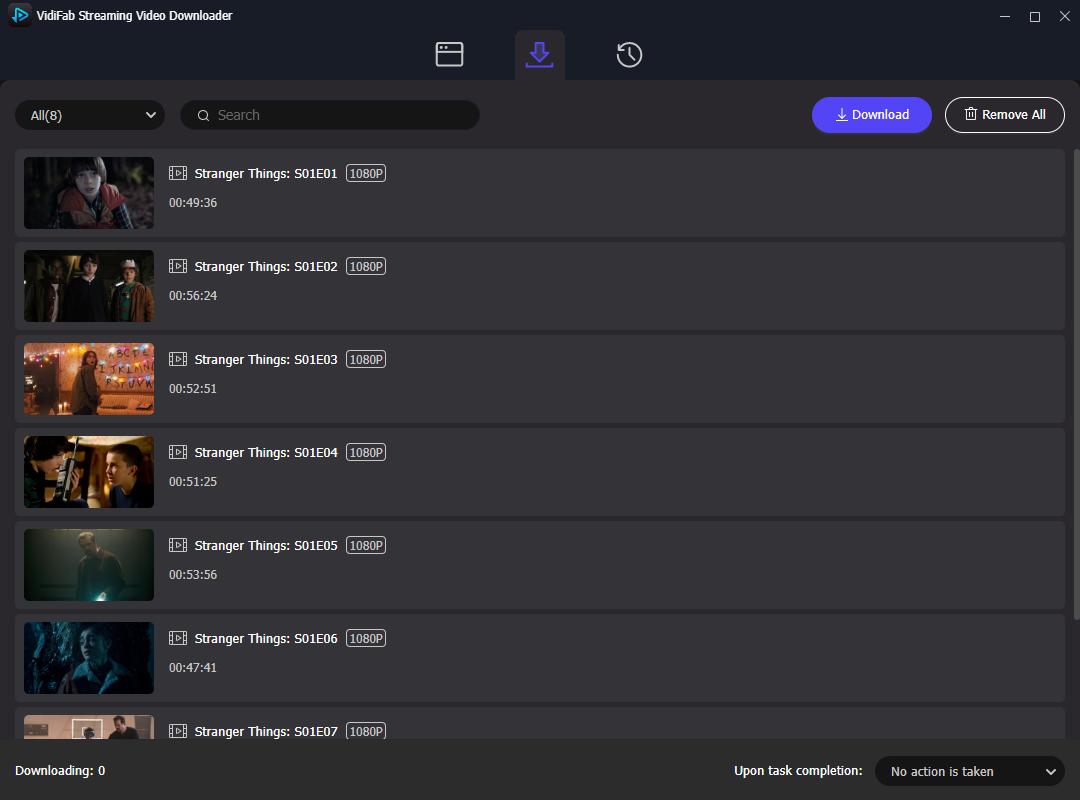
Once downloaded, the files are yours to keep on your computer. You can play them offline in any compatible media player, or copy them to other devices, without an active Netflix membership.

Note: Download only for personal, offline viewing, and respect copyright laws in your country and Netflix's Terms of Use. VidiFab does not grant rights to redistribute content.
Part 7. FAQs About Ending Your Netflix Membership
Can you cancel Netflix by phone or chat?
No. For security and account privacy reasons, Netflix customer service agents cannot directly cancel your subscription for you over the phone or via live chat.
Why is the "Cancel Membership" button missing from my Netflix account?
You are on a Kids profile: Switch to the primary adult profile to unlock the Account settings menu.
You pay through a third party: Check the Membership section on your Account page. If it lists Apple, Google Play, or a mobile/cable carrier (like T-Mobile, Verizon, or Xfinity), you must cancel through that specific provider instead of Netflix.
Why am I still being charged after canceling my Netflix subscription?
- You didn't finish the cancellation. Clicking Cancel Membership isn't enough. You have to confirm with Finish Cancellation.
- Someone restarted your account. Anyone logged into your account on a smart TV or shared device can click Restart Membership with one tap. To prevent this, go to netflix.com/password, change your password, and check the box for Sign out of all devices.
- You have a duplicate account. Search your email inboxes for old Netflix receipts to see if you accidentally created a second account under another email address.
- Your bank auto-updated a card or you left a backup card. If you canceled a carrier bundle, Netflix may have switched to a backup credit card on file. Check Manage payment info on your Account page.
How do I cancel Netflix if I forgot my email or password?
- Reset your password: Go to netflix.com/loginhelp, choose Email or Text Message (SMS), and follow the reset link or 6-digit code to regain access and cancel normally.
- Recover a forgotten email: On netflix.com/loginhelp, select I don't remember my email or phone, then enter your first name, last name, and the credit or debit card number billed by Netflix to locate your account.
- Contact Netflix Support directly: If you no longer have access to your old email or phone number, visit https://help.netflix.com/en/contactus to start a live chat or request support—an agent can locate your billing profile using your card details and cancel the subscription for you.
Will I get a refund if I cancel Netflix?
No. Netflix doesn't normally refund the unused days. If you were charged after canceling because of an error, contact Netflix and ask them to review the charge.
Can I rejoin Netflix after canceling?
Yes. You can restart your Netflix account at any time. If you return within 10 months, your viewing activity and recommendations are restored. Your Netflix downloads, however, are deleted when you cancel, so you'd need to download them again.
Final Thoughts
Canceling Netflix is usually straightforward, but the process can vary depending on how you pay. Before your next billing date, make sure the cancellation is complete. If you want to make the most of your remaining Netflix membership, you can also use VidiFab Streaming Video Downloader to save some of your favorite movies and shows for offline viewing before your membership ends.

I write about streaming services, video playback, and digital media management. My articles cover practical ways to convert video files, troubleshoot playback issues, and manage digital content across devices. I aim to make technical topics easier to understand and help readers find practical solutions to common challenges.
 Leave Your Comment