How to Get Netflix Unblocked: 6 Working Methods That Actually Work
 By Miles Kent
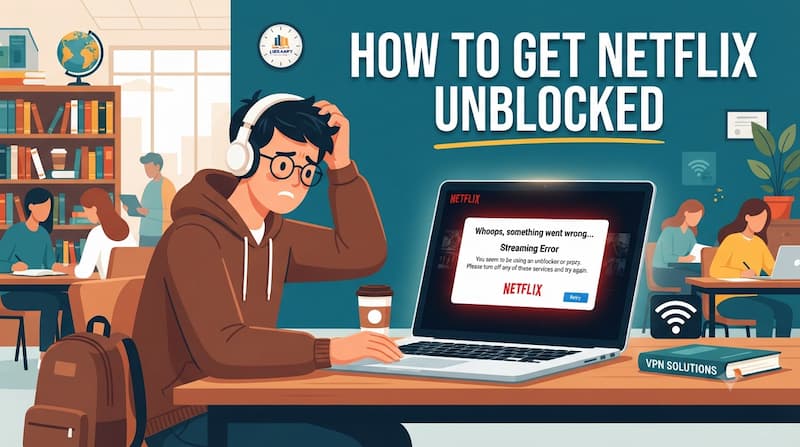
Netflix is available in over 190 countries, but access can still be restricted by school networks, workplace firewalls, regional limitations, or Netflix's own VPN and proxy detection system. If you see a message such as "You seem to be using an unblocker or proxy," the fastest fix is not always the same for every situation. You need to know whether the block comes from your local network, your device, your region, or Netflix's VPN detection.
In this guide, you will learn how to get Netflix unblocked with 6 practical methods, from reliable VPN solutions and Smart DNS settings to network changes and offline viewing options. I will also cover popular shortcuts such as "Netflix Unblocked 66," free unblocker websites, free proxies, and Chrome extensions, because many of them sound easy but fail in real use.

- Best all-around method: Use a reputable paid VPN, then switch servers if Netflix shows the proxy error.
- Best school or workplace bypass: A mobile hotspot is usually cleaner than fighting the local Wi-Fi firewall.
- Best no-buffer option: Download Netflix titles ahead of time, or use VidiFab Netflix Video Downloader to save MP4/MKV files for personal offline viewing.
Part 1. Why Is Netflix Blocked at School, Work, or Your Network?
Netflix is commonly blocked on school and workplace networks to reduce distractions, manage bandwidth, and meet network safety requirements.
1. Focus and Productivity
Schools and companies often block Netflix because streaming video is not part of the intended network use. A classroom Wi-Fi network is built for learning platforms, research tools, and communication. A workplace network is usually built for business apps, calls, file transfers, and collaboration.
2. Bandwidth Management
Netflix is extremely bandwidth-hungry. HD (1080p) video consumes about 3GB per hour, while 4K streaming can use up to 7GB per hour. To keep critical applications (such as online teaching tools or office systems) running smoothly, administrators often limit or completely block these resource-heavy sites.
3. Safety and Compliance
For example, in the United States, the Children's Internet Protection Act (CIPA) requires federally funded schools and libraries to install filters that block content harmful to minors. Blocking non-essential sites also reduces risk. Some fake "Netflix mirror" sites may contain malware or malicious scripts, so blocking them protects school and company devices from attacks.
4. Licensing and Geographic Restrictions
Movie studios usually license content by region. If Netflix does not have the rights to a show in your area, it must use IP detection to restrict access.
How Blocks Are Usually Enforced
- DNS filtering: The network intercepts Netflix domain requests and redirects them to a block page or prevents them from resolving.
- IP blacklisting: The network blocks known Netflix or VPN IP ranges directly.
- Deep Packet Inspection (DPI): The firewall looks for traffic patterns that resemble streaming or VPN protocols.
- Mobile Device Management (MDM): School-issued Chromebooks, tablets, or work laptops may block Netflix apps, browser extensions, or VPN installation at the device level.
Part 2. How to Get Netflix Unblocked: 6 Methods That Actually Work
There is no single Netflix unblocker that works in every setting. A VPN may solve a regional block but fail on a heavily managed school Chromebook. A mobile hotspot may bypass campus Wi-Fi instantly but use a lot of cellular data. Use the table below to match the method to your situation.
| Method | Reliability | Best For | Setup Time | Typical Cost | HD/4K Support |
|---|---|---|---|---|---|
| Paid VPN | High | Regional libraries and personal devices | Under 5 min | ~$9.99 - $16.45 | Yes, if speed is strong |
| Dedicated IP VPN | Very high | Reducing Netflix VPN errors | Quick after purchase | Additional ~$4 | Yes |
| Offline Download | Very high | Watching where Wi-Fi is blocked | Depends on title size | Netflix plan required | Depends on app settings |
| Free VPN | Low | Short emergency testing | Under 5 min | $0 | Usually limited |
| Mobile Hotspot | High | Bypassing school or work Wi-Fi | Under 1 min | Cellular data cost | Yes, but data-heavy |
| Smart DNS | Medium to high | Home TVs and game consoles | About 10 min | Often bundled with VPN | Yes, no VPN encryption overhead |
If the real problem is buffering, blocked school Wi-Fi, or a device that cannot run a VPN, offline viewing is often simpler than forcing a live stream to work. VidiFab Netflix Video Downloader can save Netflix videos as MP4 or MKV in up to 1080p with selectable audio tracks and subtitles, so you can watch from a computer, USB drive, or media player without depending on a restricted network.
 Free Download
 Secure Download
 Free Download
Secure Download
Free Download
Secure Download
Method 1. Use a Reliable VPN to Bypass Netflix Restrictions
A VPN creates an encrypted tunnel between your device and a remote server. Netflix then sees the VPN server's IP address instead of your local network address. This can help with region restrictions and simple network blocks, but Netflix may still block some shared VPN servers.
However, some VPN services do not perfectly mask your real IP, so it is best to pick a provider with a reliable success rate.
Top Netflix Unblocking VPN Comparison Table (2026)
| VPN Provider | Success Rate | Price (Monthly) | Simultaneous Devices | Key Unblocking Features | Compatible Devices |
|---|---|---|---|---|---|
| NordVPN | 100% | ~$14.99 | 10 devices | NordLynx protocol, SmartPlay, Meshnet, Dedicated IP | Windows, Mac, Android, iOS, Android TV, Fire TV, Routers |
| Surfshark | 100% | ~$16.45 | Unlimited | Camouflage Mode, Nexus network, Dedicated IP | Windows, Mac, Android, iOS, Linux, Android TV, Fire TV, Apple TV |
| ExpressVPN | 100% | ~$14.99 | 10-14 devices | Lightway protocol, MediaStreamer (Smart DNS) | Windows, Mac, Android, iOS, Apple TV, Gaming Consoles, Routers |
| Proton VPN | 90% | ~$9.99 | 10 devices | Stealth protocol, VPN Accelerator, Dedicated streaming servers | Windows, Mac, Android, iOS, Linux, Android TV, Fire TV, Apple TV |
| CyberGhost | 90% | ~$12.99 | 7 devices | Dedicated streaming servers, Automated smart rules | Windows, Mac, Android, iOS, Android TV, Apple TV, Fire TV, Xbox, PS3/4/5 |
How to Unblock Netflix with a VPN
The exact labels differ by VPN app, but the basic workflow is usually the same. Here is the process using NordVPN as an example.
Step 1. Go to the NordVPN website, register an account, and download the app for Windows, Mac, iPhone, Android, or another device.
Step 2. Open the NordVPN app and log in with your account.
Step 3. Choose the country whose Netflix library you want to access. For example, connect to a UK server if you want to view the UK catalog.
Step 4. Open your browser's "Incognito/Private Window," type in the Netflix website, and you will see the login page load normally. Enter your email and password to start streaming in ultra HD without restrictions.
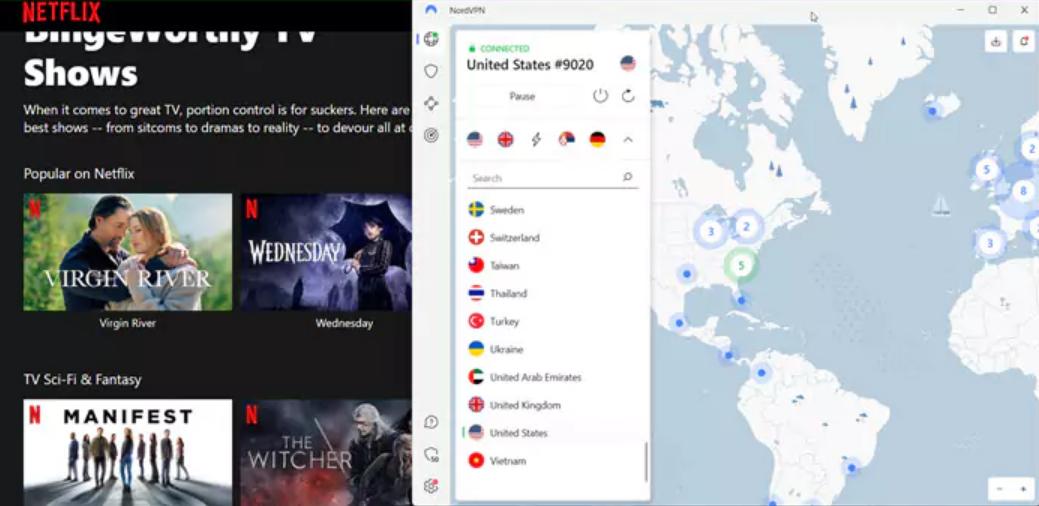
Sometimes a good VPN still hits Netflix's proxy detection. This usually means the server IP has been flagged, your browser is leaking old location data, or the VPN protocol looks easy to identify. Try these fixes before giving up on the service.
- Switch servers: Try another city or server in the same country. Netflix often blocks a specific IP address, not every server from the same VPN.
- Change VPN protocol: If the default protocol fails, try another option in the VPN settings, such as OpenVPN TCP on port 443 if your VPN supports it.
- Disable IPv6 leaks: Some VPN tunnels protect IPv4 traffic while your real IPv6 route still exposes location information.
- Turn off browser location: Deny location access in your browser and operating system before streaming.
- Clear cache and cookies: Delete recent Netflix cookies or open Netflix in a fresh private window after reconnecting to the VPN.
Method 2. Try a Dedicated IP VPN to Avoid Netflix VPN Blocks
In 2026, Netflix's detection system has become extremely sensitive. It can identify "shared IPs" used by hundreds of people at once and blacklist them. A dedicated IP solves this problem as the ultimate solution, because it assigns you a personal, fixed address, making your traffic look like a normal home user rather than a VPN server.
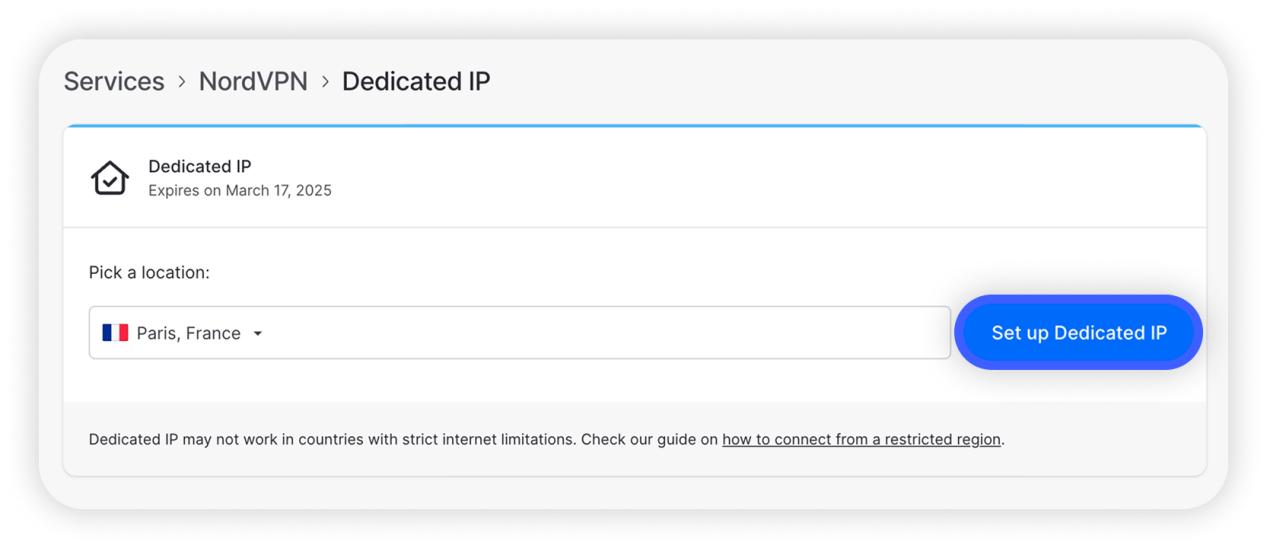
Step 1. Log into your VPN account dashboard (or during your first subscription) and click "Set up Dedicated IP" under "Additional features." The provider will ask you to choose a specific country and city (for example, New York, USA).
Step 2. Purchase the dedicated IP add-on.
- NordVPN: The price is about $2-5 per month. It supports several popular Netflix regions including the US, UK, and Japan.
- Surfshark: The extra fee is about $3.75 per month. You need to choose a specific city node (such as New York or London) when purchasing.
- LimeVPN: Their Plus plan ($9.99/month) includes a dedicated static IP by default, with no need to purchase a separate add-on.
Step 3. After payment, open the VPN client and look for the "Dedicated IP" or "Static IP" group in the server search bar or sidebar.
Step 4. Click the dedicated IP address you purchased to connect.
Step 5. Once connected, visit Fast.com and click "Show More Info" to confirm the "Client IP" has changed to your dedicated address.
Step 6. Clear your browser cache or restart the Netflix app, then enjoy streaming without proxy errors.
- Extra cost: Dedicated IP usually costs more than a basic VPN subscription.
- One-region focus: If you buy a US dedicated IP, it will not automatically unlock a Japan or UK library.
Method 3. Use the Netflix Offline Feature
Netflix's official offline download feature lets you download content in an unrestricted network (such as at home) and then watch it later on a restricted network without any internet connection. This completely avoids bandwidth limits and content filters.
How to Watch Netflix Offline on Mobile
Step 1. Connect your phone, tablet, or supported Chromebook to an unrestricted Wi-Fi network.
Step 2. Open the Netflix app and find the movie or episode you want. Tap the download icon if the title supports downloads.
Step 3. After the download finishes, open the Downloads area in the app to manage saved titles.
Step 4. At school, work, or during travel, open the Netflix app and play the saved title without starting a new stream.
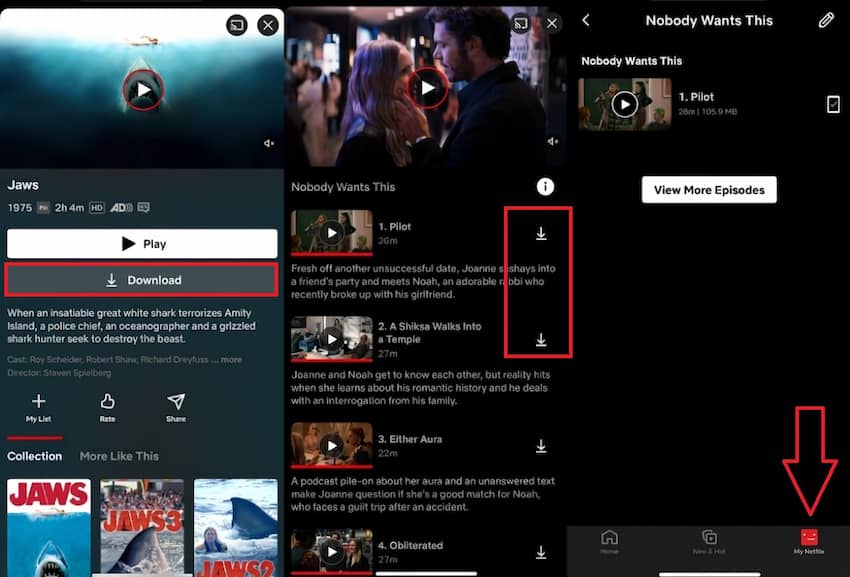
For offline viewing on a Windows PC or Mac, or if you need more than the official 48-hour playback window or 7-day save time, the official feature might not suffice. I suggest using a professional third-party tool like VidiFab Netflix Video Downloader.
This tool helps you download Netflix videos on Windows or macOS. It converts them into standard MP4 or MKV format in 1080p with Dolby Atmos, selectable audio tracks, and subtitles. You can then copy the files to a USB drive or any player, fully bypassing school or workplace network restrictions.
Free Download
Secure Download
Free Download
Secure Download
Method 4. Try a Free VPN (With Limitations)
Free VPNs are tempting, but they are rarely the best way to unblock Netflix. Their IP pools are small, shared by many users, and frequently detected. They also tend to limit data, speed, server choice, or streaming support, so even a successful connection may not last long enough for a movie.
| Free VPN Provider | Monthly Data Limit | Netflix Regions Available (2026 Testing) |
Key Limitations |
|---|---|---|---|
| PrivadoVPN Free | 10 GB | US, UK, Canada, Brazil, Argentina, India, Mexico, and more | After exceeding the data limit, speeds are reduced to 2-4 Mbps. |
| Windscribe Free | 10 GB | US, UK, Canada, France, Germany, Norway, Romania, Hong Kong | The data is consumed quickly, and HD streaming only works for a few hours. |
| Proton VPN Free | Unlimited | Netherlands, US, Japan (randomly assigned) | Officially does not support streaming. Server selection is limited, connections are random, and speeds may drop significantly after heavy usage. |
| Hotspot Shield Free | 500 MB/day (with ads) | UK, US, Singapore | Actively restricts Netflix access. During testing, the free version displayed upgrade prompts and prevented Netflix playback. |

A smart trick: If you are on a short trip, taking advantage of the 30-day money-back guarantee offered by top providers like NordVPN or ExpressVPN is a better "free" strategy. It gives you 100% unblock success and 4K picture quality.
Method 5. Switch to a Mobile Hotspot
A mobile hotspot is the fastest way to bypass a school or workplace Wi-Fi restriction because it stops using that network altogether. Your laptop or tablet connects through your phone's cellular data instead of the blocked Wi-Fi. That means local DNS filters, campus firewalls, and workplace router rules no longer control the connection.
Step 1. Confirm that your phone plan includes hotspot data. Streaming Netflix can use a lot of data, especially in HD.
Step 2. On Android, open Settings > Network & Internet > Hotspot & Tethering, then enable the portable Wi-Fi hotspot. Labels may vary by phone brand.
Step 3. On iPhone, open Settings > Personal Hotspot, then enable Allow Others to Join.
Step 4. Connect your laptop, Chromebook, or tablet to the phone hotspot and open Netflix normally.
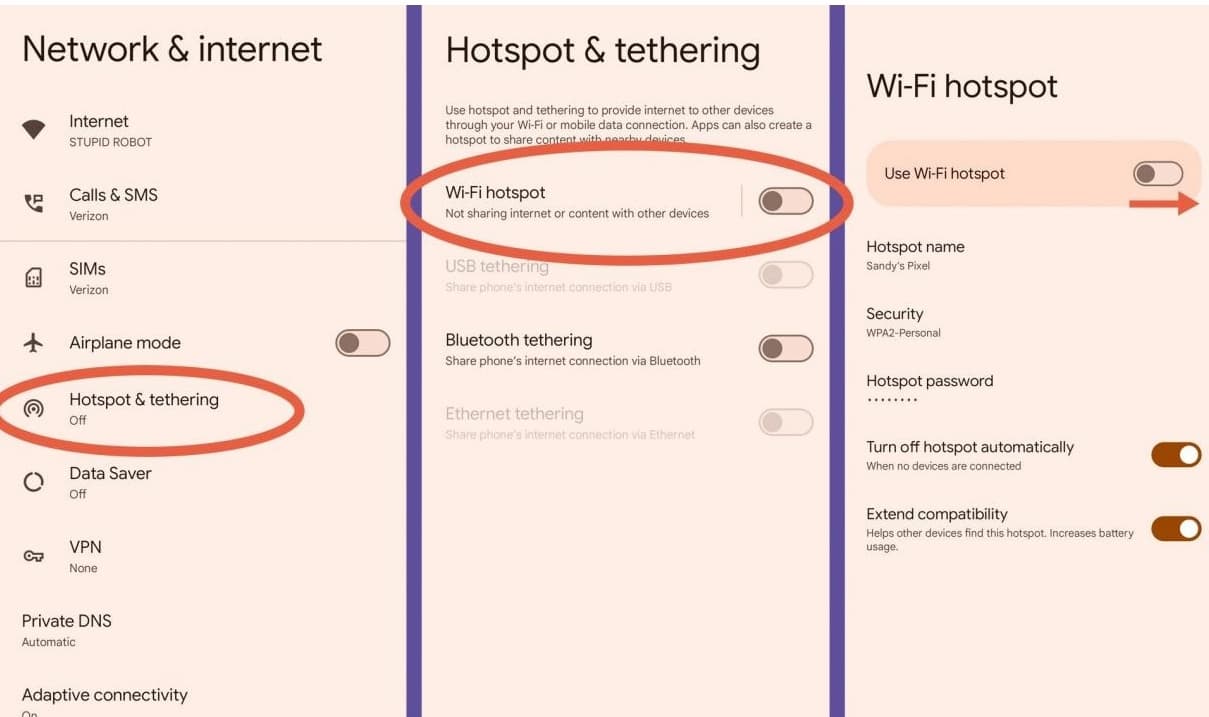
A hotspot may bypass the local Wi-Fi block, but it can burn through mobile data quickly. It may also violate school or workplace device policies if you use it on managed equipment.
Method 6. Configure Smart DNS Settings for Netflix
First, I want to be clear: Smart DNS cannot bypass school or workplace firewall restrictions. Smart DNS is not a VPN. It does not encrypt your traffic or hide your full IP address, so it does not work on school or company networks. Therefore, this method is only for bypassing Netflix's regional blocks at home. Do not try it on a campus network.
Recommended Smart DNS Services to Unblock Netflix
Based on my testing, the following providers deliver the most stable Netflix unblocking:
- ExpressVPN (MediaStreamer): Its built-in MediaStreamer service is specifically optimized for Netflix US.
- NordVPN (SmartPlay): Integrated automatically in the app, or you can manually configure DNS addresses for TVs and consoles.
- Unlocator: A dedicated Smart DNS provider that claims to unblock more than 200 streaming services, including Netflix and HBO Max.
- SmartyDNS / Getflix: Provides servers optimized for specific regions, supporting 4K lossless playback.
If You Want to Watch Overseas Netflix on Your Home TV or Console, Follow These Steps
Step 1. Turn off your VPN first, then sign in to your VPN or Smart DNS provider account.
Step 2. Find the Smart DNS server addresses. Most providers give you a primary and secondary DNS address.
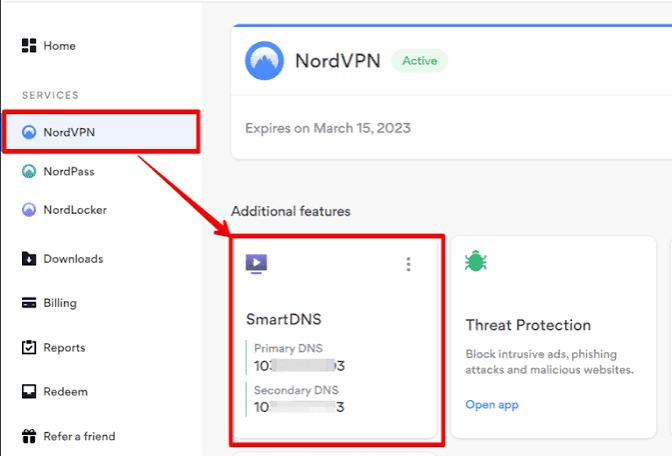
Step 3. Register or activate your current home IP address in the provider dashboard if required.
Step 4. On Windows, open the network adapter properties, select IPv4, and enter the DNS addresses manually. On a TV or console, open the network settings and change DNS from automatic to manual.
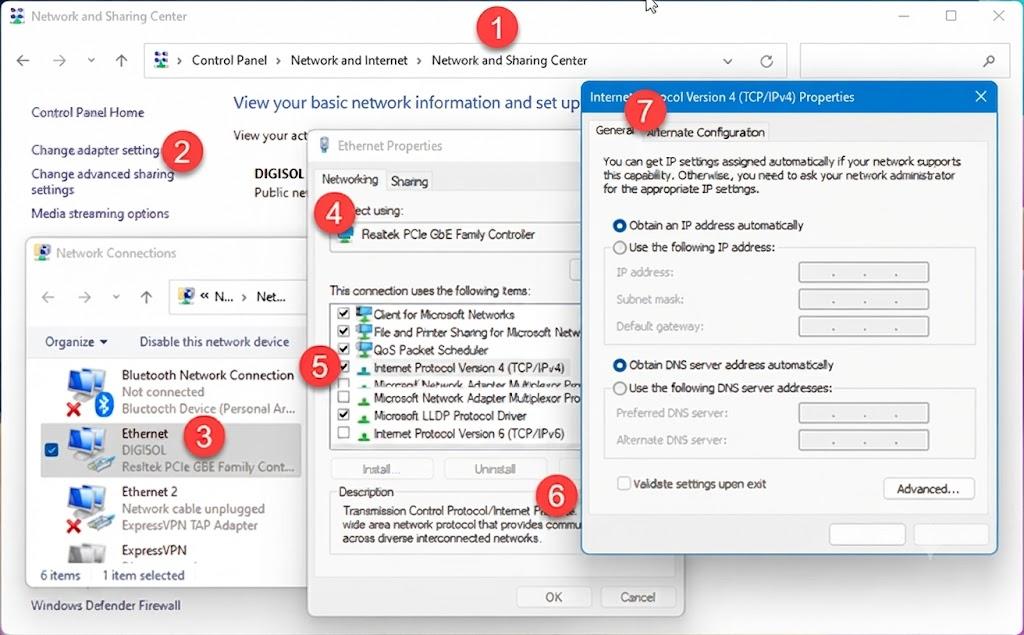
Step 5. Restart the device, open Netflix, and test playback. If it fails, check whether your home IP changed and reactivate it in the Smart DNS dashboard.
Part 3. Free Netflix Unblock Methods: What Works and What Doesn't
The internet is full of pages promising "free unblock Netflix" access, but most of them are unreliable or unsafe. Some do nothing more than redirect you to ads. Others imitate Netflix sign-in pages and try to collect account information.
Can You Use "Netflix Unblocked 66" or Mirror Sites?
No. A "Netflix Unblocked 66" site is not an official Netflix service and should not be treated as a safe Netflix login page. Netflix content is protected by account authentication and DRM, so a random static mirror site cannot simply host the real Netflix library. If a site asks for your Netflix username and password, close it.
Can You Use Tor Browser to Bypass School Restrictions?
No. First, Netflix has blacklisted most known Tor exit nodes, so you will typically just see the "you seem to be using an unblocker or proxy" error page after connecting. Second, Tor's multi-layer relay architecture causes huge bandwidth loss. Speed tests show its average download speed drops below 1.5 Mbps, which is far below the 25 Mbps threshold Netflix needs to reliably play 1080P or 4K video.
Can You Use Free Chrome Extensions to Unblock Netflix?
Most free "Netflix unblock Chrome" extensions are simple shared proxies. Their data-center IP addresses are easy for Netflix to flag, and some extensions request broad browser permissions that are not worth the risk. If an extension has unclear ownership, aggressive ads, or very little support history, avoid it.
Can You Use Free Proxies or Change DNS Settings?
Free web proxies are usually not suitable for Netflix because they lack speed, privacy, and reliable streaming support. Manually switching to public DNS such as Google DNS or Cloudflare DNS may bypass only basic domain filtering. It will not change your visible IP address, so it cannot solve Netflix regional restrictions or advanced network blocking.
Part 4. Netflix Unblocked FAQs
Is It Legal to Unblock Netflix at School or Work?
Can Netflix Ban Your Account for Using a VPN?
Why Does Netflix Keep Blocking My VPN?
Does Changing DNS Affect Netflix Speed?
What Is the Best Netflix Unblocker in 2026?
- School or workplace restrictions: A reliable VPN or mobile hotspot.
- Netflix VPN detection errors: A dedicated IP VPN.
- Accessing another Netflix region: Smart DNS or a streaming-friendly VPN.
- Watching without internet access: Offline downloads using tools such as VidiFab Netflix Downloader.
Part 5. Conlusion
Getting Netflix unblocked is easier when you choose the right solution for your situation. A reliable VPN remains the best option for most users, while Smart DNS can help with region changes and a mobile hotspot can bypass school or workplace restrictions. If streaming access is still limited, offline viewing offers a practical alternative. Focus on trusted methods and avoid unofficial unblock websites or tools that promise instant access but rarely work reliably.
Free Download
Secure Download
Free Download
Secure Download




I write about streaming services, video playback, and digital media management. My articles cover practical ways to convert video files, troubleshoot playback issues, and manage digital content across devices. I aim to make technical topics easier to understand and help readers find practical solutions to common challenges.
 Leave Your Comment