How to Download Shows on Hulu for Offline Viewing
 By Miles Kent
With award-winning hits like The Bear and next-day access to popular network TV shows, Hulu has become one of the most popular streaming services for TV lovers. But can you download shows on Hulu for offline viewing? Yes, you can, but the feature is limited to eligible Hulu plans, supported mobile devices, and downloadable titles.
If you're wondering how to download shows on Hulu, you've come to the right place. This guide explains which Hulu shows can be downloaded, how to download episodes on iPhone or Android, and what options are available if you want to save Hulu shows on a Windows PC or Mac.
Part 1. Can You Download Shows on Hulu?
You can download shows on Hulu to watch offline later, but this feature is only available with the No Ads plan, according to an official Hulu downloads document . Also, you can only download on a phone or tablet using the Hulu app. Here's a detailed breakdown of the plans, devices, and other conditions for downloading Hulu shows:
Which Hulu Plans Support Downloads?
You can only download content on Hulu if you have a premium plan. If you're on the standard ad-supported plan, downloading isn't an option.
| Hulu Subscription Category | Supports Downloads? |
|---|---|
| Hulu (No Ads) | ✅ |
| Hulu (With Ads) | ❌ |
| Hulu (No Ads) + Live TV | ✅ |
| Hulu + Live TV (Standard) | ❌ |
| Disney Bundle Premium (Duo/Trio Premium) | ✅ |
| Disney Bundle Basic (Duo/Trio Basic) | ❌ |
| Hulu Premium Extra Member | ✅ |
| Hulu (With Ads) Extra Member | ❌ |
If you're on an With Ads plan, you can use VidiFab Streaming Video Downloader to download shows, movies, and unlimited videos from Hulu to watch offline.
 Free Download
 Secure Download
 Free Download
Secure Download
Free Download
Secure Download
Which Devices Support Hulu Downloads?
Hulu's built-in download feature is designed for mobile viewing. Downloads are not officially available on computers, smart TVs, or gaming consoles.
Supported Devices:
- Apple iPhones and iPads (running iOS 16.4 or higher)
- Android smartphones and tablets (running Android 7.1 or higher)
- Amazon Fire tablets (Fire OS 7 or higher)
Unsupported Devices:
- Macs and Windows laptops or PCs (even in a browser)
- Smart TVs
- Apple TV, Roku, and Fire TV sticks
- Gaming consoles (PlayStation and Xbox)
What You Need to Download Shows on Hulu
- An Ad-Free Subscription Plan: You must be actively subscribed to an eligible premium plan, such as Hulu (No Ads), Hulu + Live TV (No Ads / Premium), or an ad-free Disney Bundle.
- A Supported Phone or Tablet: iPhone, iPad, Android, or Amazon Fire tablet.
- The Official Hulu App: The latest version of the Hulu mobile app installed on your device from the App Store, Google Play, or Amazon Appstore.
- A Good Connection: WiFi is best. You can also allow mobile data.
- Available Device Storage: It's best to keep 5 to 10 GB of free space for Hulu downloads.
- An Eligible Video Title: A movie or TV episode that shows a Download icon next to its title, which is explained in the next section.
Part 2. Can You Download Every Show on Hulu?
No. You cannot download every show. Some titles from Premium Add-ons or Live TV content are not available for download.
The good news is you can download a lot of content from Hulu's streaming library. You can save many Hulu Originals, popular shows, older seasons, and movies. Just make sure to check each title before you rely on it.
How to Tell If a Hulu Show Is Downloadable
The easiest way to check if a specific movie or TV episode can be saved offline is to look for the Download icon (a downward arrow icon).
Step 1. Open the Hulu app on your mobile device.
Step 2. Search for the show you want to watch.
Step 3. Open the show's details page.
Step 4. Look for a Download icon next to available episodes.
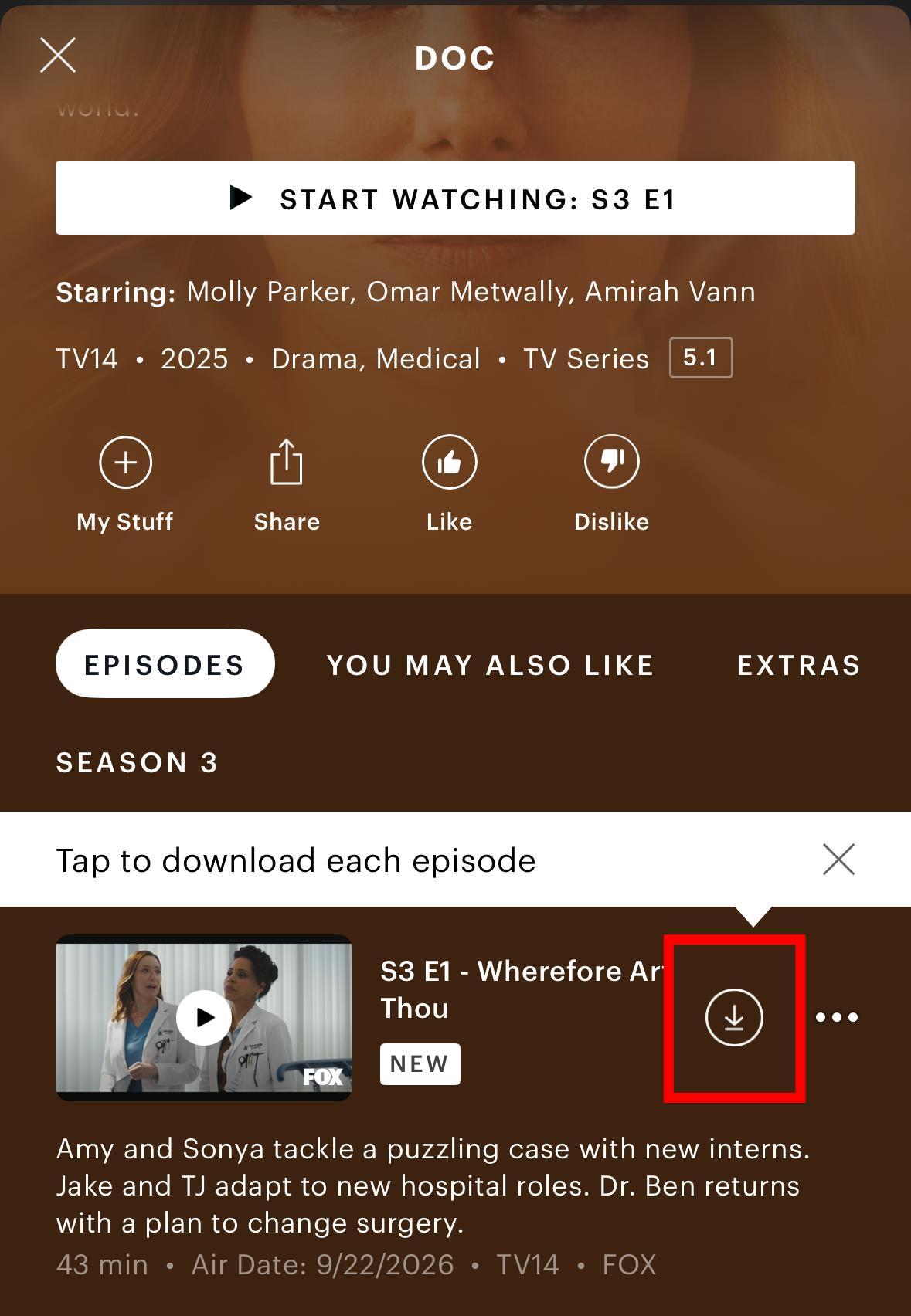
If no download option appears, the title is not currently available for download through Hulu.
Find Shows That Are Available for Download
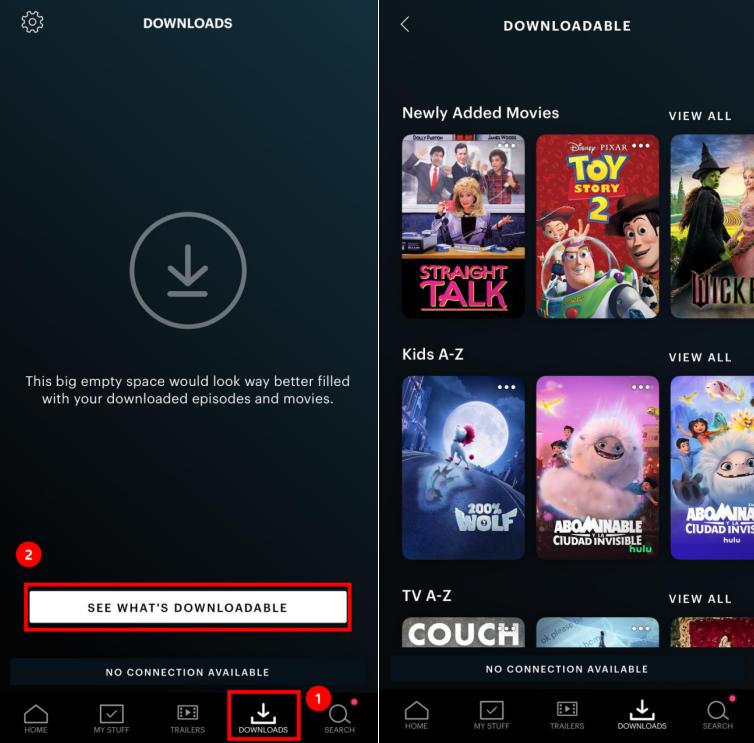
If you're not looking for a specific show and just want to browse downloadable content, Hulu provides a dedicated section for eligible titles.
Step 1. Open the Hulu app.
Step 2. Tap Downloads in the navigation bar at the bottom of your screen.
Step 3. Select See What's Downloadable.
Step 4. Hulu will display TV shows and movies that currently support offline downloads.
Part 3. How to Download Shows on Hulu on iPhone or Android
If you have an eligible Hulu plan and a supported mobile device, you can download eligible episodes for offline viewing directly from the Hulu app.
Step 1. Connect to Wi-Fi. Hulu usually limits downloads to Wi-Fi only to avoid extra charges on your phone bill. If you want to download using cellular data, tap the profile icon, go to Settings, then Downloads, and switch on Cellular Downloading.
Step 2. Launch the Hulu app. Open the official Hulu app on your iPhone, iPad, or Android device and make sure you are logged in to your premium, ad-free profile.
Step 3. Search for your show. Tap the title to open its main details page.
Step 4. Tap the download button. Scroll down to the episode list, find the episode you want, and tap the Download icon to the right of the episode title.
Step 5. Watch Hulu shows offline. Once an episode has finished downloading, open Downloads in the Hulu app and tap the episode you want to watch.
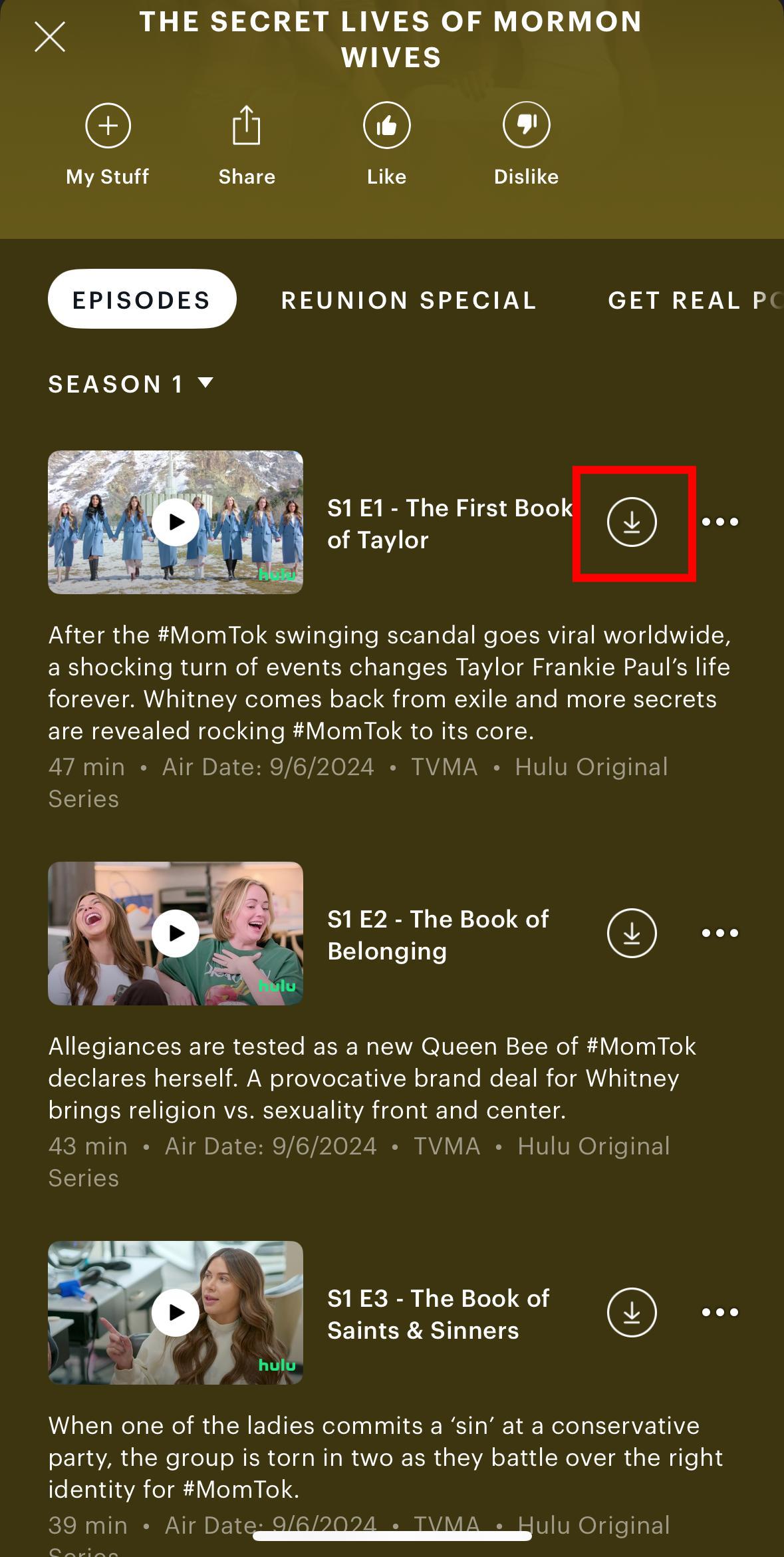
- You cannot download an entire season at once. Hulu only lets you download eligible episodes individually.
- You can adjust download quality. Go to Profile icon > Settings > Downloads > Video Quality and choose Standard or High.
Part 4. Can You Download Hulu Shows on a Laptop or Computer?
No, not with the Hulu app. Hulu content cannot be downloaded on a TV-connected device, a computer, or a Windows 10 or 11 tablet.
If you want to watch Hulu shows offline on a computer, you can use a dedicated streaming video downloader such as VidiFab.
VidiFab Streaming Video Downloader allows everyone on Hulu, even those with the With Ads plan, to download videos. You can download unlimited Hulu TV shows and movies in HD quality in MP4 or MKV formats. This means you can watch your downloads on nearly any computer without needing the internet.
Hulu App vs. VidiFab: Which Download Method Fits You?
| Download Feature | Hulu App | VidiFab Hulu Video Downloader |
|---|---|---|
| What you get | Offline access inside the Hulu app | Regular MP4 or MKV video files |
| What can be downloaded | Select downloadable titles | Any Hulu videos, as long as they can be played normally |
| How many at once | Download episodes individually | Batch download multiple seasons |
| How long they last | Downloads can expire | Files stay on your device |
| Top video quality | Depends on Hulu's available download quality | 720p |
| Audio | Available audio in the Hulu download | Available multilingual audio tracks |
| Subtitles | Available subtitles in the Hulu download | Embedded or separate subtitle files |
| Where you can play it | Hulu app | Compatible media players and devices |
If you mostly use Hulu on a mobile device and just need offline access for a short time, the Hulu app should work fine.
If you want to watch Hulu shows offline on your computer or TV, or if you have an ad-supported plan, or if the show you want doesn't have a download option, VidiFab is a better choice.
Part 5. How to Download Hulu Shows on a Windows PC or Mac
To download Hulu shows on your Windows PC or Mac, start by downloading and installing the VidiFab Streaming Video Downloader. It offers a trial that lets you download the first 3 minutes of any video. If you decide to purchase the full license, you can use the code VF25OFF for a 25% discount.
VidiFab Streaming Video Downloader
Download Hulu videos in MP4 or MKV format for offline viewing on your laptop.
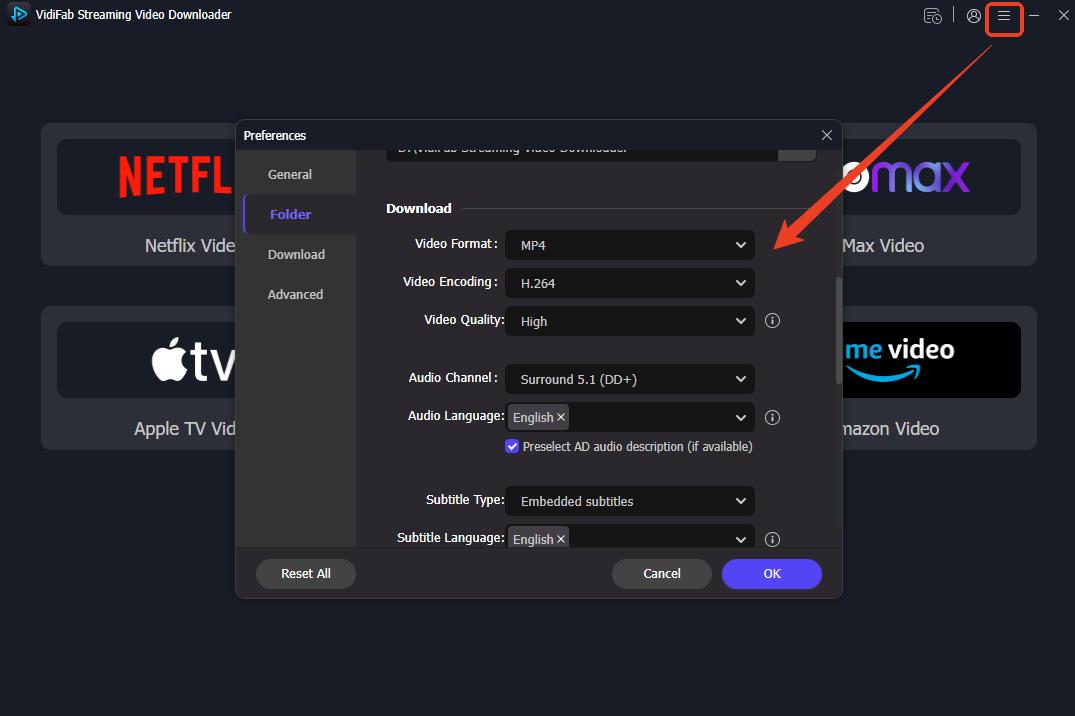
Step 1. Set the output format and folder in VidiFab. Open VidiFab and go to Preferences. Choose your preferred output format, such as MP4 or MKV, and select the output folder where you want to save the downloaded Hulu videos.
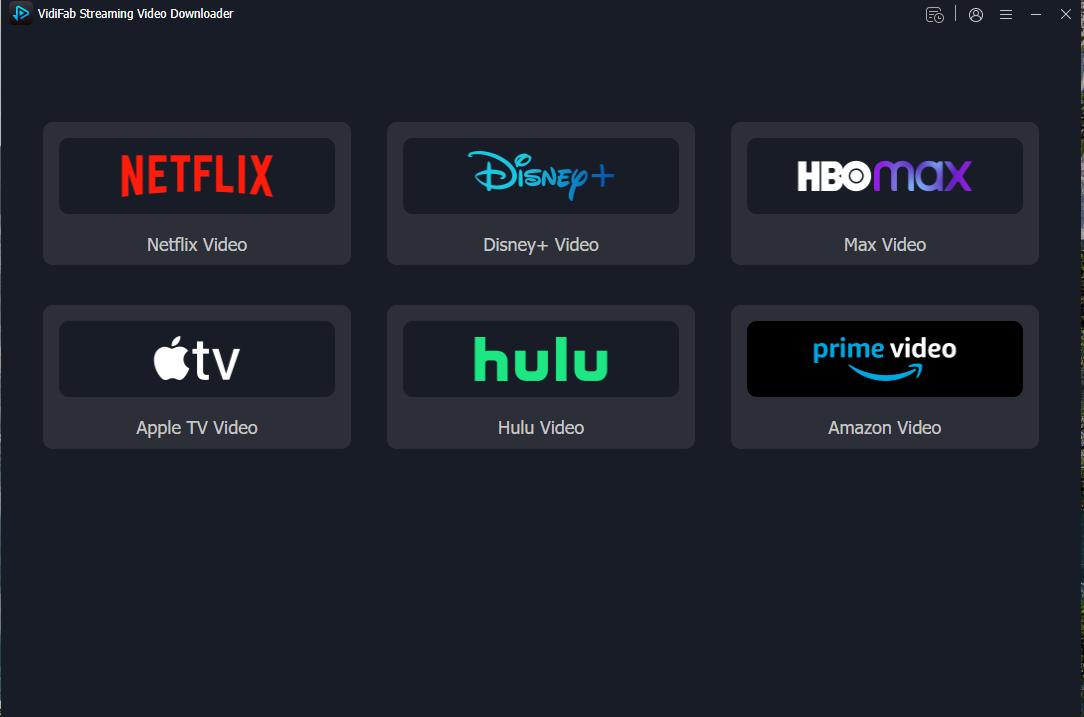
Step 2. Open Hulu and find the show. Open Hulu in VidiFab's built-in web player and sign in to your account. Find the show or movie you want to download, then click the download button in the bottom-right corner.
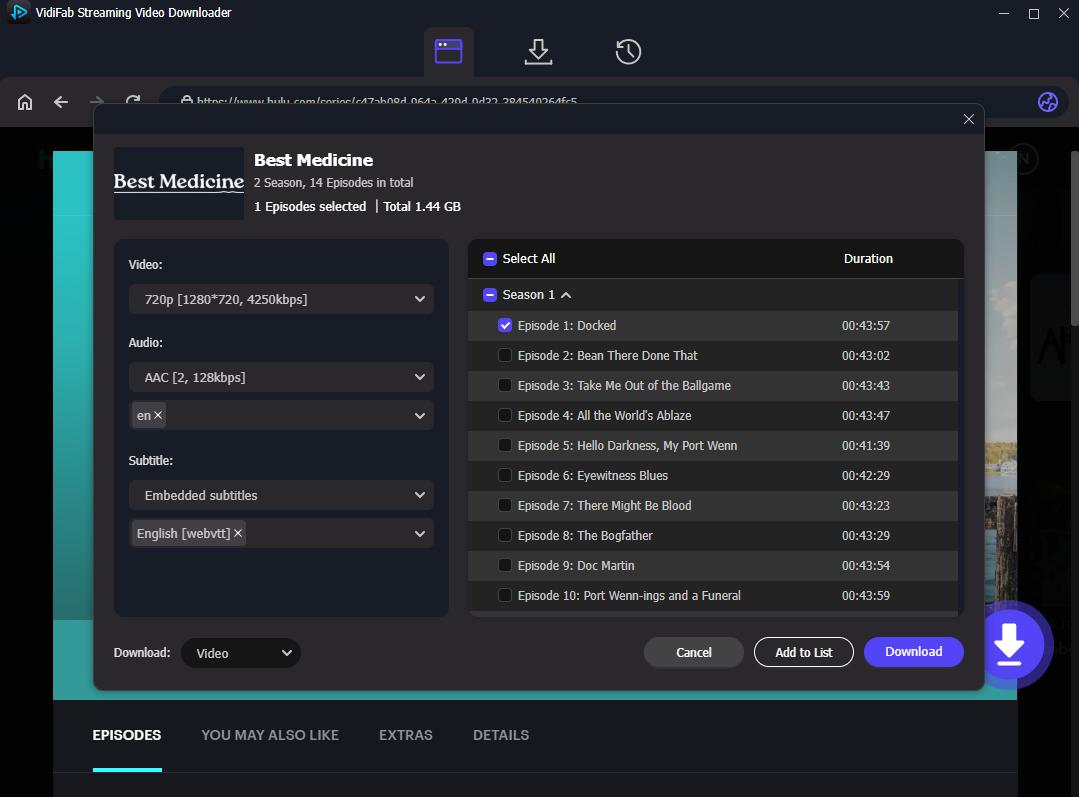
Step 3. Customize the download settings. When the download settings window pops up, choose the video quality, audio track language, and subtitle options. If you're downloading multiple episodes, check the Select All box for batch downloading.

Step 4. Start the download. Click Download to start saving the Hulu videos to your selected output folder. Once the process is complete, you can find the downloaded MP4 or MKV files in the output folder and watch them offline with a compatible media player.
Part 6. Troubleshooting: Why Can't I Download Shows on Hulu?
If you don't see the download icon, if the Hulu app won't download, or if the download fails, go through this list in order.
| Problem | What to check or do |
|---|---|
| You see no download icon anywhere. | Make sure you're using an eligible ad-free Hulu plan. Downloads are not available with ad-supported plans. |
| The icon is missing on one show only. | That title may not support offline downloads. Try another show or episode with a download icon. |
| You're on an ad-free plan but still can't download. | The title may not be available for offline viewing, or you may be outside the U.S. Check the title and your current location. |
| The download will not start or keeps stopping. | Check your internet connection, move closer to your router, or turn on Cellular Downloading. |
| You get a message about a download limit. | Hulu allows up to 25 downloads across 5 devices. Delete a finished download to free up a slot. |
| Your downloads disappeared. | The downloads may have expired, the title may have been removed from Hulu, or you may have logged out. Logging out automatically clears all downloads from that device. |
| The downloaded episode will not play. | Check whether your download has expired. Hulu lets you start watching within 30 days and gives you 48 hours to finish once you start. Go to Downloads and look for a renew option. If you're outside the U.S., downloaded titles will not play. |
Part 7. FAQs About Hulu Downloads
Can you download Hulu shows to an SD card?
Can different profiles on my Hulu account have separate download lists?
Why are my Hulu downloads not playing in 4K or HDR?
If I downgrade my subscription plan, what happens to my saved downloads?
Final Thoughts
Downloading shows on Hulu lets you enjoy your favorite premium content offline. Just remember to upgrade to an ad-free plan, stick to a supported mobile device, and keep an eye on your 25-title limit. If you need to save Hulu videos on a Windows PC or Mac, a streaming video downloader like VidiFab offers another option.
Now that you know the rules and methods, grab your device, hit download, and enjoy streaming without interruptions on your next trip!
Free Download
Secure Download
Free Download
Secure Download



I'm a video tech specialist with over 10 years of experience in digital media and streaming. I focus on making complex workflows simple and practical. Through my guides, you'll learn how to convert media, keep high-quality playback across devices, and manage your streaming video library with ease.
 Leave Your Comment