How to Fix Hulu Error 94 on Any Device: A Complete Troubleshooting Guide
 By Miles Kent
If you're stuck on Hulu Error 94, it usually indicates a temporary loading failure, network connection issue, or device activation conflict. Follow these quick steps to get your stream back up and running immediately:
- Check Your Login and Subscription: Make sure your Hulu login details are correct. If you subscribed to a Hulu bundle through Disney+, activate Hulu before trying to watch.
- Restart the Hulu App: Close Hulu completely, then reopen it.
- Check Your Internet Connection: Ensure your network meets Hulu's minimum streaming requirements (3.0 Mbps for On-Demand content and 8.0 Mbps for Live TV). Try disconnecting other devices to free up bandwidth.
- Power Cycle Your Device: Turn off your TV or streaming device, unplug it for about 60 seconds, then plug it back in and try Hulu again.
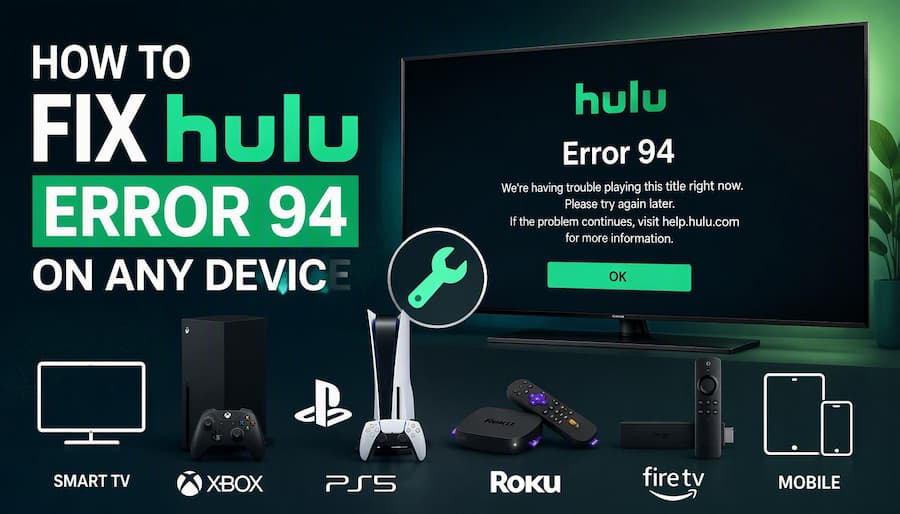
Part 1. What Is Hulu Error 94 and Why Does It Happen?
Hulu Error Code 94 is a common connection and loading problem. It happens when the Hulu app fails to communicate properly with Hulu's servers or load the video key.
When Error 94 occurs, you will most commonly see a message on your screen like this:
Loading Error
"Failed to load Hulu. Please close and open the application to try again. ERROR 94"
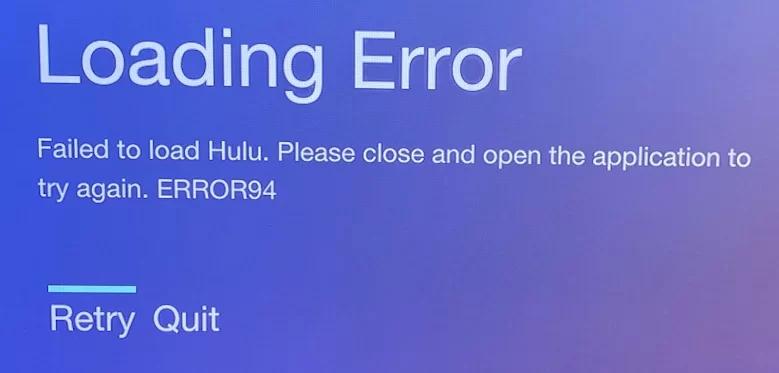
However, the error may appear in different situations. Hulu may get stuck in a loading loop, crash while playing a video, or fail during account sign-in. You may also see general playback messages such as "Cannot play this title right now" or "We're having trouble playing this."
What Causes Hulu Error 94?
- Unstable or weak internet connection: The app cannot keep a steady link to Hulu's servers.
- Corrupted app cache or data files: Old or damaged files stop the app from starting or playing correctly.
- Outdated Hulu app or system firmware: An old app or TV software may not work well with Hulu's latest updates.
- Incompatible device or activation error: Your device may not be linked to your Hulu account correctly.
- Active VPN or proxy: These tools can block or change your connection to Hulu.
Part 2. 6 Ways to Fix Hulu Error 94
Resolving Hulu Error Code 94 usually requires clearing corrupted session data, restoring network stability, or re-authenticating device tokens. Follow these 6 proven troubleshooting steps in order. Menu names may vary depending on your device and software version.
Fix 1. Force Quit and Reopen the Hulu App
A temporary app glitch may stop Hulu from loading correctly. Fully close the app and open it again to see if the error disappears.
- Fire TV / Android TV: Go to Settings > Applications > Manage Installed Applications > Hulu > Force Stop.
- Apple TV: Double-click the TV/Home button on the Siri Remote, highlight the Hulu tile, and swipe up to force quit.
- Mobile Devices (Android/iOS): Swipe up from the bottom of the screen and swipe the Hulu app card away.
- Computer Web Browsers: Close the Hulu browser tab, open a New Incognito / Private Window (Ctrl+Shift+N on Windows or Cmd+Shift+N on Mac), navigate back to Hulu.com, and sign in again.
Fix 2. Clear App Cache and Data
Corrupted temporary files are one of the most common triggers for Error 94. Clearing the cache removes damaged temporary data without deleting your account.
- Android / Fire OS: Go to Settings > Apps > Hulu > Storage > Select Clear Cache (and then Clear Data if startup errors persist).
- iOS / iPadOS: Go to Settings > General > iPhone Storage > Hulu > Select Offload App to purge cached binary data while keeping basic preferences.
- Desktop Web Browsers: Open browser settings, navigate to Privacy and Security > Clear Browsing Data, select Cached images and files and Cookies, then click Clear Data.

Note: Clearing data will sign you out of Hulu. Keep your email and password ready. Some devices, like LG and Xbox, do not have a clear cache option. On these, uninstall and reinstall Hulu instead.
Fix 3. Power Cycle Your Streaming Device and Router/Modem
A power cycle refreshes your device and your network connection. It fixes many temporary problems.
Turn off your TV or streaming device. Unplug the device, your router, and your modem from power. Wait 60 seconds. Plug in the modem and router first. Wait until the lights are steady. Plug in your TV or streaming device, then open Hulu.
Fix 4. Test and Improve Your Internet Speed
Hulu Error 94 may occur when your internet connection is slow or unstable. To check your connection, run a quick speed test using Fast.com or Speedtest.net. Then compare your download speed with Hulu's recommended minimum speeds below.
- 3.0 Mbps for On-Demand Movies & TV Shows
- 8.0 Mbps for Live TV Streams
- 16.0 Mbps for 4K Ultra HD Content

Optimization Tip: To eliminate wireless channel interference, switch your streaming device from a 2.4 GHz Wi-Fi channel to a 5 GHz band, or install a direct Ethernet cable connection for optimal stability.
Fix 5. Disable Active VPNs or Proxy Connections
Hulu may block or slow down connections that use a VPN or proxy. This can cause loading errors.
To rule out connection issues, fully disable any active VPN or proxy services on your streaming device, computer, or router, then try Hulu again. If the error persists, check your DNS settings. Set DNS to automatic, or try a trusted public DNS service, such as Google Public DNS (8.8.8.8 and 8.8.4.4).
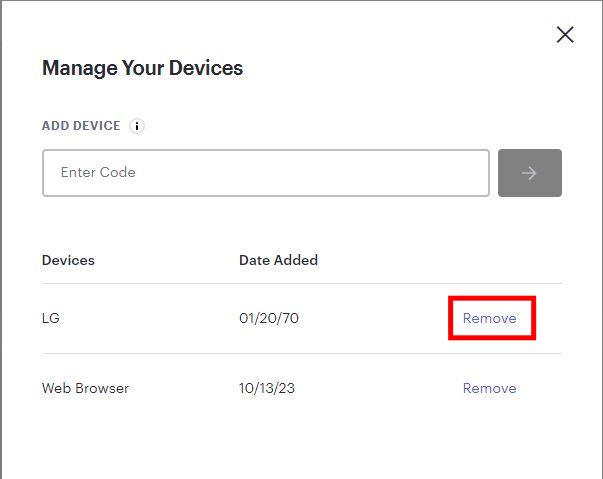
Fix 6. Deactivate and Reactivate Your Device in Your Hulu Account
If your device is not linked to your account correctly, Hulu may fail to load. Removing the device and adding it again can fix this.
-
01
On a phone or computer, log in to your Hulu account at hulu.com.
-
02
Go to Account, then find Watch Hulu on Your Devices, and select Manage Devices.
-
03
Remove the device that shows Error 94.
-
04
Open Hulu on that device and log in again. You may need to enter an activation code.
Part 3. Device-Specific Solutions for Hulu Error Code 94
If you've already done the basic troubleshooting steps in Part 2—like restarting your device, clearing the Hulu app cache, and checking your internet connection—and it still isn't working, the problem might be related to your operating system or TV hardware. Check the section for your device below to find specific solutions.
Hulu Error 94 on Samsung TV
If Hulu Error 94 appears on your Samsung TV, try reinstalling the app first. If that doesn't help, reset the Smart Hub or check whether your TV still receives software updates.
Method 1. Reinstall the Hulu App
Navigate to Apps on your Samsung TV, select the Settings icon in the top-right corner, highlight Hulu, and select Reinstall or Delete. Then search for Hulu in the App Store and download it. Lastly, open Hulu, log in, and see if the Hulu app works properly.
Method 2. Reset Samsung Smart Hub
Make sure your TV is on Live TV or an HDMI input (Smart Hub cannot be reset while inside an app).
Navigate to Settings > All Settings > Support > Device Care > Self Diagnosis > Reset Smart Hub. (On 2016–2021 models: Settings > Support > Self Diagnosis > Reset Smart Hub).
Enter your TV security PIN (the factory default PIN is 0000).
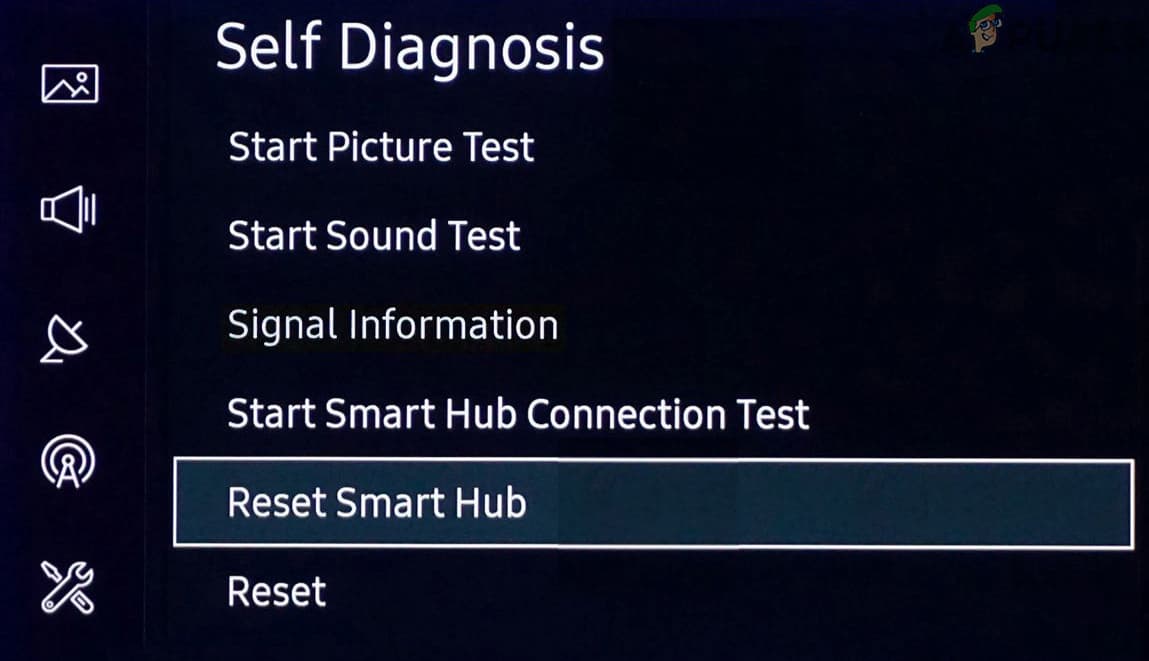
Note: If menu items appear grayed out, press and hold the Return button on your remote to close active background apps first.
Method 3. Legacy Model Workaround (For 2019 & Older Models)
For older Samsung models (e.g., 2019 and earlier), check for Tizen OS firmware updates under Settings > Support > Software Update. If Samsung has ended official software support for your model, the internal web browser and DRM libraries may no longer support Hulu's updated streaming protocols. In this case, attaching a dedicated streaming media stick, such as an Amazon Fire Stick or Roku player, via HDMI will restore seamless playback.
Hulu Error 94 on LG TV / webOS
On LG Smart TVs, app problems may be related to the app installation, system software, or startup settings. Try these methods in order.
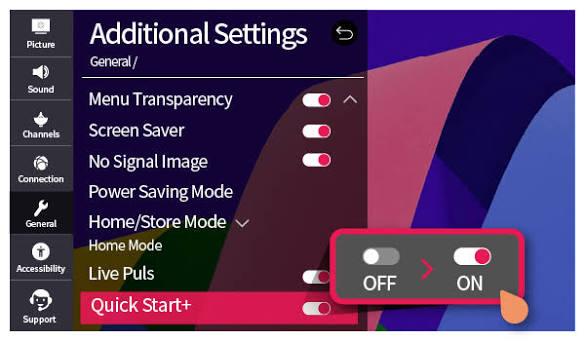
Method 1. Turn Off Quick Start+
Go to Settings > All Settings > General or System > Additional Settings > Quick Start+, and turn it off if the option is available. Then turn off the TV, unplug it for about 60 seconds, and plug it back in. Open Hulu and test playback.
Method 2. Reinstall the Hulu App from LG Content Store
Press the Home button on your Magic Remote, highlight the Hulu tile, click the X icon above it to delete the app, then download a fresh copy from the LG Content Store to clear corrupted system registration file.
Method 3. Update webOS System Firmware
- webOS 5.0 and newer (2020–present): Select Support > Software Update > Check for Updates.
- webOS 4.5 and older (2019 and earlier): Select General > About This TV > Check for Updates.
If there's a new version, click Download and Install. Then restart your LG TV after it finishes installing.
Method 4. Check Date and Time Settings
Incorrect system time causes SSL/TLS certificate handshake failures when connecting to Hulu servers. Go to Settings > General > System > Time & Date and set the date and time to Set Automatically.
Hulu Error 94 on Sony TV / Google TV / Android TV
Sony BRAVIA and regular Android TV/Google TV might show Error 94 due to aggressive power-saving settings, outdated system graphics, or problems with Google Play syncing. Give these fixes a shot on your TV and check if the 94 error code disappears.
Method 1. Turn off "Energy Saver" or "Idle TV Standby" Modes
Navigate to Settings > System > Power & Energy > Energy Saver (or Idle TV Standby) and turn these options Off.
Method 2. Update Android System WebView & Google Play Services
Open the Google Play Store on your TV, search for Android System WebView and Google Play Services, and update both if an update is available. Then, restart the TV and open the Hulu app to check if it works.
Method 3. Reset TV to Factory Settings (Last Resort)
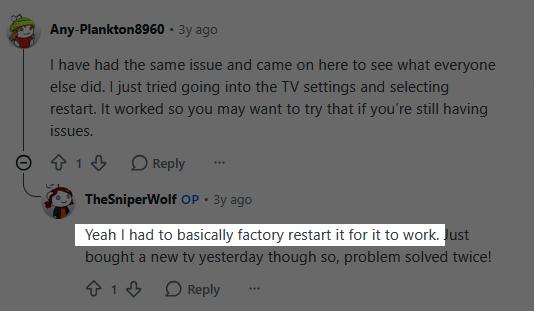
If nothing else works, a factory reset may help. One user on Reddit's r/AndroidTV reported that a factory reset got Hulu working again on a Google TV.
To do this, just head to Settings > System > About > Reset > Factory Reset (keep in mind that the menu names and paths might be different depending on your device). Remember, a factory reset will erase your personal settings, accounts, installed apps, and saved network info, so you'll have to set everything up again afterward.
Hulu Error 94 on TCL TV
TCL makes TVs that run on Roku and on Google TV. Check which one you have. If your TCL uses Google TV, follow the Sony / Google TV steps above.
Method 1. Restart Your TCL Roku TV System
Perform a system reboot via the Roku settings menu (Settings > System > Power > System restart). Alternatively, clear the system memory using the secret Roku remote sequence: press Home 5 times, Up 1 time, Rewind 2 times, and Fast Forward 2 times.
Method 2. Switch Your Wi-Fi Band (2.4GHz vs 5GHz)
Certain TCL Wi-Fi hardware modules experience frequency drops or DNS handshake failures on dual-band routers. Navigate to Settings > Network > Set Up Connection, disconnect from your current Wi-Fi network, and manually connect specifically to your router's 5GHz band or switch to 2.4GHz if the 5GHz signal is weak.
Hulu Error 94 on Fire TV / Firestick
Method 1. Firestick Hardware Remote Restart
If the Fire OS interface is frozen or unresponsive, force a hardware reboot directly from your remote: press and hold the Select (center button) and Play/Pause buttons simultaneously for 5 seconds until the Firestick screen turns off and initiates a reboot sequence.
Method 2. Check Fire OS Software Updates & HDCP Compliance
Go to Settings > My Fire TV > About > Check for System Update. Additionally, ensure your Firestick is plugged directly into a high-speed HDMI port on your TV and HDCP-compliant display to avoid DRM handshake errors during stream launch.
Hulu Error 94 on Xbox One / Xbox Series
If Hulu is not loading on your Xbox, resetting the network settings may help when the problem is related to the console's connection.
-
01
Press the Xbox button on your controller to open the guide.
-
02
Select Profile & system > Settings > General > Network settings.
-
03
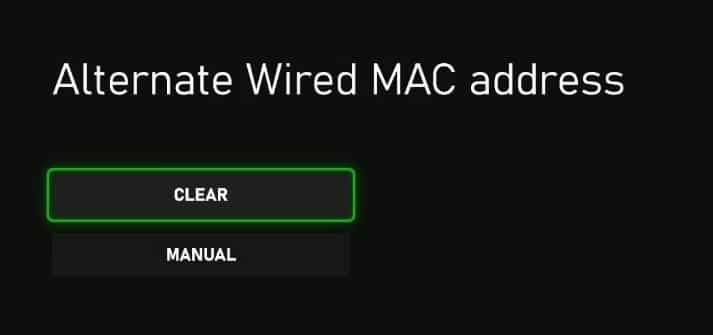
Go to Advanced settings > Alternate MAC address.
-
04
Select Clear and allow your Xbox console to restart.
Hulu Error 94 on PS4 / PS5 / Nintendo Switch
Gaming consoles can experience Error 94 due to digital rights management (DRM) licensing hiccups or corrupted local saved utility data.
Method 1. Restore Licenses (PlayStation Only)
- PS4: Go to Settings > Account Management > Restore Licenses.
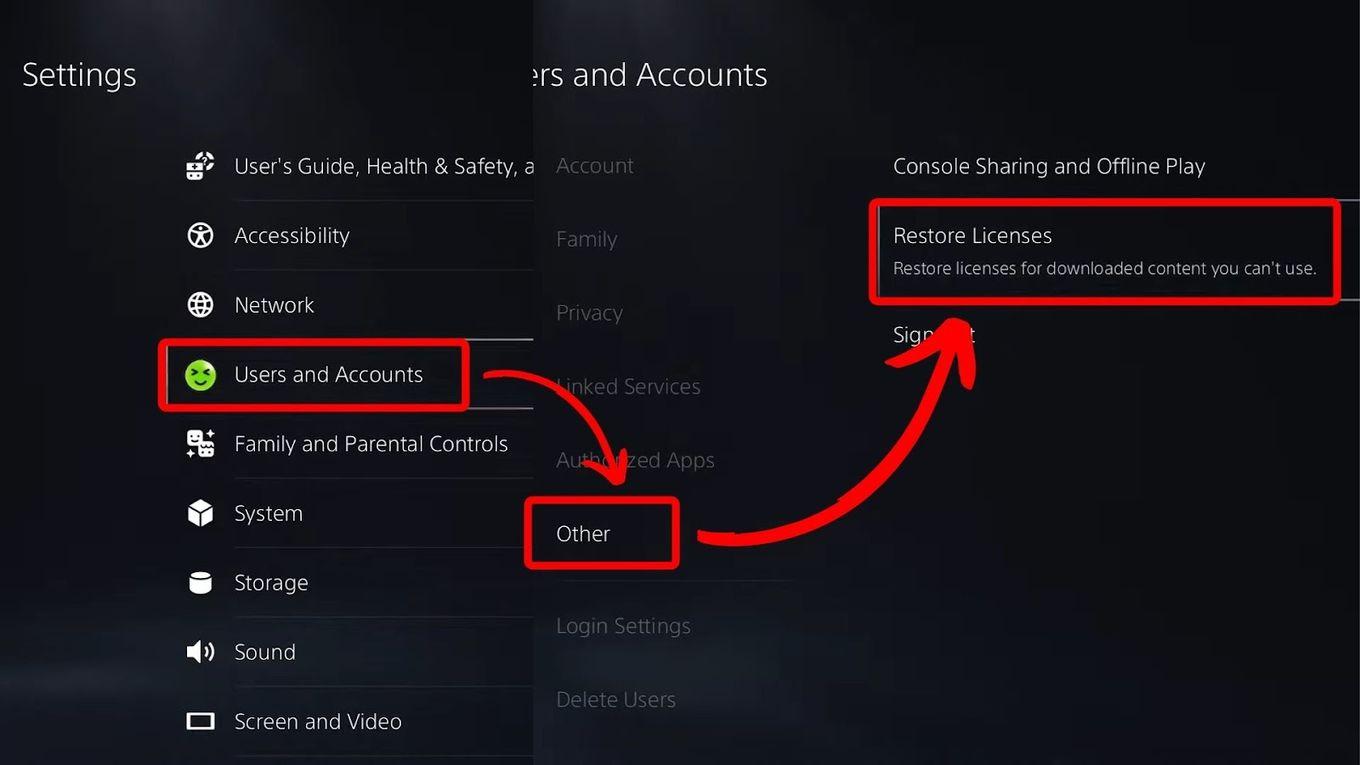
- PS5: Go to Settings > Users and Accounts > Other > Restore Licenses.
Then open Hulu again.
Method 2. Delete Saved Data & Clean Reinstall the App
PlayStation: Go to Settings > Storage > Saved Data > Hulu, press the Options button on your controller, and select Delete. Then uninstall and re-download Hulu from the PlayStation Store.
Nintendo Switch: Open System Settings from the Home Menu, go to Data Management > Software > Hulu, select Delete Software, restart your console, and re-download Hulu from the Nintendo eShop.
Part 4. Bonus: Download Hulu Videos to Watch Offline Without Errors
Error 94 usually comes from a weak connection or an app problem. Even after you fix it, it can come back at a bad time, like in the middle of a movie night. A simple way to avoid this is to download your favorite Hulu shows and movies ahead of time. Then you can play them as local files, without needing Hulu's app to load or stream.
VidiFab Streaming Video Downloader lets you save Hulu movies and TV shows to your computer as MP4 or MKV files. It does not fix Error 94 inside the Hulu app. Instead, it helps you skip the streaming step that causes the error.
Once a video is saved, you watch it as a normal video file. This avoids the main causes of Error 94:
- No weak or unstable internet while watching: You don't need an internet connection to watch the Hulu videos you download from the VidiFab downloader.
- No corrupted app cache or data: Your video plays in a media player, not in the Hulu app, so broken app files cannot stop it.
- No outdated app or system problems: You don't need the latest Hulu app or TV firmware to play a local file. This helps a lot on older smart TVs that Hulu no longer supports well.
- No problems from Hulu server issues: If Hulu is slow or down, your saved videos still play.
 Free Download
 Secure Download
 Free Download
Secure Download
Free Download
Secure Download
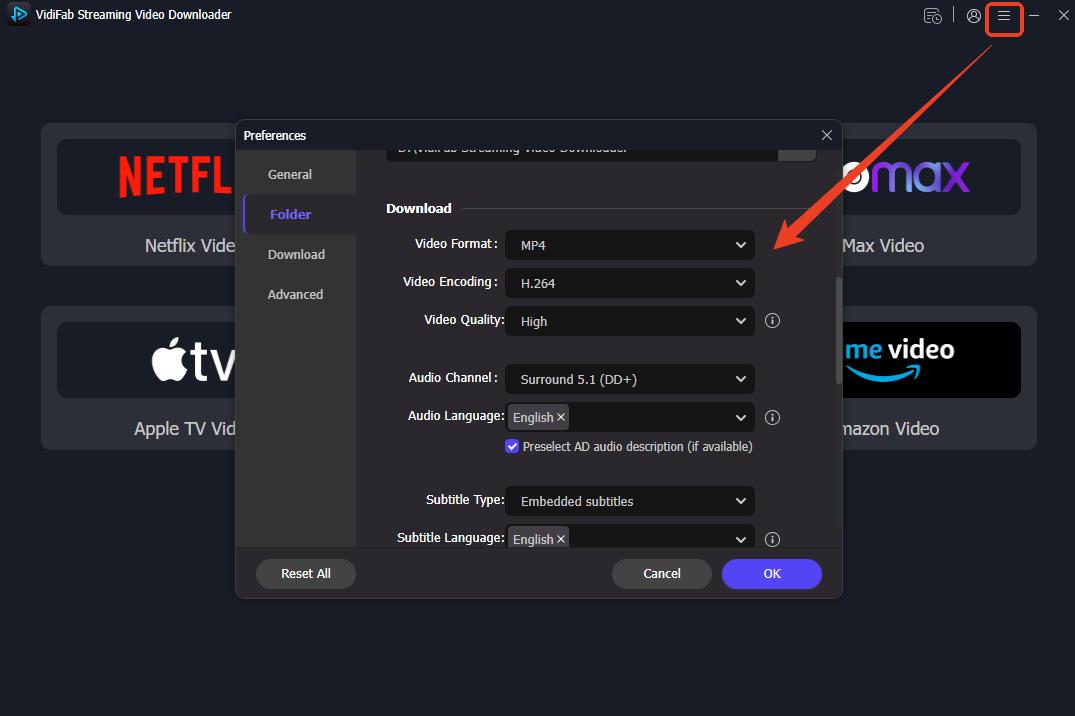
Step 1. Open VidiFab and go to Preferences. Choose your output format, such as MP4 or MKV. Then pick the folder where you want your downloaded videos to be saved. You can also change other download settings here.
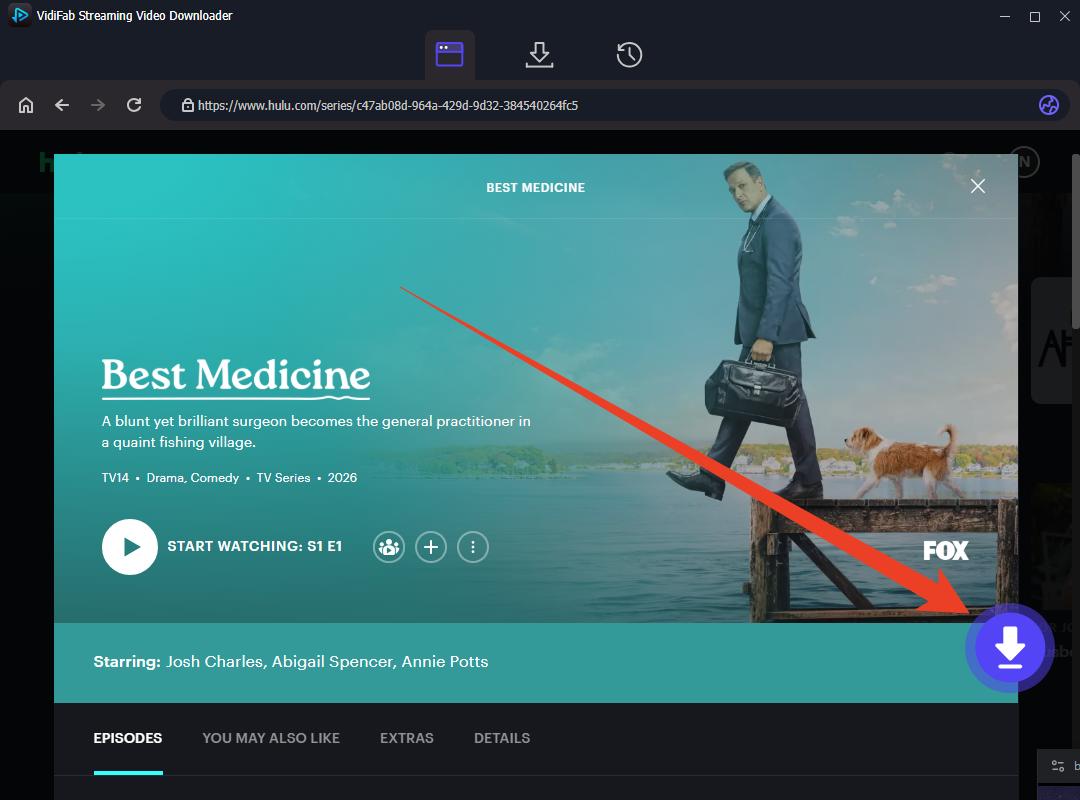
Step 2. Open Hulu in VidiFab's built-in browser and sign in to your Hulu account. Find the movie or TV show you want to save. On the playback page, click the Download button in the lower-right corner.
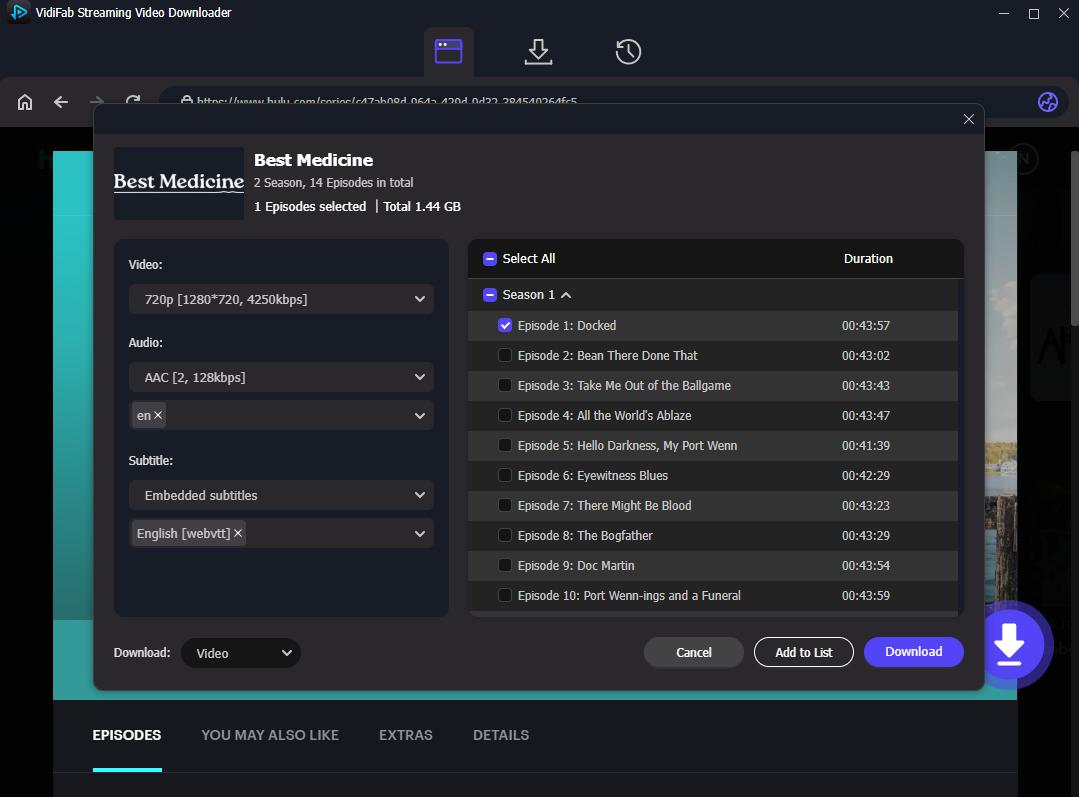
Step 3. In the settings window, select your video quality, audio language, and subtitles. For a TV series, you can choose several episodes, or click Select All to add the whole season to the queue.
Step 4. Click Download. When it finishes, open the output folder to find your MP4 or MKV files. You can now watch them on compatible devices and media players, without a live Hulu stream.
Please use downloaded videos for personal viewing only, and follow Hulu's Terms of Use and the copyright laws in your area.
Part 5. When to Contact Hulu Support
Most cases of Hulu Error 94 can be fixed with the steps above. But sometimes the problem is bigger than your device or your Wi-Fi. It may be time to ask Hulu for help if:
- You tried the general fixes and the device-specific steps, and the error still appears.
- Error 94 shows up on every device you own, even on a phone or computer with a good connection. This may point to an account or server problem.
- You can't log in, and you are sure your email and password are correct.
- Your Disney+ bundle or Hulu plan looks active, but Hulu still won't load.
- Hulu's status looks normal for other people, but the error never goes away for you.
What to Prepare Before You Contact Hulu
- Your device: The brand, model, and year (for example, a Samsung TV from 2019).
- Software versions: Your device's system version and your Hulu app version, if you can find them.
- When it started: The date the error began and what you were doing when it appeared.
- What you already tried: For example, restarting, clearing cache, reinstalling, and testing your internet.
- A screenshot or photo: Take a picture of the error message, if possible.
How to Contact Hulu Support
-
01
Go to the Hulu Help Center and sign in to your account.
-
02
Look for Hulu's contact options in the Help Center. The available options, such as chat or phone, can change, so check the page for the latest choices.
-
03
Give the support agent the details you prepared above.
While You Wait for a Reply
You don't have to stop watching. You can try Hulu on another device, like your phone or computer. Or you can use VidiFab to download your shows ahead of time and watch them offline.
Part 6. FAQs
Can Hulu Error 94 be caused by a Hulu server outage?
Why does Hulu Error 94 keep coming back after I restart the app?
Why does Hulu work on my phone but not on my TV?
What should I do if Hulu Error 94 appears only when playing certain shows?
Why does Hulu Error 94 happen when I try to cast from my phone to TV?
Conclusion
Still seeing Error 94 after trying every fix? Check Downdetector to see if Hulu is down for others. If it isn't, contact Hulu Support and tell them which fixes you already tried.
To avoid this in the future, download your favorite Hulu shows and movies with the VidiFab streaming video downloader. That way you have a backup copy to watch offline, even when Hulu is down.
Free Download
Secure Download
Free Download
Secure Download

I write about streaming services, video playback, and digital media management. My articles cover practical ways to convert video files, troubleshoot playback issues, and manage digital content across devices. I aim to make technical topics easier to understand and help readers find practical solutions to common challenges.
 Leave Your Comment