Top 4 Reliable 123Movies Downloaders for High-Quality Downloads
 By Arlo Bennett
123Movies is one of the most popular free online movie streaming sites, famous for its huge library of movies and TV shows. Although the 123Movies website shows a "Download in HD" button, my testing found that it doesn't actually download videos. Instead, it often installs third-party software full of ads on your computer. So, to download movies on 123Movies safely, you need a reliable 123Movies downloader.
I looked at recommendations from Reddit users and tested every tool mentioned. After careful testing, I identified four methods that really work for downloading movies from 123Movies. Each method includes step-by-step instructions, along with its pros and cons. At the end of the article, there's also a comparison table to help you choose the method that works best for you.
- 123Movies does not have a built-in download feature; the "Download" buttons on the site are usually deceptive ads.
- Using a dedicated 123movies movie downloader is essential to avoid installing unwanted software on your device.
- This guide covers four distinct methods: professional software (VidiFab), browser extensions, IDM, and P2P alternatives like RARBG.
Note: This guide is for educational purposes only. We do not condone the distribution of copyrighted material. If you choose to download a movie from 123Movies, ensure it is strictly for personal, fair-use viewing.
Part 1. Can You Download Movies from 123Movies?
No, you can’t directly download movies from 123Movies, even though the site shows a “Download in HD” button.
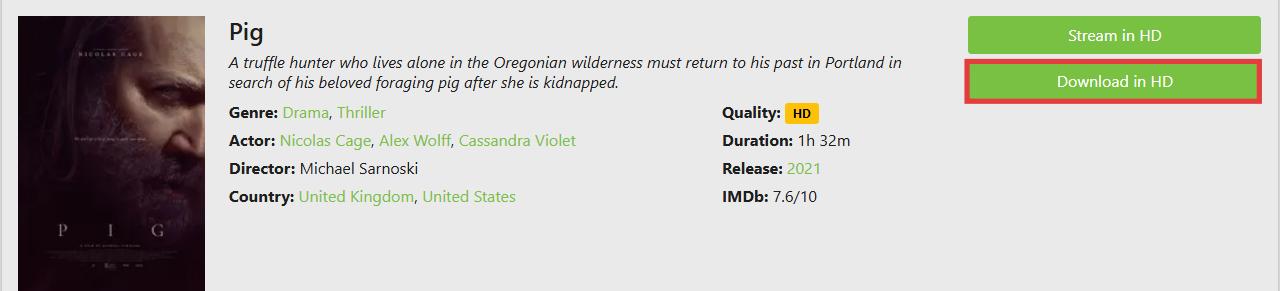
I tested the "Download in HD" button on 123Movies (ww8.123moviesfree.net), and instead of downloading the movie, it prompted me to install a file called OperaGXSetup.exe. After checking, this file is actually an installer for the Opera GX gaming browser, not the movie itself.
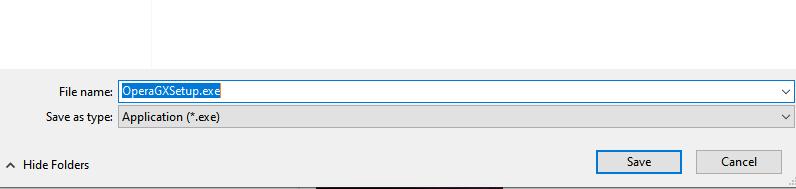
I do not recommend installing it, because it doesn't come from the official Opera GX website.
Basically, 123Movies does not let you download videos. The site and its clones only shows a download button to trick users into installing unrelated software for affiliate revenue. If you want a real MP4 file for offline viewing, you need to ignore the on-site buttons and use one of the verified tools mentioned below.
Part 2. Free 123Movies Downloaders That Works
The reliable way to download movies from 123Movies safely is by using a trusted downloader. After testing, I found four tools that actually work.
Tool 1. VidiFab Streaming Video Downloader
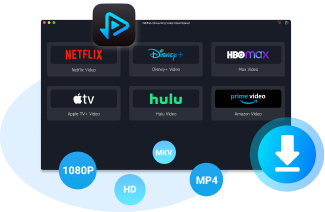
VidiFab Streaming Video Downloader is a professional software that lets you download videos from major streaming platforms like Netflix, Amazon Prime, HBO Max, Hulu, Apple TV+, and Disney+. If you have an active subscription to any of these services, you can use VidiFab to save movies and shows as high-quality, ad-free MP4 or MKV files.
Unlike browser-based tools, which often fail or stop working after updates, VidiFab ensures your downloads keep full HD quality (up to 1080p) and lets you download as many videos as you want. All downloads include multiple audio tracks and embedded or external subtitles, making it easy to watch on any device.
I recommend VidiFab for anyone who wants to build their own collection of movies or TV shows, because it provides a smooth, fast, and reliable download experience. For instance, while downloading movies from Netflix usually takes me about 2 hours, this cuts it down to just a few minutes!
VidiFab Streaming Video Downloader
Download videos from streaming platfroms as MP4/MKV in 1080p with Dolby Atmos for offline viewing all devices.
How to Download Movies from 123Movies Using VidiFab
Step 1. Set Your Download Preferences
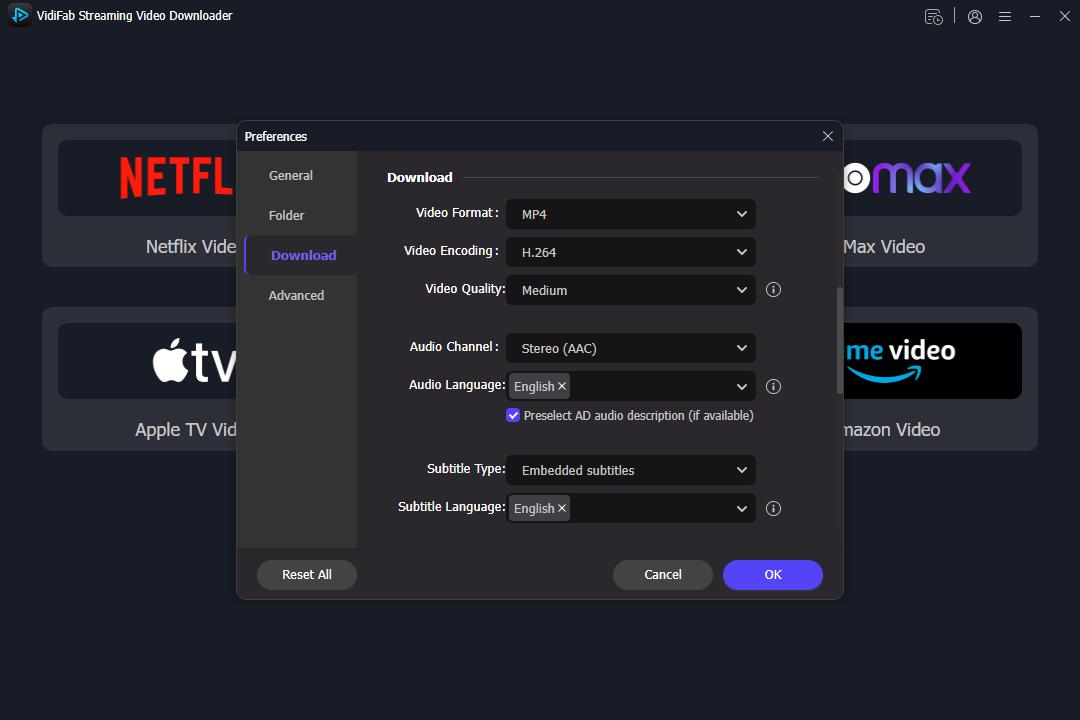
First, download and install VidiFab. Launch the software, click the Menu icon in the top right corner and select Preferences. Here, ensure the Download Video Format is set to MP4 or MKV. You can also pre-select your preferred video quality (1080p) and encoding method to ensure every 123Movies download meets your standards.
Step 2. Find Your Movie on Supported Premium Platforms
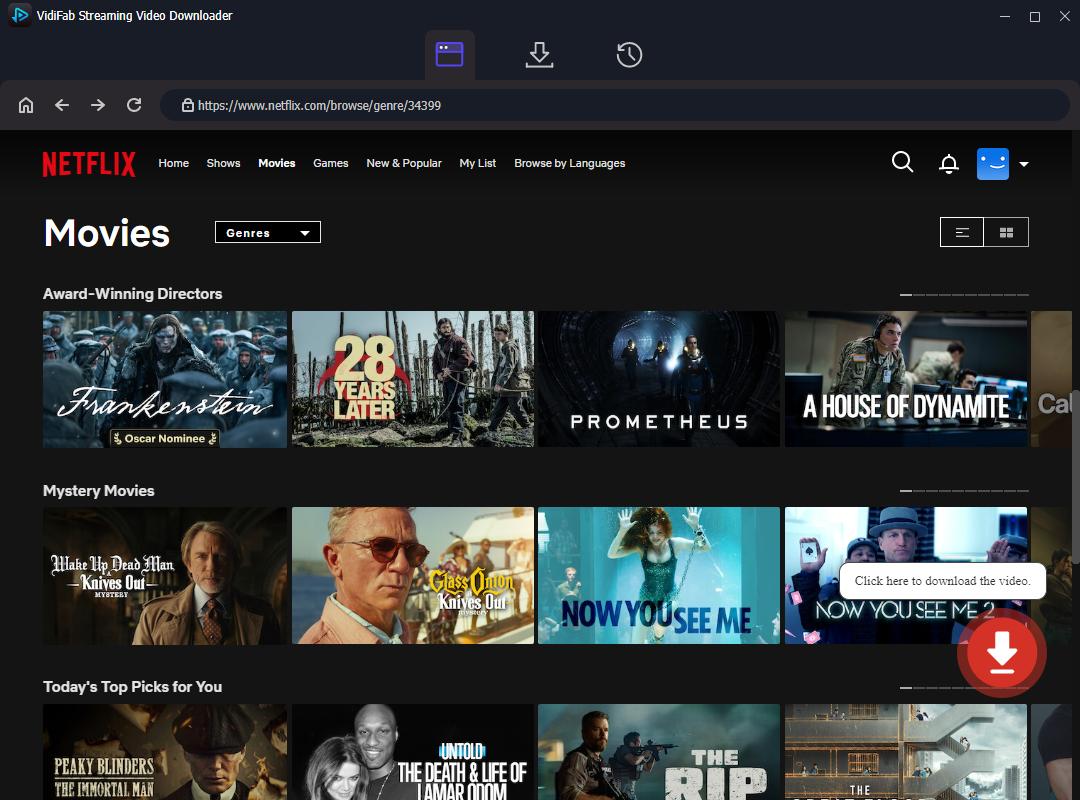
Since most films found on 123movies.to are also available on these platforms, you can use VidiFab to download the official, high-bitrate version instead of a low-quality stream. Simply select the platform icon (e.g., Netflix), log in, and search for the movie you originally found on 123Movies. Click the download button in the bottom right corner.
Good news: VidiFab plans to add support for external websites like 123Movies in the future, so you may soon be able to download directly from sites like 123Movies.
Step 3. Set Video Quality, Audio, and Subtitles
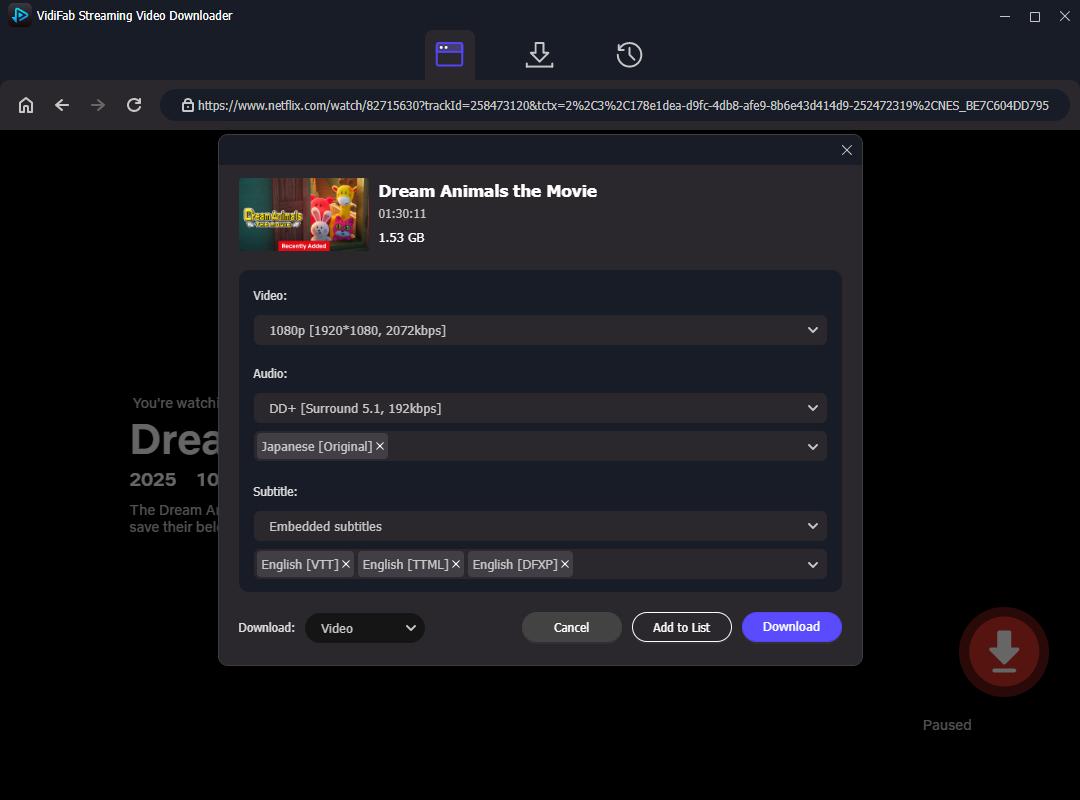
Choose 1080p for high-definition quality. If the movie has multiple audio tracks, select your preferred language. You can also choose embedded or external subtitles. This ensures your downloaded file is ready for offline viewing exactly how you want it.
Step 4. Start Downloading and Save Files
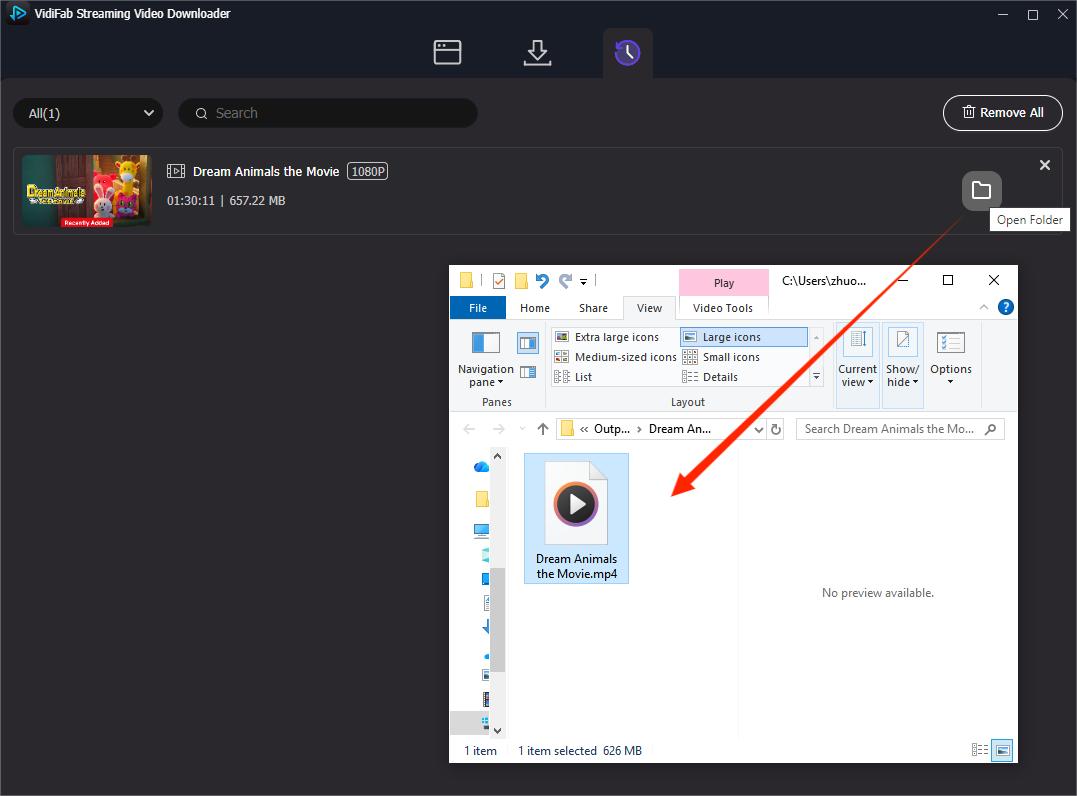
Click Download to begin saving the movie. VidiFab extracts the video as a standard MP4 or MKV file, so you can watch it on your PC, Mac, Android device, or Smart TV without needing the original streaming platform. After the download finishes, check the History tab to find and organize your files for offline viewing.
Pros:
- Downloads high-quality MP4 and MKV files
- Supports full 1080p resolution and high-quality audio
- No ads or download limits
- Saves multi-language subtitles and audio tracks
- Offers a safe download environment
Cons:
- Currently doesn't support 123Movies directly
- Requires a subscription to the streaming platform
- Software installation is needed
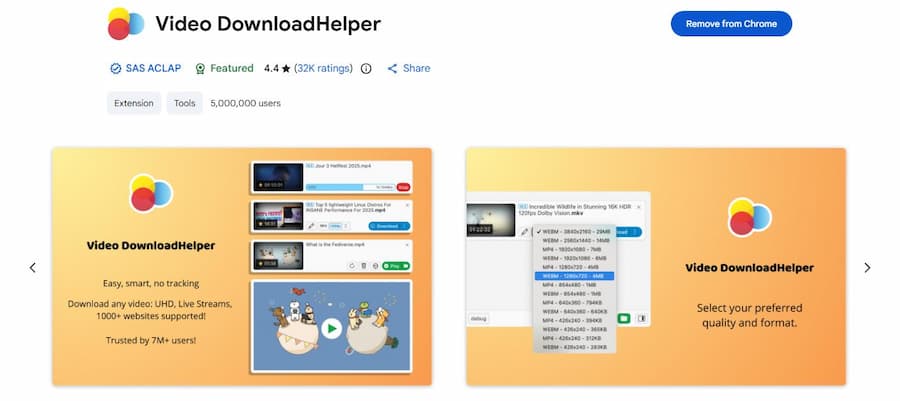
Tool 2. Video DownloadHelper
Video DownloadHelper is a browser plugin that works on Chrome, Firefox, and Edge. After testing this extension with different movies on 123Movies, I can confirm it successfully captures video files. However, keep in mind that the download speed is inconsistent and depends on your internet connection and the site's server stability.
Video DownloadHelper offers both free and premium plans. The free plan allows one download at a time, and some high-resolution conversions may include a watermark. The Premium Plan unlocks faster download speeds, removes watermarks on converted files, and allows for simultaneous downloads.
How to Download Movies from 123Movies with Video DownloadHelper
Step 1. Go to the official Video DownloadHelper website and add it to your browser.
Step 2. Open a movie on 123Movies and start playback.
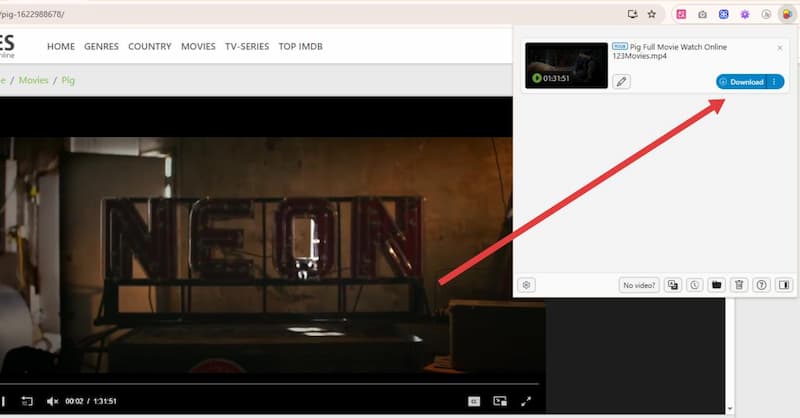
Step 3. Once the video starts, the Video DownloadHelper icon in your browser toolbar will turn from gray to color. Click it to see the detected files.
Step 4. Click the gear icon in the bottom left corner to set the resolution to 1080p or 720p, and select the video format if you have a preference.
Step 5. Click the blue download button. The video will start downloading to your computer.
Pros:
- Works on multiple browsers like Chrome, Firefox, and Edge.
- Can download videos from many websites.
- Lets you choose video quality like 1080p or 720p.
- Free plan available for basic use.
Cons:
- Download speed depends on your internet connection.
- Premium plan required for faster downloads and extra features.
- Sometimes the plugin may fail on certain sites.
Tool 3. Internet Download Manager (Windows Only)
Internet Download Manager (IDM) is a legendary download accelerator designed to increase your download speeds by up to 8 times. It is widely considered a powerful tool for capturing video from web players. You can easily use IDM to download videos from 123Movies or any other site with video content.
While it is a premium tool, you can use a 30-day free trial with no credit card required to test its full capabilities. It is compatible with Windows 11, 10, 8.1, and 7 (both 32-bit and 64-bit versions).
Steps to Download Movies from 123Movies Using IDM:
Step 1. Download IDM from the official page and install it on your computer.
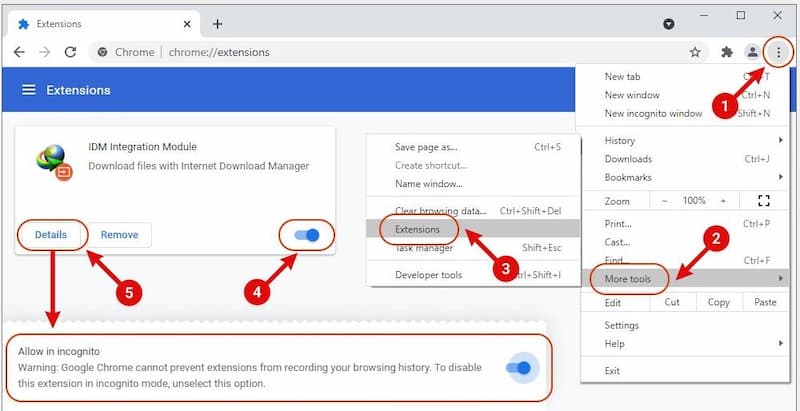
Step 2. Launch IDM. The software will guide you on how to integrate it with your browser. For Chrome, for example, you need to open the extensions page, enable Developer Mode, and toggle the IDM integration extension on.
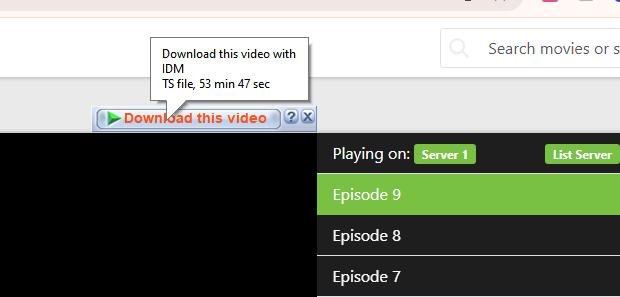
Step 3. Open the movie you want to download on 123Movies. A "Download this video" button will appear in the top-right corner of the video player. Click it.
Step 4. In the pop-up window, select your preferred file save location and click Start Download.
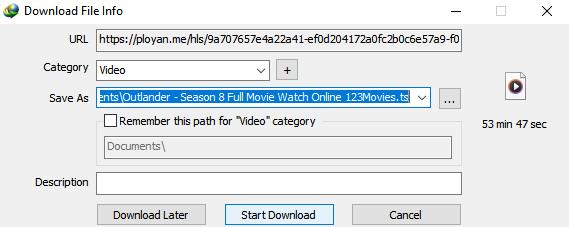
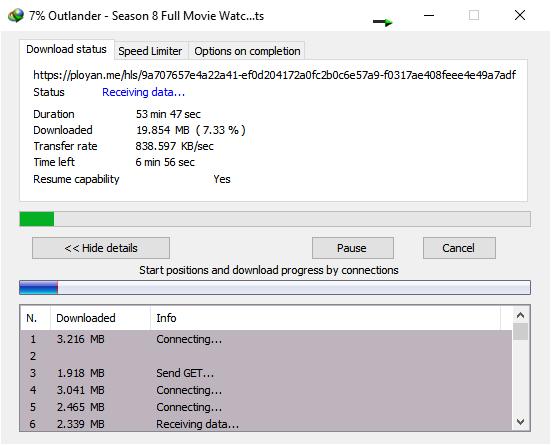
Step 5. You can monitor the download progress in the pop-up window. Overall, IDM usually downloads videos faster than Video DownloadHelper, depending on your internet connection.
Pros:
- Fast download speeds compared to browser plugins
- Detects videos automatically with a "Download this video" button
- Resumes interrupted or broken downloads efficiently
Cons:
- Only available for Windows
- Paid license required after the 30-day free trial
- No options for video subtitles, audio tracks, or video quality setup
Tool 4. RARBG & Torrents
This method involves downloading a "seed" file from a site like RARBG and using a BitTorrent client to download the actual movie. So, you will need to download and install a BitTorrent client like qBittorrent on your computer, which is available for Windows, macOS, and Linux.
And then, you can find the torrent file from RARBG. This site is where high-quality movie releases are organized by resolution and source. But the video quality depends on the torrent file, usually HD or 1080p. Some torrents include subtitles embedded in the file, but not all.
How to Download Movies from 123Movies Using RARBG & Torrents
Step 1. Download qBittorrent from the official site and install it on your computer.
Step 2. Open RARBG in your browser and search for the movie you want.
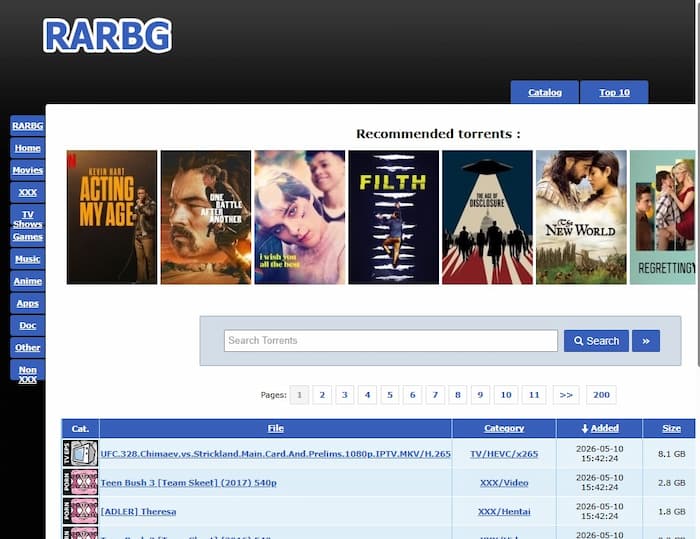
Step 3. Find a torrent file that matches the movie and check its resolution and file size.
Step 4. Click the small magnet icon. Your browser will ask to open qBittorrent.
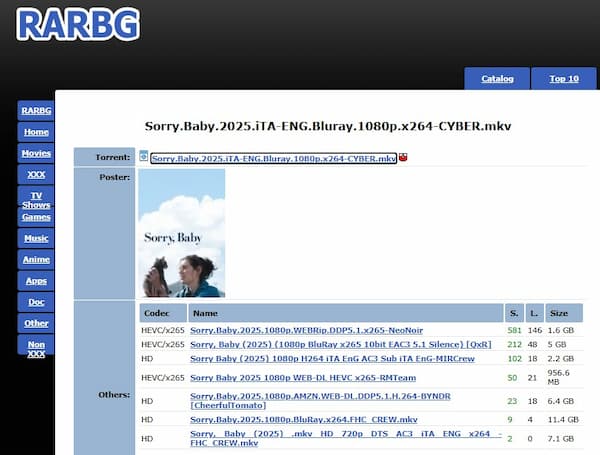
Step 5. Choose your download folder and start the download.
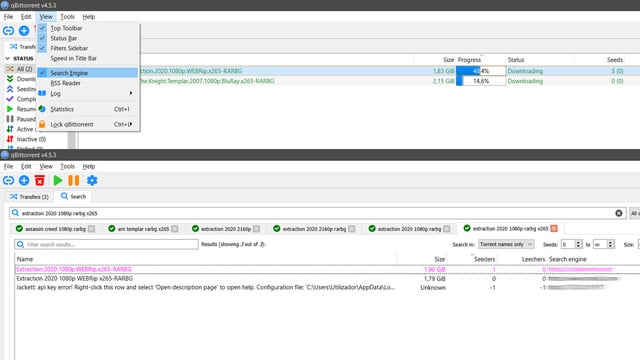
Step 6. If subtitles are not included, you can download them separately from sites like OpenSubtitles.org and add them to your video player.
Pros:
- Works on Windows, macOS, and Linux
- Free to use
- Can download high-quality videos
- Usually includes professional subtitles and multiple audio tracks
- Completely free with no hidden premium subscriptions
Cons:
- Requires a separate BitTorrent client installation
- Download speed depends on torrent seeders
- Some torrents may not include subtitles
- Your IP address is visible to others (VPN is highly recommended)
- Risk of fake or low-quality torrent files
Part 3. Which 123Movies Downloader Should You Choose?
For the best balance of safety and quality, VidiFab is the top choice for premium streaming, while IDM offers the fastest downloads for Windows users. If you want 4K quality for free, RARBG/Torrents is the most reliable alternative.
Comparison Table: 123Movies Downloader Methods
| Feature | VidiFab Downloader | Video DownloadHelper | Internet Download Manager | RARBG & Torrents |
|---|---|---|---|---|
| Platform | Windows & macOS | Chrome, Firefox, Edge | Windows Only | Win, Mac, & Linux |
| Cost | Free Trial / Paid | Free / Premium Plan | 30-Day Free Trial | Free |
| Output Quality | Up to 1080p | 480p/720p/1080p | Up to 1080p | Up to 4K Blu-ray |
| Subtitles & Audio | Multi-language & 5.1 Sound | Depends on source video | Depends on source video | Depends on source video |
| Security | High (Ad-free environment) | Medium (Safe but has ads) | High (Safe tool) | Low (Requires VPN/P2P) |
| Best For | Premium quality & safety | Quick, casual browser grabs | Speed-focused Windows users | High-definition cinephiles |
- Choose VidiFab if you care most about safety and high-quality downloads. It's ideal for users who have an active subscription to at least one major streaming platform, like Netflix or Amazon, and want to grab movies with perfect subtitles and zero risk of malware.
- Choose Video DownloadHelper if you're a casual viewer who just needs a quick, small download and doesn't want to install extra software. It's convenient for one-off clips, though the speed can be slower.
- Choose IDM if you're a Windows power user who wants the fastest downloads and often grabs videos from multiple websites. It's great for efficiency and bulk downloads.
- Choose RARBG & Torrents if you're a cinephile aiming for the ultimate 4K home-theater experience. This method can give you uncompressed files for free, but make sure to use a VPN to stay safe.
Part 4. FAQs About 123Movies Downloads
Is 123Movies safe to use without an ad-blocker?
Why does the 123Movies Download in HD button keep redirecting me?
Why do I get a 'No Video Found' error with my browser extension?
How can I download from 123Movies without losing video quality?
Can I download 123Movies videos directly to my Android or iPhone?
Is it legal to download a movie from 123Movies for personal use?
How do I get subtitles when downloading from 123Movies?
What is the safest 123Movies mirror site to use right now?
Final Thoughts
Ultimately, while 123Movies is convenient for quick streaming, it doesn't offer a safe, official way to download movies for offline viewing. From my experience, clicking on-site "Download" buttons often leads to adware, redirects, or other security risks.
The safest way to download movies is by using a trusted 123Movies downloader like VidiFab Streaming Video Downloader or IDM. These tools protect your device from malware and let you save high-quality MP4 files with proper subtitles. Always stay cautious online, use an ad blocker, avoid downloading software from 123Movies itself, and keep your offline collection for personal use only.
 Free Download
 Secure Download
 Free Download
Secure Download
Free Download
Secure Download



I write about must-watch movies and TV shows, plus detailed reviews of video downloaders and media tools. I help you discover what to watch next and pick the right tools to save and manage your favorite content. My goal is to give you clear, honest insights so you can enjoy streaming and offline viewing without the hassle.
 Leave Your Comment