How to Download Crunchyroll Episodes on Mobile, PC, and Mac
 By Miles Kent
Crunchyroll lets eligible Fan, Mega Fan, and Ultimate Fan members download supported episodes for offline viewing on mobile devices, but official downloads have limits. If you want to download episodes from Crunchyroll on a Windows PC or Mac, your options are different. This guide covers official mobile downloads, desktop alternatives, and quick fixes for when Crunchyroll downloads get stuck or fail.
Part 1. Can You Download Episodes on Crunchyroll?
Yes. Crunchyroll’s Fan, Mega Fan, and Ultimate Fan subscriptions all support offline downloads, but only on certain devices. If you can install the official Crunchyroll app from your device’s app store, you can log in with your subscription and download episodes for offline viewing. This table shows which devices support it.
| Device | Requirement | Official Downloads | How to Save Episodes |
|---|---|---|---|
| iPhone and iPad | iOS / iPadOS 17.0 or later | Yes | Crunchyroll app (see Part 2) |
| Android phones and tablets | Android 8.0 or later | Yes | Crunchyroll app (see Part 2) |
| Amazon Fire tablets | Fire OS 5 or higher | Yes | Crunchyroll app (see Part 2) |
| Windows PC | Microsoft Store app | No, streaming only | VidiFab or OBS (see Part 3) |
| Mac | Web browser only | No, streaming only | VidiFab or OBS (see Part 3) |
| Smart TVs (Android TV, Apple TV) | Crunchyroll TV app | No, streaming only | Save on PC or Mac with VidiFab (see Part 3) |
| PlayStation and Xbox | Crunchyroll console app | No, streaming only | Save on PC or Mac with VidiFab (see Part 3) |
| Nintendo Switch | Service ends October 30, 2026 | Ending | Use a phone, tablet, or PC instead |
Nintendo Switch is ending support. The Crunchyroll app is no longer available on Nintendo Switch, and the service officially ends on October 30, 2026. After that date, you won’t be able to download or watch Crunchyroll on that console.
On devices without official downloads, Crunchyroll only supports online streaming. To save episodes on a computer, you need a dedicated downloader such as VidiFab Crunchyroll Episodes Downloader, which lets you download unlimited Crunchyroll videos and save them as MP4 files.
Part 2. How to Download Crunchyroll Episodes on Mobile (Official Way)
If you have an active Fan, Mega Fan, or Ultimate Fan membership and a supported iOS, Android, or Fire OS device, you can save anime episodes directly in the Crunchyroll app for offline viewing.
Steps to Download Crunchyroll Episodes on Supported Mobile Devices
-
01
Open the Crunchyroll app and sign in.
-
02
(Optional) Choose your download quality: Go to Account > Download Quality and select High, Medium, or Low. Higher quality uses more storage space.
-
03
Find the anime you want. Open the series page and select an episode.
-
04
Tap the download icon next to the episode. If you don't see the icon, that particular title isn't available for offline viewing.
-
05
To save a whole season at once, tap Download All.
-
06
Wait for the download to finish. Keep the app open until the progress completes fully.
-
07
Open your downloads. Go to My Lists > Downloads and tap an episode to play it offline.
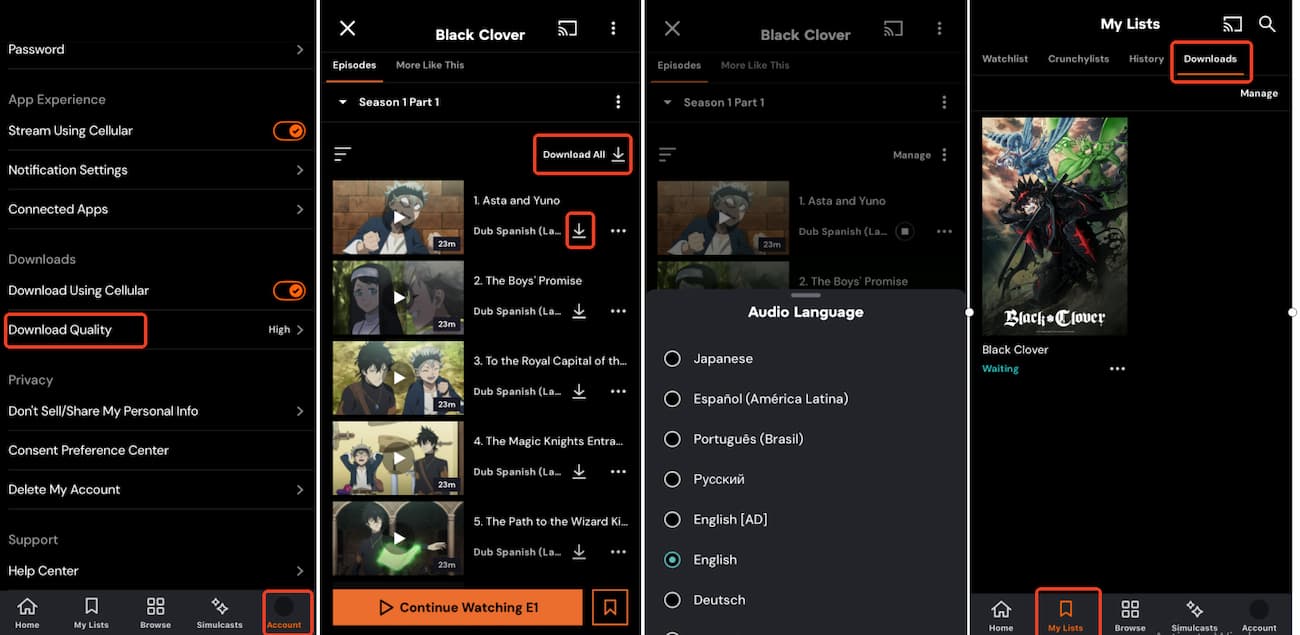
- Download shortly before you leave. An episode you haven't played expires after about 7 days, and once you press play, you have about 48 hours to finish it. If an episode expires, simply reconnect to the internet and download it again while your subscription is active.
Part 3. How to Download Crunchyroll Episodes on PC and Mac (Desktop Workarounds)
Crunchyroll offers a Windows app in the Microsoft Store, but installing it does not unlock an offline download option. On Mac, you can stream Crunchyroll through web browsers like Safari or Chrome, but no official desktop download feature exists for macOS either.
To watch Crunchyroll offline on a desktop computer, you must use alternative desktop solutions.
Method 1. Download Crunchyroll Episodes with VidiFab Streaming Video Downloader
VidiFab Crunchyroll Episodes Downloader (also known as VidiFab Streaming Video Downloader) works on Windows and Mac. It lets you download unlimited Crunchyroll episodes and save them as MP4 or MKV files. Because these are regular video files, they don't expire after 7 days or 48 hours, and you can play them on any device or media player.
Video Tutorial: How to Download Crunchyroll Episodes on PC and Mac
-
01
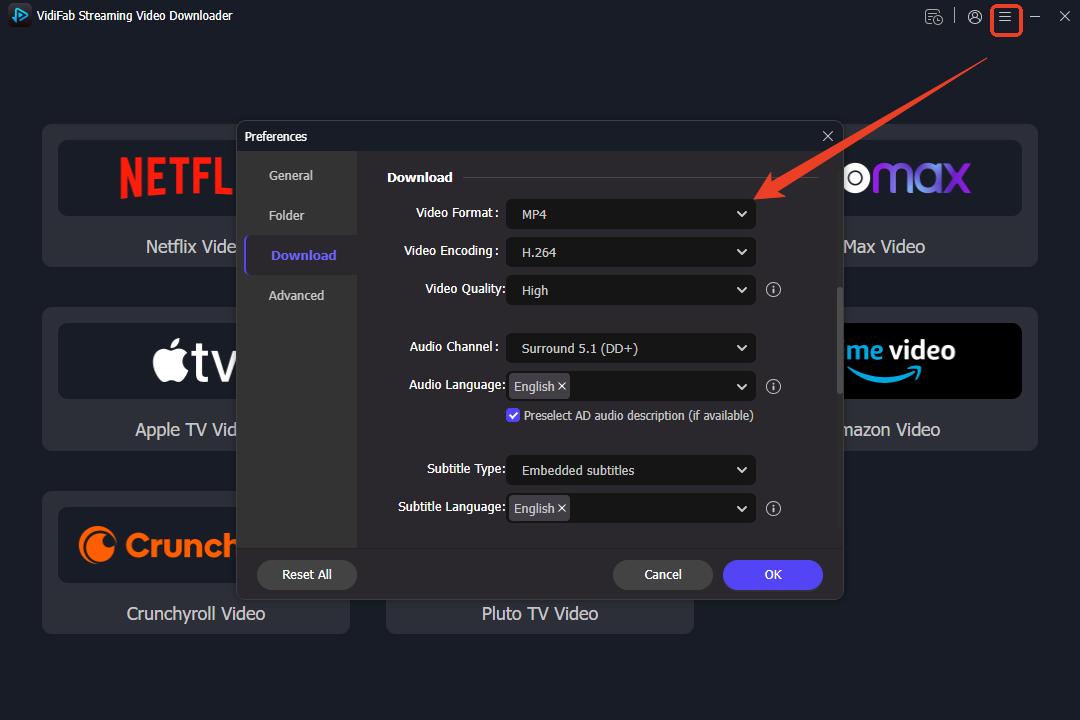
Install and open VidiFab. Click the menu icon in the top right corner, go to Preferences, choose MP4 or MKV as the output format, and select a folder for your anime library.
-
02
Return to the main interface and click the Crunchyroll tab. Log in to your Premium account in the built-in browser, search for the series, and start playing an episode. When the Download button appears on screen, click it so VidiFab can parse the video stream.
-
03
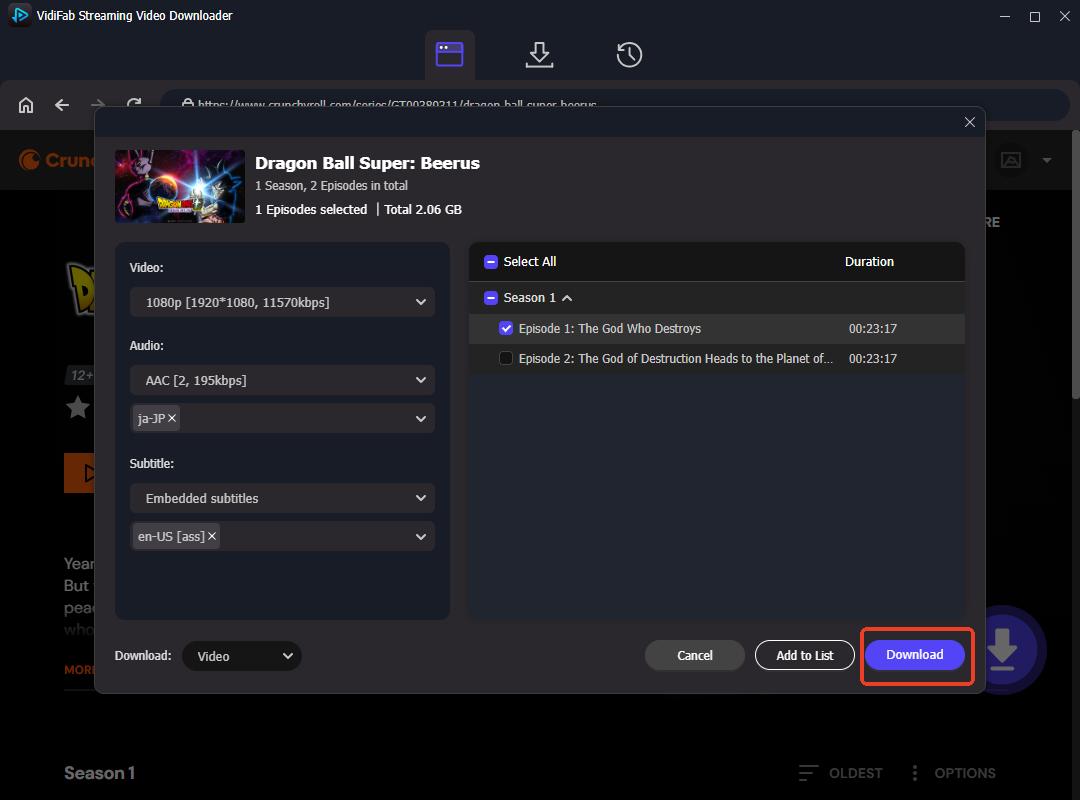
Choose your video, audio, and subtitle settings. In the pop-up window, set the following:
- Video Quality: Select resolutions up to 1080p Full HD.
- Audio Quality: Clear AAC 2.0 audio tracks.
- Audio Language: Choose your preferred default audio track or select multiple languages.
- Subtitle Type: Embedded / Hardsub or Softsub / SRT.
- Subtitle Language: Select one or multiple subtitle languages according to your preference.
- Batch Download: Check the Select All box in the right panel to queue an entire season at once.
-
04
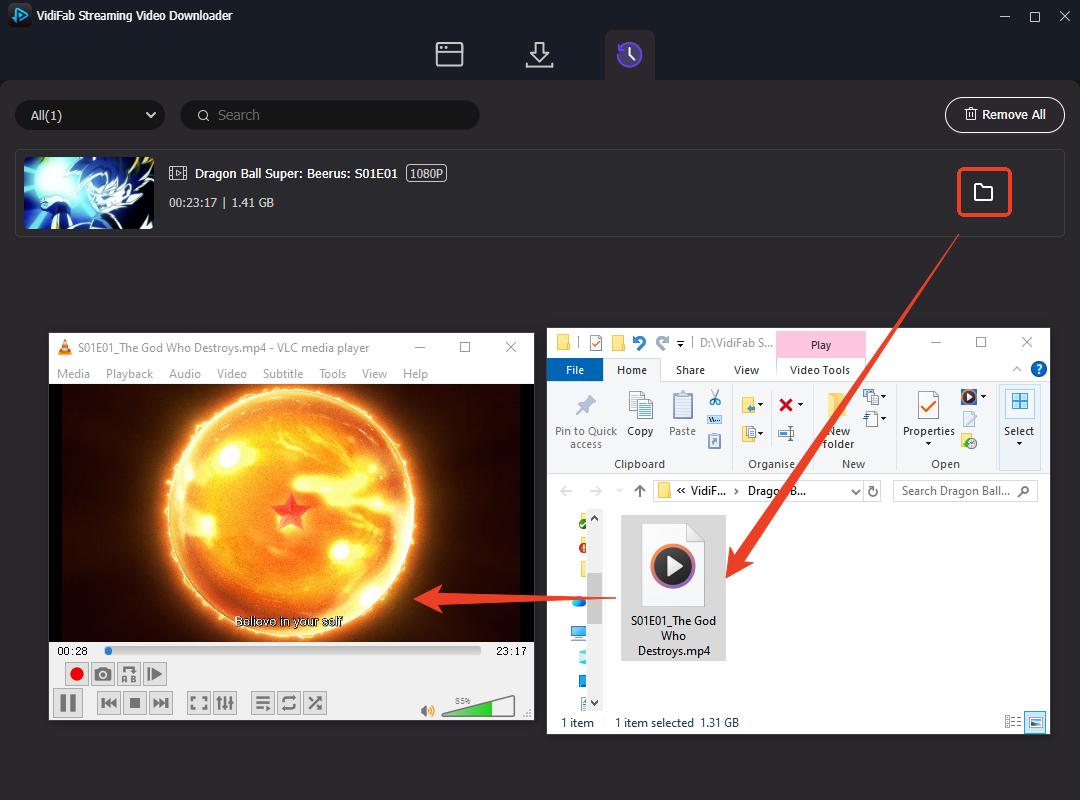
When the queue finishes, open the History tab and click the folder icon to find your files. They are standard, DRM-free MP4 or MKV files. You can copy them to an external drive, stream them from a home media server like Plex, or play them in VLC Media Player and switch between audio and subtitle tracks.
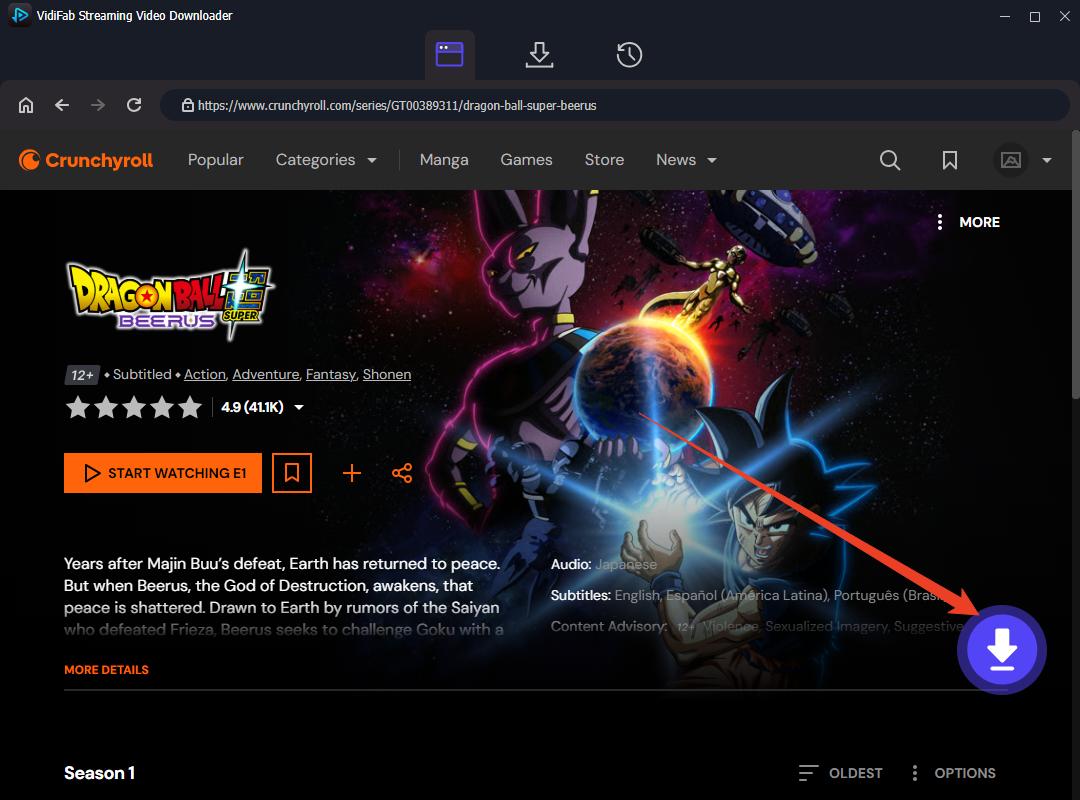

Your login credentials stay private. VidiFab does not track, store, or share your login information or personal data.
Click Download to start. VidiFab can keep running in the background, so you can keep using your computer.
You still need an active Crunchyroll subscription to access full-length HD video streams within VidiFab. VidiFab is intended strictly for personal offline viewing and educational archiving of content you have legally licensed. Do not redistribute or share copyrighted video files.
Method 2: Record Crunchyroll Episodes With OBS Studio
OBS Studio is a free screen recorder for Windows and Mac. It doesn't download the video. It records your screen while the episode plays.
Before you record, keep in mind:
- OBS records in real time.
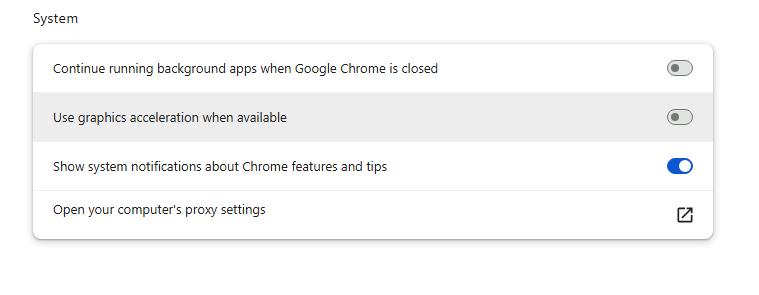
- Turn off hardware acceleration in your browser, or the recording may be a black screen. In Google Chrome and Microsoft Edge, open the browser settings and turn off Use graphics acceleration when available, and restart your browser.
-
01
Install OBS Studio from its official website.
-
02
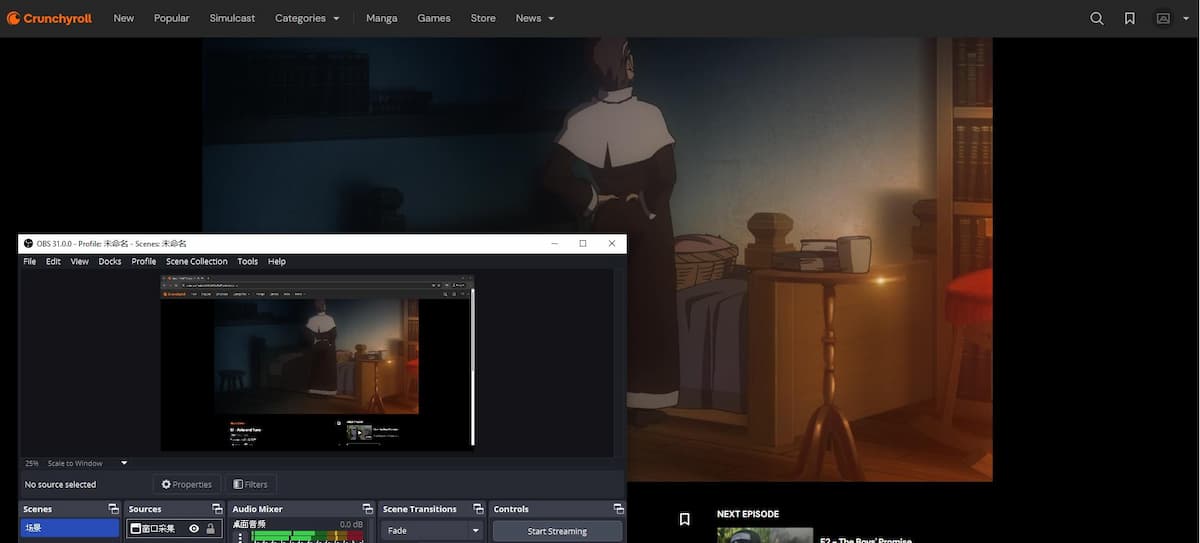
Under Sources, click the + icon and choose Display Capture or Window Capture.
-
03
If you chose Window Capture, select the browser window that is playing Crunchyroll from the Window dropdown menu.
-
04
Go to Settings > Output and set the recording format to MP4 or MKV.
-
05
Play the episode in your browser or the Windows app, switching to full screen if possible.
-
06
Click Start Recording. Once the episode finishes playing, click Stop Recording in OBS.
-
07
Find your recorded file by going to File > Show Recordings in the top menu bar.
Part 4. Quick Comparison: Which Crunchyroll Download Method Is Best for You?
The best way to download Crunchyroll episodes depends on your device and how you want to watch them. The official app is the simplest option for supported mobile devices. On a Windows PC or Mac, a desktop downloader may offer more flexibility, while OBS Studio is an option for screen recording if you don't mind the time consumption.
| Feature | Crunchyroll App (Official) | VidiFab Streaming Video Downloader | OBS Studio (Screen Recording) |
|---|---|---|---|
| Works on | iPhone, iPad, Android, Fire tablets | Windows and Mac | Windows and Mac |
| Subscription needed | Yes | Yes | Yes |
| File type | Encrypted, playable only in the app | MP4 or MKV | MP4 or MKV |
| Expiration | About 7 days if unplayed, about 48 hours after you press play | None | None |
| Max quality | Set in the app's download quality | Up to 1080p | Depends on your screen and OBS settings |
| Audio and subtitles | Choose in the player | Multiple audio and subtitle languages, embedded or SRT subtitles | One audio track, subtitles recorded into the video |
| Batch download | Download a season in the app | Select all episodes at once | No, one episode at a time |
| Title availability | Not every title has a download button | Any episode you can play | Any episode you can play |
| Play on other devices | No | Yes, any device or media player | Yes, any device or media player |
- Choose the official app if: You only watch on your phone or tablet and want the simplest setup. You're fine with the trade-offs: it's included with your subscription, but episodes expire and some titles can't be downloaded.
- Choose VidiFab if: You want episodes on your PC or Mac. You want files that never expire. You want to save a whole season with your preferred audio and subtitle tracks.
- Choose OBS Studio if: You only need a few episodes occasionally and don't mind recording in real time. You're fine with the trade-offs: it's free, but it's slow, can produce a black screen if hardware acceleration is on, and subtitles can't be turned off later.
Part 5. Troubleshooting: Crunchyroll Won't Download? Try These Fixes
Crunchyroll downloads can sometimes fail on iPhone and iPad, even when you have an eligible subscription and a working internet connection. If an episode won't download, try these fixes one by one before giving up.
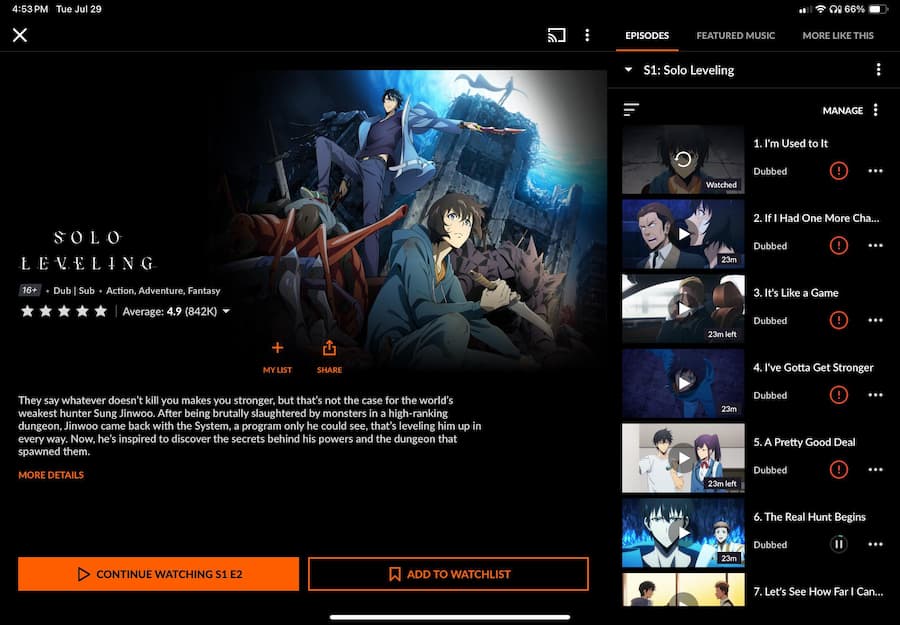
Fix 1. Download one episode at a time. Tap the download icon next to a single episode. Wait for that episode to complete 100% before tapping the download button on the next one.
Fix 2. Choose Medium download quality. Go to Account > Download Quality and change it from High to Medium. Medium quality uses less storage (about 200-300 MB per episode) and downloads faster, with fewer connection timeouts.
Fix 3. Make sure your device has enough storage. When your phone is almost full, the app itself can lag or freeze, which interrupts downloads. Delete unused apps, photos, or old downloads to free up space.
Fix 4. Start the download from the player. Open the episode and play it online for a few seconds. Tap the Download icon in the video description.
Fix 5. Stay on the download screen. While a download is in progress, don't lock your phone, switch to other apps, or browse other anime in Crunchyroll. Just leave it until it finishes.
Fix 6. Restart and update. Update the Crunchyroll app to the latest version, then close it and restart your phone or tablet.
Fix 7. Still not working? Submit a request through the Crunchyroll Support Portal.
If the app keeps failing, I'd recommend VidiFab Streaming Video Downloader. I've used it to download from Crunchyroll, and it has worked every time. It saves episodes locally on your PC or Mac, so you don't depend on the mobile app. See Part 3 for the steps.
Part 6. FAQs About Downloading Crunchyroll Episodes
Can I download Crunchyroll episodes with a free account?
How many Crunchyroll episodes can I download at once?
Can I choose English dub or subtitles in downloaded Crunchyroll episodes?
- In the official mobile app: Choose your preferred audio (English dub or Japanese) and subtitle language in your Account Settings, or directly on the episode page, before you press the download icon.
- With desktop tools (VidiFab): You can select multiple audio tracks and switchable soft subtitles (SRT) to be included in a single output file.
Does Crunchyroll download episodes in the background?
Conclusion
Crunchyroll's official downloads work on iOS, Android, and Fire tablets, but episodes expire and some titles can't be saved. If you want episodes on a PC or Mac, VidiFab Streaming Video Downloader saves them as MP4 or MKV files that never expire. OBS Studio is a free but slower backup. Pick the method that fits your device, and enjoy your favorite anime anytime, anywhere.
 Free Download
 Secure Download
 Free Download
Secure Download
Free Download
Secure Download

I write about streaming services, video playback, and digital media management. My articles cover practical ways to convert video files, troubleshoot playback issues, and manage digital content across devices. I aim to make technical topics easier to understand and help readers find practical solutions to common challenges.
 Leave Your Comment