Streaming Video Downloader
Your All-in-One Streaming Video Downloader
VidiFab Streaming Video Downloader lets you download movies and TV shows from Netflix, Amazon Prime Video, Disney+, HBO Max, Hulu, and Apple TV+ straight to MP4 or MKV. Enjoy ad-free HD videos with multilingual subtitles and audio tracks, unlimited downloads, and no regional restrictions.
Available for:


Download Streaming Video Across 6 Platforms Smartly







VidiFab Netflix Video Downloader
Tired of Netflix download limits and disappearing titles? Meet the ultimate solution for offline viewing. VidiFab, a premium Netflix Downloader, empowers you to save your favorite Netflix movies and series directly into MP4 or MKV formats at resolution up to 1080p with immersive Dolby audio. It boosts you productivity with 7X batch downloading speeds, ensuring your entire watchlist is ready for offline viewing in minutes.

VidiFab Prime Video Downloader
Limited by various Prime video download limits like count, time, and device limit? Try VidiFab, the definitive Amazon Prime Video Downloader designed to save Prime Video content directly to your computer, no rental or purchase required. It lets you build a permanent offline library in high-quality MP4 or MKV formats at 1080p resolution. With lighting-fast 8X batch downloading, you can experience your Prime Video library, anywhere and anytime.

VidiFab Disney Plus Downloader
Ever wish your Disney+ favorites could stay in your collection for good? With VidiFab, a powerful Disney Plus Video Downloader, you can bypass device and download limitations, ensuring your downloads are yours to keep forever. It even helps you unlock region restrictions, giving you access to a world of content. Plus, you can save videos in high-quality MP4 or MKV formats with crystal-clear Dolby audio and 5X batch downloading speeds.

VidiFab HBO Max Downloader
Not able to download your favorite HBO originals and blockbusters to your computer? VidiFab Max Video Downloader is your ultimate companion for offline viewing. It lets you download all your must-watch content directly with the built-in web player. Say goodbye to buffering and limited viewing windows by saving your library in versatile MP4 or MKV formats. With an industry-leading 16X download speed, you can grab entire seasons effortlessly.

VidiFab Hulu Video Downloader
Wanna download your favorite Hulu series to your computer to watch when you're heading offline? VidiFab Hulu Downloader liberates your watchlist by removing those restrictive 30-day and 48-hour viewing windows, allowing you to keep your downloads for as long as you need. Even better, VidiFab enables you to save videos directly to your computer in MP4 and MKV formats, completely ad-free, and at 7X batch downloading speed.

VidiFab Apple TV+ Downloader
Found yourself racing against a 30-day expiration timer just to finish your favorite Apple TV+ series? VidiFab Apple TV Video Downloader is the smart solution to remove restrictive expiration dates. By bypassing limits on simultaneous downloads and device counts, VidiFab gives you the freedom to build a permanent library directly on your computer. With a high-speed 5X batch downloading, your videos will be saved to MP4 and MKV formats instantly.
Download All Your Favorite Streaming Videos Your Way
 Unlimited Video Downloads
Experience true entertainment freedom with VidiFab URL Video Downloader, where your favorite content is always just a click away. Take full control of your library by removing common restrictions like device and region limits, allowing you to watch on any screen. Once downloaded, it's yours to keep and watch on your own schedule, with no extra fees or expiration dates.
 High-Speed Bulk Download
Stop waiting for one-by-one downloads with VidiFab's batch mode. VidiFab Bulk Video Downloader lets you queue full TV shows or movie collections from various streaming platforms and download them all at once with one click. Powered by high-speed technology, it ensures a fast and stable download for long flights or offline binge-watching in minutes.
 Lossless Video Conversion
Enjoy your favorite movies and TV shows in original quality, just like streaming online. Say goodbye to grainy images and muffled sound. VidiFab Streaming Video Downloader preserves sharp visuals with full HD resolution and immersive 5.1 Dolby audio. No compression, no quality loss, no blur, just a true-to-source viewing experience every time.
 Customizable Output Options
Take complete command of your media library using VidiFab All Video Downloader. Tailor every download to your exact needs by selecting your preferred video format like MP4 or quality like 1080p (Full HD), ensuring perfect compatibility with any device. Beyond just the visuals, keep preferred audio tracks, subtitles, and essential metadata like cast information.


And There's So Much More Powerful Features

Flexible Encoding
Choose encoding options like H.264 or AVI. Make videos compatible with computers, media servers, or other devices.

Subtitle / Audio Mode
Save subtitles in SRT or original formats, and download audio tracks separately for flexible listening.

Multilingual Support
Save videos with audio and subtitles in up to 30 languages. Perfect for learning or watching in your preferred language.

Channel Controls
Pick stereo (AAC) or Surround 5.1 (DD+). Preserve surround sound or optimize performance on nearly any devices.

Tag Preservation
Preserve titles, episode info, cover art, and other metadata for a clean, well-organized library.

Ad Removal
Automatically remove ads during downloads. Watch your videos uninterrupted from start to finish.

Device Limit Removal
Watch downloaded videos on other devices with full freedom and no restrictions.

Hardware Acceleration
Speed up downloads and conversions. Save time and reduce CPU usage while videos process faster than ever.
4 Easy Steps to Download Streaming Videos
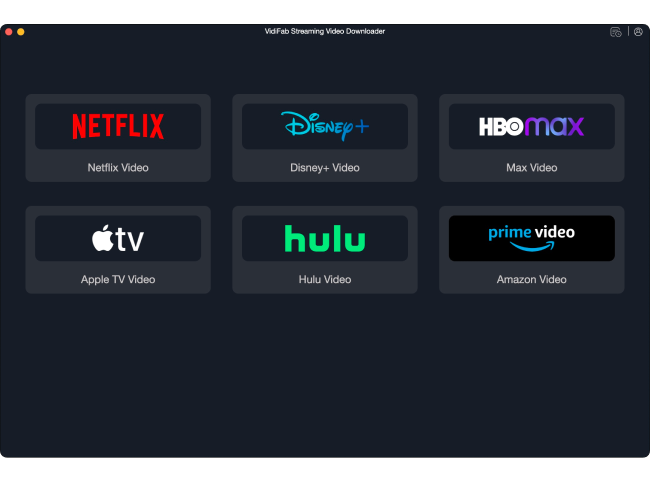
Install the VidiFab Software
Open VidiFab Streaming Video Downloader, select your preferred platform, and sign in to your account.
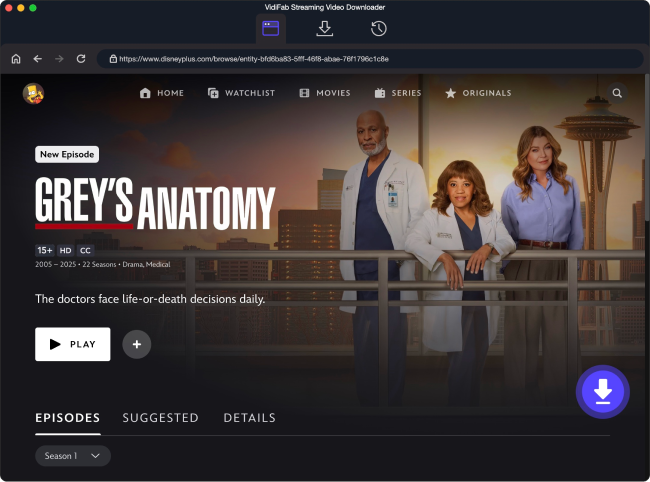
Find the Movie or Show You Want
Search for the video in the built-in web player or paste its link.
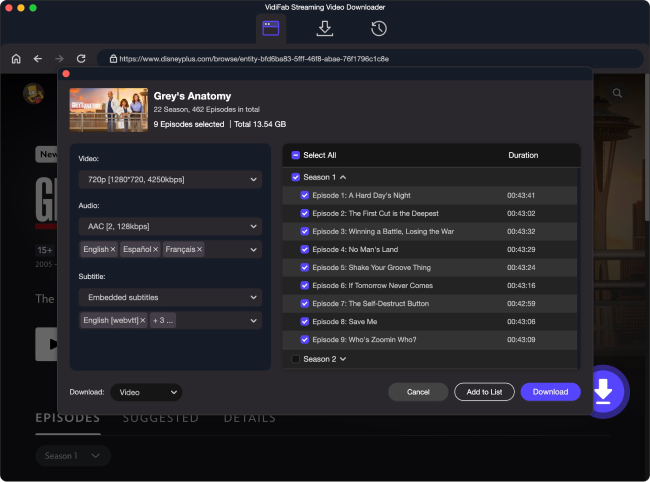
Set Output Preferences
Go to the video page, click the download button, and customize format, quality, subtitles, and more.
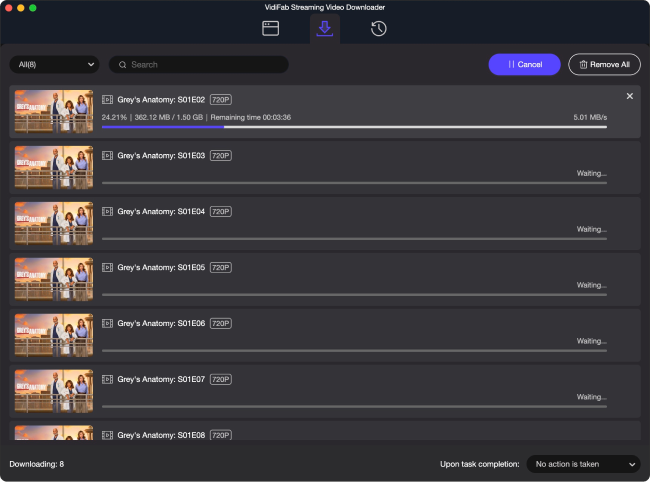
Start High Speed Download
Click Download to start a fast and stable download. The video will be saved to your device.
Loved by Millions of Users and Experts

VidiFab Streaming Video Downloader is the ideal hub for anyone looking to organize their streaming content from major services in one place. The process of batch downloading full seasons and exporting them to MP4 or MKV is both simple and remarkably intuitive.
Well-Known Media Jessica
I was worried about losing quality, but Vidifab keeps the video looking sharp and even grabs the subtitles perfectly. It is so nice to have all my favorite shows backed up in high resolution.
Our User
VidiFab Streaming Video Downloader delivers fast and reliable performance across multiple streaming platforms. Its ability to preserve the original audio and video quality makes it a professional-grade solution for enthusiasts who prioritize a premium offline viewing experience.
Well-Known Media Michael
As someone with a huge collection of movies and shows, this tool is a lifesaver. It keeps all the file info organized, making it easy to store everything on my hard drive and play it back on any device I own.
Our User
VidiFab Streaming Video Downloader stands out by offering detailed download settings. You can easily select your preferred video quality and audio tracks as well as specific subtitle formats to get exactly the file you need.
Well-Known Media Liam
Liam
This software is incredibly fast compared to the basic tools I used before. I can batch download several high-res videos in the background while I work, and it never slows down my computer performance.
Our UserFrequently Asked Questions
Is it safe to use Vidifab, and will it affect my streaming accounts?
VidiFab is completely safe to use. It will never collect your personal information. Your logged-in account and details are used solely to assist in downloading streaming videos. The software acts as a secure browser to ensure your accounts remain safe and unaffected.
What types of video content can VidiFab download from streaming platforms?
VidiFab downloads movies, TV shows, documentaries, originals, and full series from Netflix, Amazon Prime Video, Disney+, Hulu, HBO Max, and Apple TV+. Simply put, if you can watch it on the platform, you can download it with VidiFab.
Can I watch downloaded videos after canceling my streaming subscription?
Yes. Once a video is downloaded to your computer, it is yours to keep forever. You can still watch your saved videos even if you cancel your streaming subscription or if the original content is eventually removed from the platform.
Can I transfer downloaded videos to my tablet, phone, or other devices?
Yes. Videos are saved in universal MP4 or MKV formats compatible with almost all devices. You can easily move your files to iPhones, Android phones, iPads, or smart TVs for offline viewing.
What are the limitations of the free trial version?
The free trial allows you to download the first three minutes of each video. To unlock full-length video downloads for the complete experience, we recommend upgrading to the full version.
What if I encounter a problem or need a refund after purchase?
We provide 24/7 technical support to help you resolve any issues. We are committed to helping you successfully download and convert your videos. If we cannot resolve your issue, your purchase is protected by a 14-day or 30-day money-back guarantee depending on your plan, to ensure your purchase is risk-free.
 VidiFab Streaming Video Downloader